> ## Documentation Index
> Fetch the complete documentation index at: https://docs.costory.io/llms.txt
> Use this file to discover all available pages before exploring further.
# Decentralize FinOps with Per-Team Cost Reports
> Scale cost visibility across engineering teams by scoping automated reports to each squad. Deliver cloud cost insights via Slack, Teams, or email, no billing console access needed.
Engineering teams often lack direct visibility into their cloud cost footprint. FinOps stays centralized with one person or a small team, and everyone else is in the dark. When cost-saving initiatives get launched, tracking progress is fragmented, teams can't see the impact of their work, and ownership becomes a bottleneck.
This guide shows you how to scope automated cost reports to each team using Costory's [Slack, Teams, and email reports](/features/slack-reports), giving every squad direct visibility into their own cloud costs.
## Prerequisites
* Your cloud billing data is connected to Costory (see [Quickstart](/get-started/quickstart)).
* You have a way to scope costs per team, either via native cloud tags, via [dimensions](/features/tagging/dimensions) that map resources to teams, or via [Teams](/features/teams) with persistent cost scopes.
## What you get
* Per-team cost reports delivered automatically via Slack, Teams, or email.
* Each squad sees only the data relevant to them. No noise, no manual digging.
* A continuous feedback loop that keeps teams accountable for their cloud spend.
## How to decentralize FinOps step by step
Open any view in [Explorer](/features/cost-explorer) and filter to the scope you want to report on: a specific team, service, or environment.
Reports can be scoped using:
* **CSP metadata:** cloud provider attributes like service name, region, or account
* **Native labels:** your existing cloud resource tags
* **Dimensions:** imported tags and rule-based mappings to teams, environments, features, or custom groupings via [Dimensions](/features/tagging/dimensions)
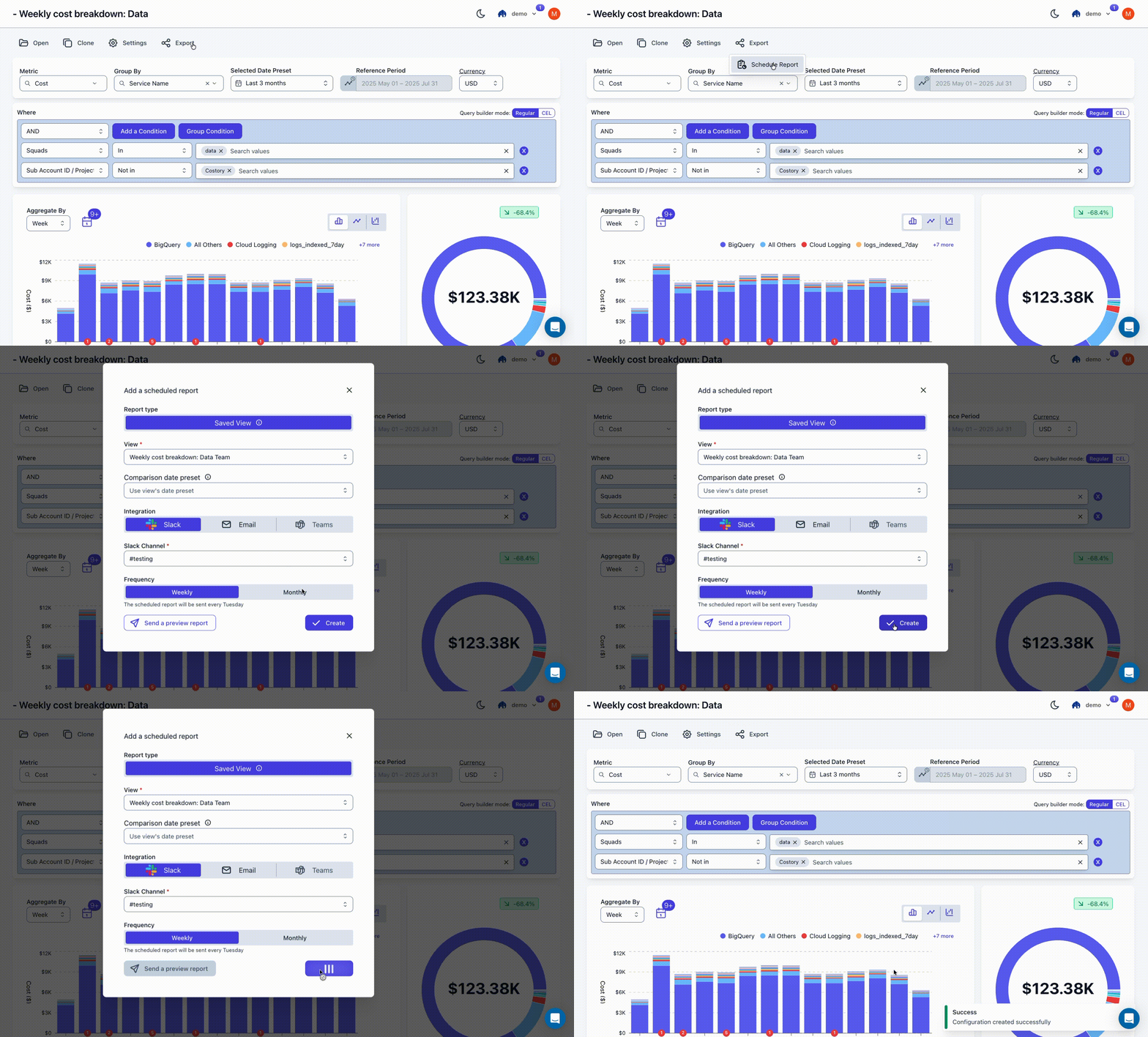
 Create a scheduled report from your current view. Configure the delivery channel (Slack, Teams, or email) and set the cadence: weekly or monthly.
Reports run automatically, giving teams a continuous feedback loop.
Create a scheduled report from your current view. Configure the delivery channel (Slack, Teams, or email) and set the cadence: weekly or monthly.
Reports run automatically, giving teams a continuous feedback loop.
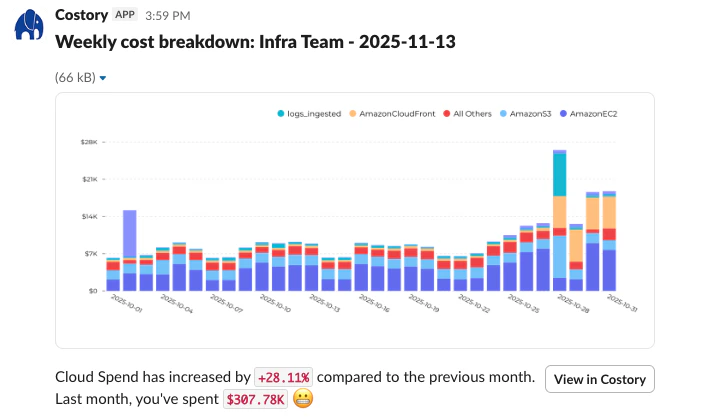
 For example: your backend team gets a weekly Slack report scoped to their services, your data team gets one scoped to BigQuery and Datadog, and leadership gets a monthly summary across everything.
Start with one or two teams, validate the report content, then roll out to all squads. Combine with [budgets](/use-cases/automate_budget) to add spending alerts alongside the reports.
## Next steps
* **Add event context to team reports:** Connect [events](/setup/events) so each team sees deploys and incidents alongside their costs. See [Event Correlations](/automate-reporting/event-correlation).
* **Include unit economics:** Show teams their cost per user or per request, not just total spend. See [Relate Costs to Usage](/automate-reporting/unit-economics).
* **Automate the monthly review:** Use the [Digest](/features/digest) for AI-generated org-wide reports. See [Monthly Cloud Cost Reporting](/automate-reporting/monthly-reviews).
For example: your backend team gets a weekly Slack report scoped to their services, your data team gets one scoped to BigQuery and Datadog, and leadership gets a monthly summary across everything.
Start with one or two teams, validate the report content, then roll out to all squads. Combine with [budgets](/use-cases/automate_budget) to add spending alerts alongside the reports.
## Next steps
* **Add event context to team reports:** Connect [events](/setup/events) so each team sees deploys and incidents alongside their costs. See [Event Correlations](/automate-reporting/event-correlation).
* **Include unit economics:** Show teams their cost per user or per request, not just total spend. See [Relate Costs to Usage](/automate-reporting/unit-economics).
* **Automate the monthly review:** Use the [Digest](/features/digest) for AI-generated org-wide reports. See [Monthly Cloud Cost Reporting](/automate-reporting/monthly-reviews).