> ## Documentation Index
> Fetch the complete documentation index at: https://docs.costory.io/llms.txt
> Use this file to discover all available pages before exploring further.
# Changelog
> Product updates and announcements
## Organize dashboards with tags
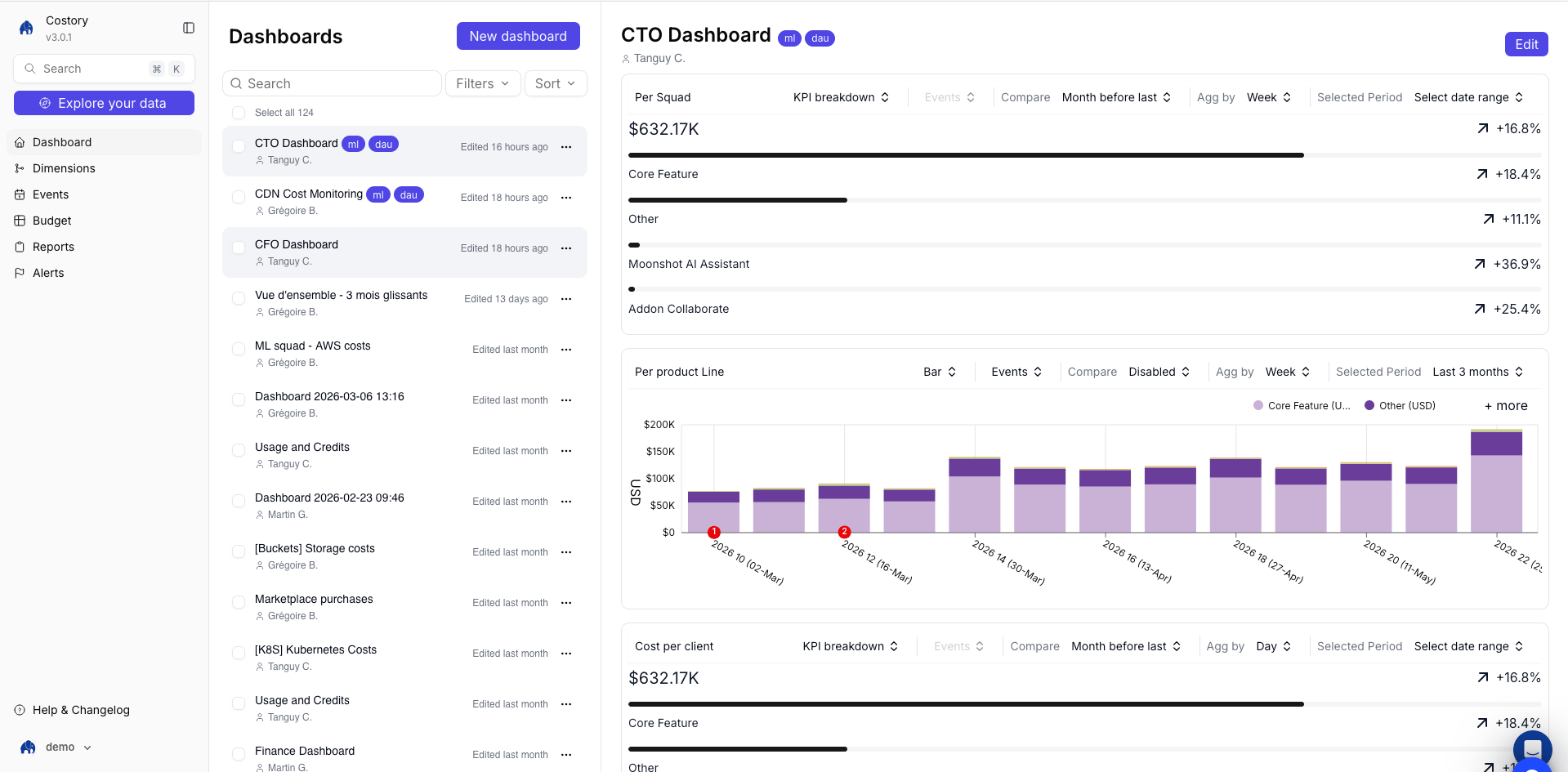
You can now add tags to dashboards and bulk edit them from the **View all dashboards** page, making it easier to group dashboards by team, workflow, or FinOps process.
 ## Customize chart color palettes
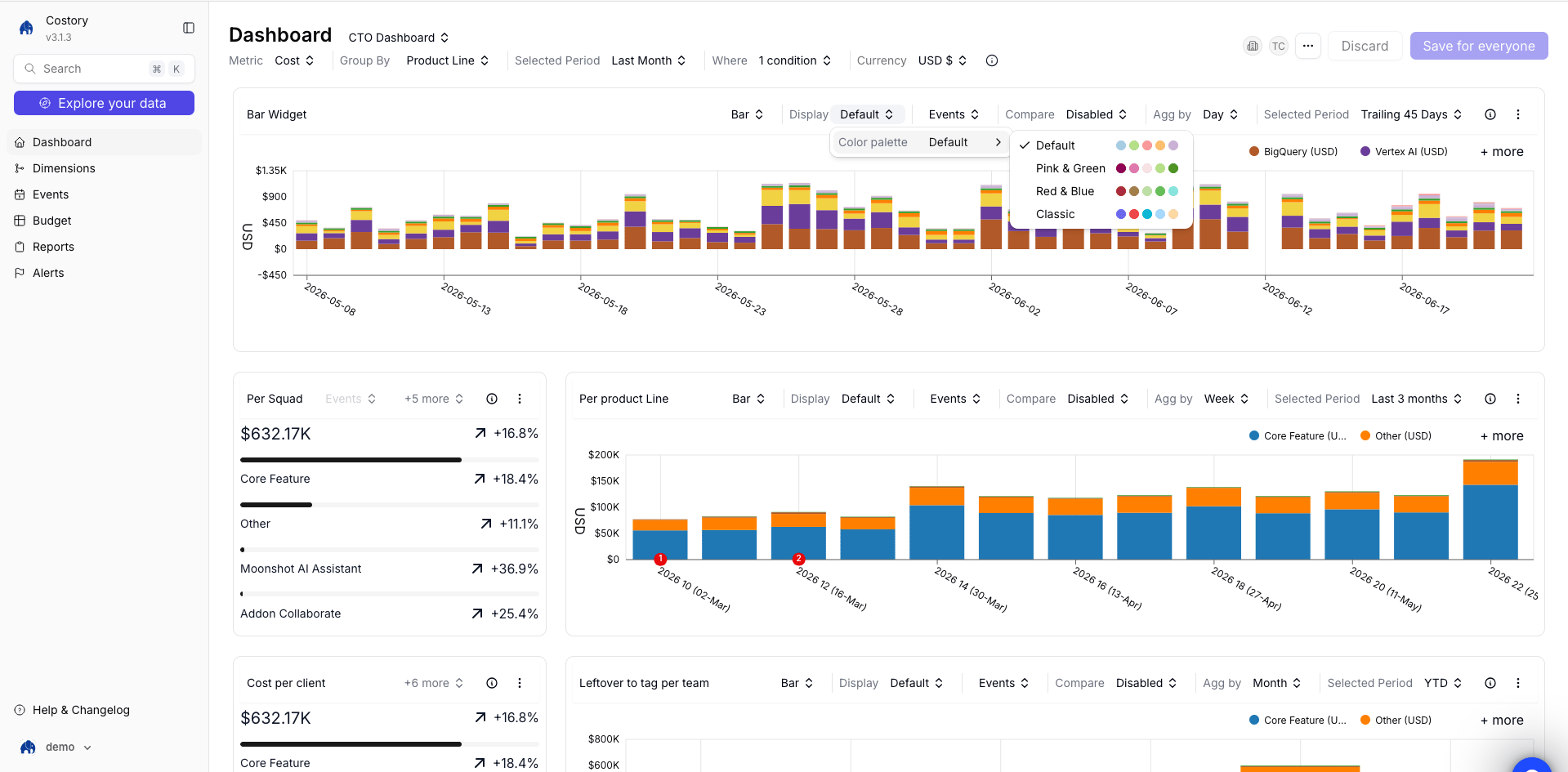
You can now choose the color palette for each chart from four options, so dashboard visuals stay readable and consistent with the story you want to tell.
## Customize chart color palettes
You can now choose the color palette for each chart from four options, so dashboard visuals stay readable and consistent with the story you want to tell.
 ## BigQuery data exports (Copilot Pro)
Query the same cost data you see in Costory from your own BigQuery project—use it in Looker, notebooks, or custom SQL without re-building filters by hand.
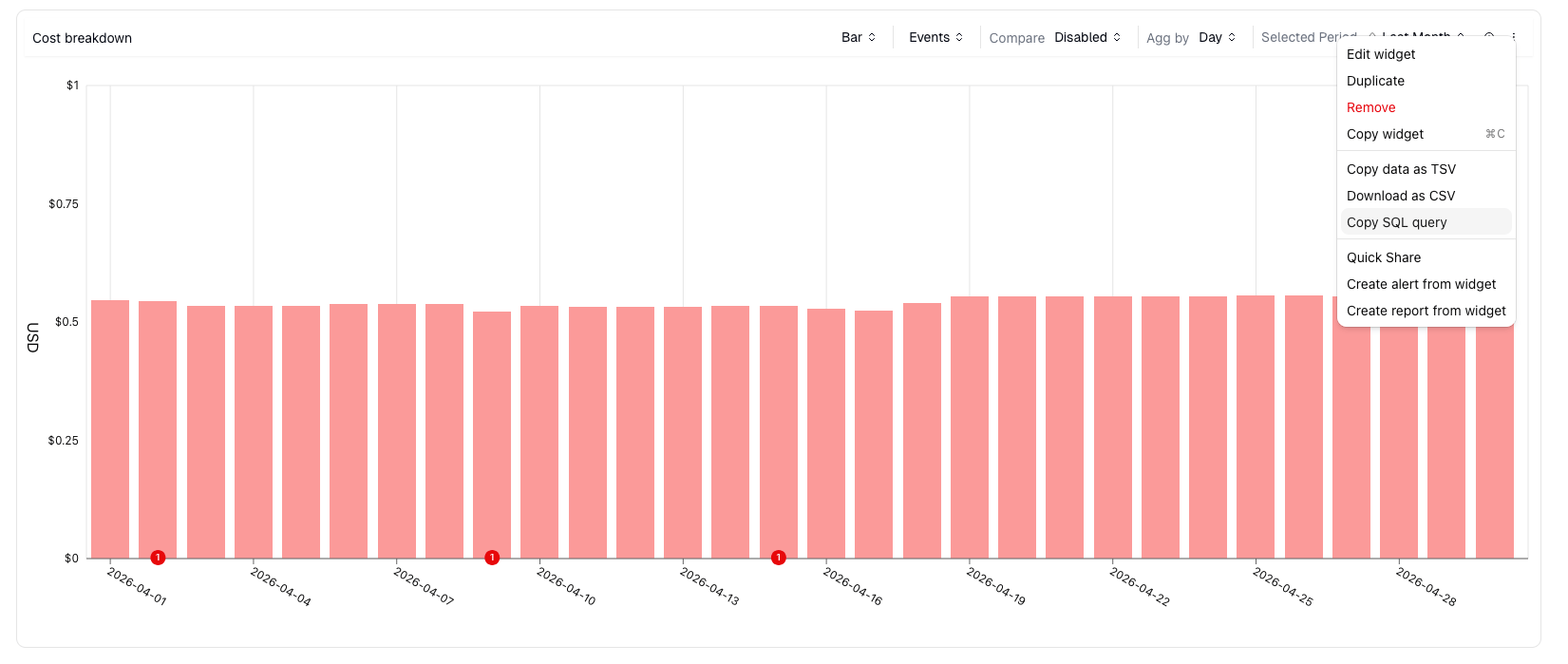
On any [dashboard](/features/dashboards) widget, click **Copy SQL query** to copy the SQL for that view. An **Organization Admin** must grant your service account or user read access to the export table under **Integrations > Destinations**.
## BigQuery data exports (Copilot Pro)
Query the same cost data you see in Costory from your own BigQuery project—use it in Looker, notebooks, or custom SQL without re-building filters by hand.
On any [dashboard](/features/dashboards) widget, click **Copy SQL query** to copy the SQL for that view. An **Organization Admin** must grant your service account or user read access to the export table under **Integrations > Destinations**.
 ## Costory v3: a simpler way to investigate cloud costs
Two years ago, we built Costory to help you understand and manage cloud costs. Since then, we’ve spoken with many of you about how you use the platform every day.
One theme came up often: the product had accumulated too many ways to do the same things.
At the same time, LLMs are changing how teams work with their tools. Costory v3 is designed to help you move faster: investigate cost changes, capture context, and turn those investigations into reusable workflows through MCP, APIs, reports, and alerts.
So we rebuilt the Costory experience around six core areas you rely on most.
* **Explorer**: Your entrypoint for investigating cost changes.
* **Dashboards**: Save investigations, revisit them later, and annotate them with events.
* **Dimensions**: Standardize and group cost labels so every team can understand its costs.
* **Events**: Add context to cost changes and connect events directly to your analysis.
* **Reports**: Manage scheduled reports, scheduled dashboards, and cost digest analysis in one place. (Cost digests are coming later this month).
* **Alerts**: Catch unexpected cost increases using fixed thresholds and relative thresholds.
The search was also improved to help you explore faster: dashboards, dimensions, events and reports.
For existing users, the transition is already complete. We migrated your views and redirected your existing URLs to the new layout.
Tell us what still feels harder than before so we can improve it.
## Snowflake billing
We now support **Snowflake** account usage and billing data in Costory. Create a **Snowflake** integration on **Integrations** with key-pair authentication, then add a **Snowflake** billing datasource that reuses that integration. **Terraform** is not available for this datasource yet (connect via the Costory UI).
See the [Snowflake billing setup guide](/setup/billing/snowflake).
## Plot Budgets Alongside Actual Cost in the Explorer
## Costory v3: a simpler way to investigate cloud costs
Two years ago, we built Costory to help you understand and manage cloud costs. Since then, we’ve spoken with many of you about how you use the platform every day.
One theme came up often: the product had accumulated too many ways to do the same things.
At the same time, LLMs are changing how teams work with their tools. Costory v3 is designed to help you move faster: investigate cost changes, capture context, and turn those investigations into reusable workflows through MCP, APIs, reports, and alerts.
So we rebuilt the Costory experience around six core areas you rely on most.
* **Explorer**: Your entrypoint for investigating cost changes.
* **Dashboards**: Save investigations, revisit them later, and annotate them with events.
* **Dimensions**: Standardize and group cost labels so every team can understand its costs.
* **Events**: Add context to cost changes and connect events directly to your analysis.
* **Reports**: Manage scheduled reports, scheduled dashboards, and cost digest analysis in one place. (Cost digests are coming later this month).
* **Alerts**: Catch unexpected cost increases using fixed thresholds and relative thresholds.
The search was also improved to help you explore faster: dashboards, dimensions, events and reports.
For existing users, the transition is already complete. We migrated your views and redirected your existing URLs to the new layout.
Tell us what still feels harder than before so we can improve it.
## Snowflake billing
We now support **Snowflake** account usage and billing data in Costory. Create a **Snowflake** integration on **Integrations** with key-pair authentication, then add a **Snowflake** billing datasource that reuses that integration. **Terraform** is not available for this datasource yet (connect via the Costory UI).
See the [Snowflake billing setup guide](/setup/billing/snowflake).
## Plot Budgets Alongside Actual Cost in the Explorer
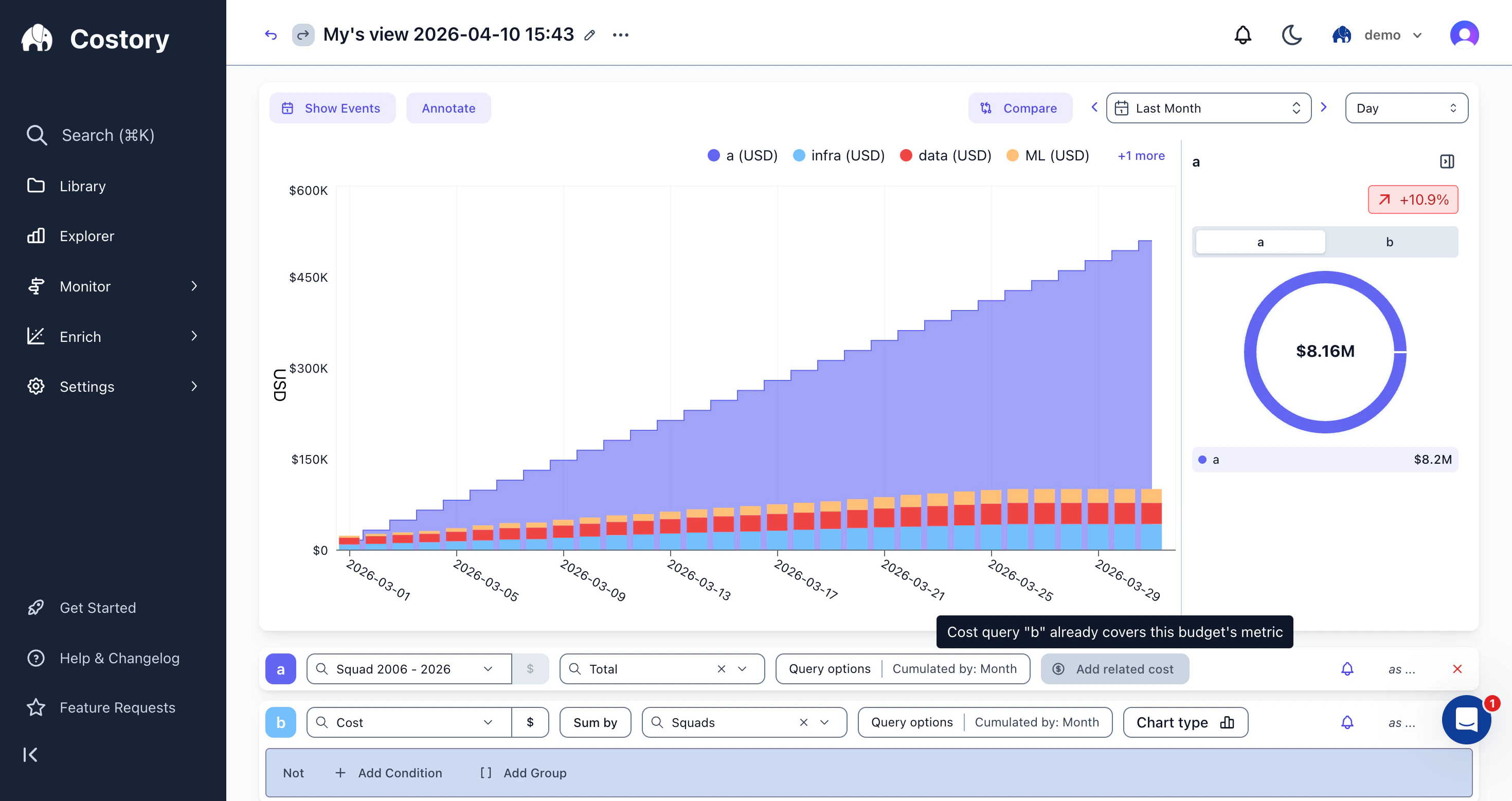 You can now plot [budgets](/features/budgets) as an area chart directly in [Explorer](/features/cost-explorer). Open the metric selector, switch to the **budget** tab, and pick any budget to visualize its monthly target as a shaded area alongside your actual cost data.
Use it to spot budget overruns as they happen: overlay your team's monthly budget on top of cumulated daily spend to see whether you're on track mid-month, or compare budget lines across squads to identify which teams are consistently over or under target. Click **Add related cost** to automatically add a cost series scoped to the budget's definition, with filters and group-by pre-filled so actual spend aligns with budget lines.
## Period-over-Period Cost Alerts
You can now plot [budgets](/features/budgets) as an area chart directly in [Explorer](/features/cost-explorer). Open the metric selector, switch to the **budget** tab, and pick any budget to visualize its monthly target as a shaded area alongside your actual cost data.
Use it to spot budget overruns as they happen: overlay your team's monthly budget on top of cumulated daily spend to see whether you're on track mid-month, or compare budget lines across squads to identify which teams are consistently over or under target. Click **Add related cost** to automatically add a cost series scoped to the budget's definition, with filters and group-by pre-filled so actual spend aligns with budget lines.
## Period-over-Period Cost Alerts
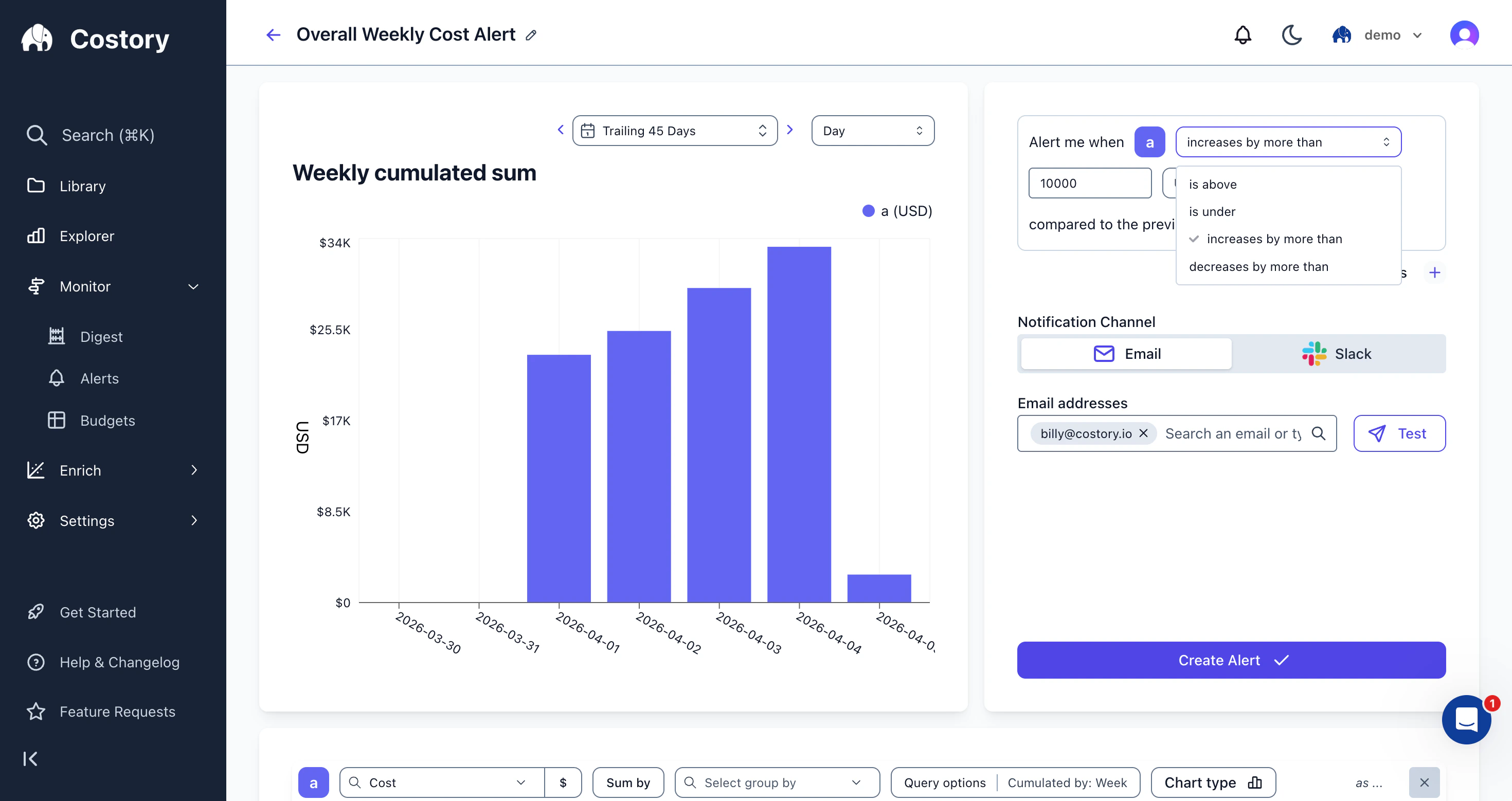 [Cloud cost alerts](/features/alerts) now support **relative thresholds** alongside absolute caps. Instead of only firing when spend crosses a fixed amount, you can configure alerts that trigger when costs **increase or decrease by more than a set amount or percentage** compared to the previous day, week, or month.
Each threshold row has its own mode, so you can mix absolute and relative rules on the same alert. For example, get an informational notification when weekly spend increases by more than 10%, and escalate to a warning if it exceeds a hard dollar cap.
Four threshold modes are available: **is above**, **is under**, **increases by more than**, and **decreases by more than**. For the relative modes, choose between an absolute delta (USD) or percentage change.
## New Billing Datasource
You can now import Elastic Cloud organization billing and instance costs to Costory using an Organization API key and Organization ID. Data is normalized into Standard Columns so you can explore Elastic spend next to AWS, GCP, Azure, and other [billing datasources](/setup/billing).
See the new [Elastic Cloud billing setup guide](/setup/billing/elastic-cloud) for step-by-step instructions.
## New Metrics Datasource
You can now import custom usage metrics directly from **AWS CloudWatch** into Costory. Create an AWS CloudWatch integration, paste your CloudWatch Insights query (for example S3 `BucketSizeBytes`, HTTP request counts, CPU utilization, or SQS queue depth), and Costory will keep these metrics in sync alongside your billing data. This makes it easier to build unit economics like cost per request, cost per active user, or cost per GB stored using real infrastructure signals.
See the new [AWS CloudWatch usage metrics setup guide](/setup/usage-metrics/aws-cloudwatch) for step-by-step instructions and example queries.
## Small improvements
* Teams Usage public API endpoints are now available: see in [https://app-api.costory.io/docs/](https://app-api.costory.io/docs/)
## Small improvements
* You can set up billing data sources for AWS, Azure, GCP, Cursor, Anthropic, and more using a fully Terraform-based workflow. See [Billing Data](/setup/billing).
* The MCP experience is improved: see [AI Assistant (MCP)](/features/mcp).
The Costory team is at KubeCon this week; the next release is planned for April 1.
## Teams
A single cost view rarely works for an entire organization. Your backend squad needs Contracted Cost scoped to their services, while finance needs Billed Cost across everything. **Teams** let you configure those defaults once so each group lands on the right numbers without manual filtering. Learn more in [Teams](/features/teams).
## MCP (beta)
The MCP server is in beta. Read [AI Assistant (MCP)](/features/mcp) and send feedback or suggestions to help shape what ships next.
## Small improvements
* When a virtual dimension finishes computing and appears in the explorer, you get a notification in the top-right corner. The same applies to other long-running tasks in Costory.
* Track [Cursor](https://www.cursor.com/) and Anthropic Claude Code spend: use [Cursor Billing Setup](/setup/billing/cursor) and [Anthropic Billing Setup](/setup/billing/anthropic).
## Events Page
[Cloud cost alerts](/features/alerts) now support **relative thresholds** alongside absolute caps. Instead of only firing when spend crosses a fixed amount, you can configure alerts that trigger when costs **increase or decrease by more than a set amount or percentage** compared to the previous day, week, or month.
Each threshold row has its own mode, so you can mix absolute and relative rules on the same alert. For example, get an informational notification when weekly spend increases by more than 10%, and escalate to a warning if it exceeds a hard dollar cap.
Four threshold modes are available: **is above**, **is under**, **increases by more than**, and **decreases by more than**. For the relative modes, choose between an absolute delta (USD) or percentage change.
## New Billing Datasource
You can now import Elastic Cloud organization billing and instance costs to Costory using an Organization API key and Organization ID. Data is normalized into Standard Columns so you can explore Elastic spend next to AWS, GCP, Azure, and other [billing datasources](/setup/billing).
See the new [Elastic Cloud billing setup guide](/setup/billing/elastic-cloud) for step-by-step instructions.
## New Metrics Datasource
You can now import custom usage metrics directly from **AWS CloudWatch** into Costory. Create an AWS CloudWatch integration, paste your CloudWatch Insights query (for example S3 `BucketSizeBytes`, HTTP request counts, CPU utilization, or SQS queue depth), and Costory will keep these metrics in sync alongside your billing data. This makes it easier to build unit economics like cost per request, cost per active user, or cost per GB stored using real infrastructure signals.
See the new [AWS CloudWatch usage metrics setup guide](/setup/usage-metrics/aws-cloudwatch) for step-by-step instructions and example queries.
## Small improvements
* Teams Usage public API endpoints are now available: see in [https://app-api.costory.io/docs/](https://app-api.costory.io/docs/)
## Small improvements
* You can set up billing data sources for AWS, Azure, GCP, Cursor, Anthropic, and more using a fully Terraform-based workflow. See [Billing Data](/setup/billing).
* The MCP experience is improved: see [AI Assistant (MCP)](/features/mcp).
The Costory team is at KubeCon this week; the next release is planned for April 1.
## Teams
A single cost view rarely works for an entire organization. Your backend squad needs Contracted Cost scoped to their services, while finance needs Billed Cost across everything. **Teams** let you configure those defaults once so each group lands on the right numbers without manual filtering. Learn more in [Teams](/features/teams).
## MCP (beta)
The MCP server is in beta. Read [AI Assistant (MCP)](/features/mcp) and send feedback or suggestions to help shape what ships next.
## Small improvements
* When a virtual dimension finishes computing and appears in the explorer, you get a notification in the top-right corner. The same applies to other long-running tasks in Costory.
* Track [Cursor](https://www.cursor.com/) and Anthropic Claude Code spend: use [Cursor Billing Setup](/setup/billing/cursor) and [Anthropic Billing Setup](/setup/billing/anthropic).
## Events Page
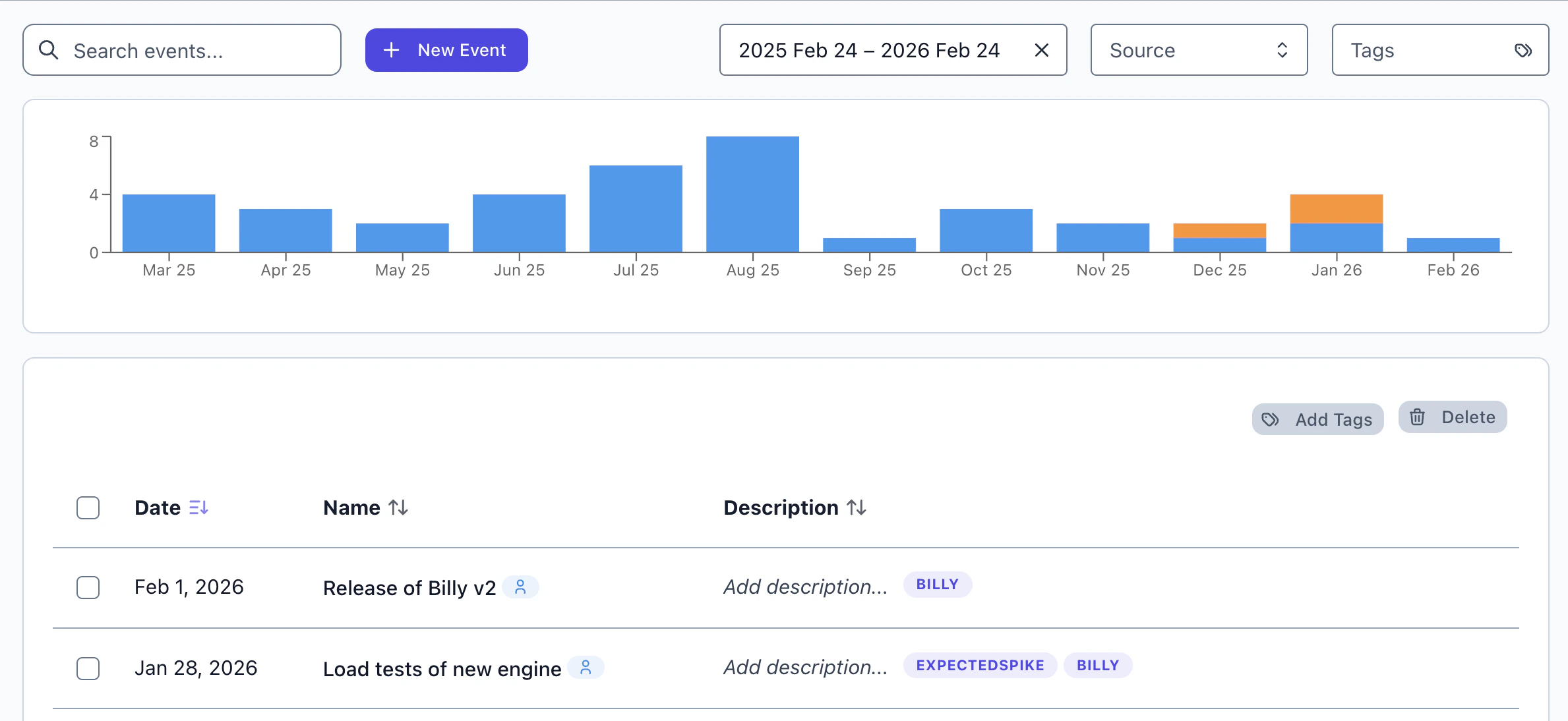 Track deployments, incidents, and infrastructure changes in a dedicated [Events page](/features/events) with full filtering and tagging support.
* Browse all events with metadata, tags, and provider information at a glance
* Inline explorer modal lets you see the cost impact of any single event without leaving the page
* **Save as Context**: jump directly from an event into Explorer with filters pre-filled, so you can immediately drill into the cost impact
## Budget Configuration
Track deployments, incidents, and infrastructure changes in a dedicated [Events page](/features/events) with full filtering and tagging support.
* Browse all events with metadata, tags, and provider information at a glance
* Inline explorer modal lets you see the cost impact of any single event without leaving the page
* **Save as Context**: jump directly from an event into Explorer with filters pre-filled, so you can immediately drill into the cost impact
## Budget Configuration
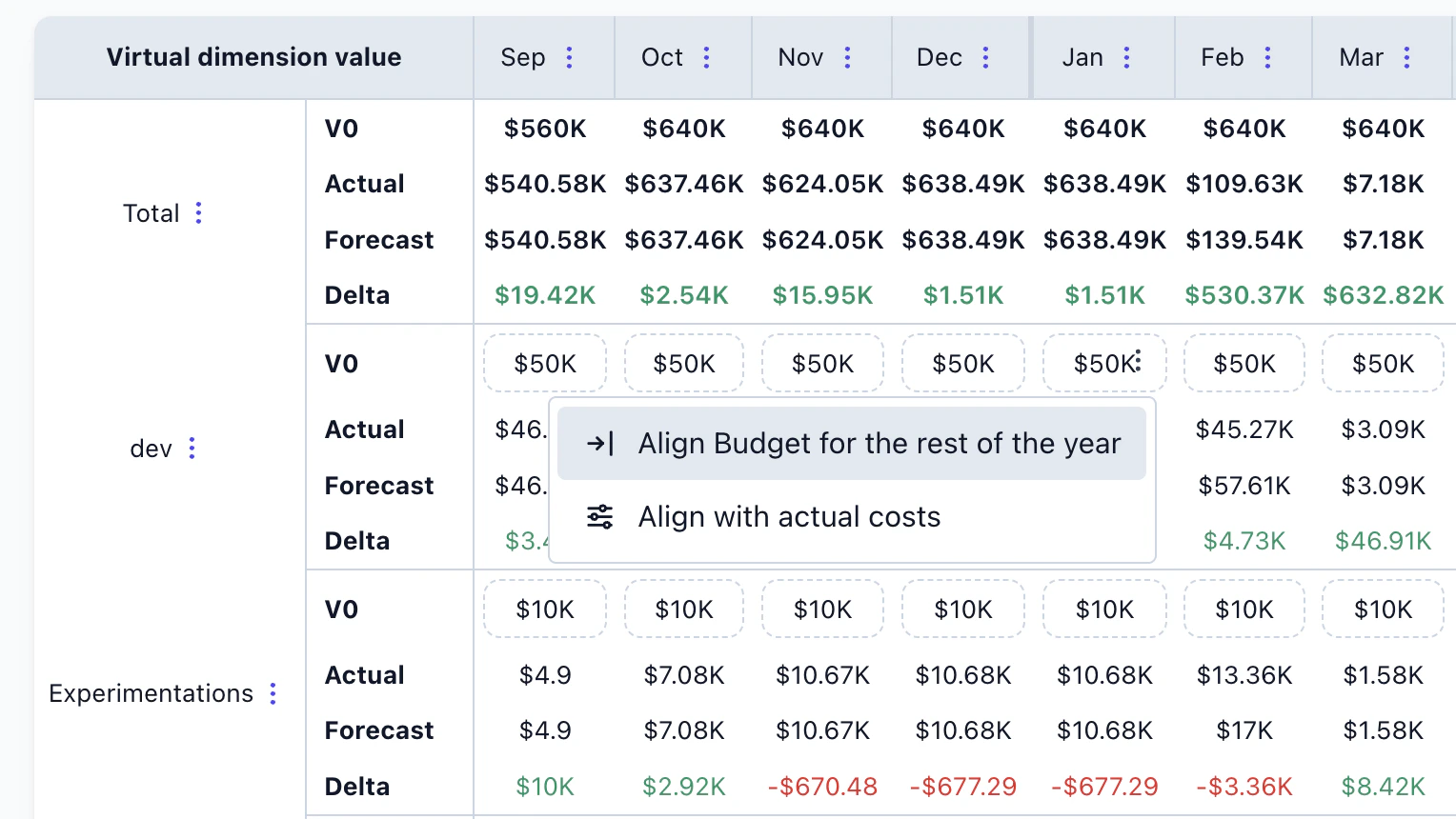 New filling options make it easier to [configure budgets](/use-cases/automate_budget). Set monthly allocations manually, distribute evenly across the year, or use historical spend as a baseline — then adjust from there.
## Sharing & Collaboration
New filling options make it easier to [configure budgets](/use-cases/automate_budget). Set monthly allocations manually, distribute evenly across the year, or use historical spend as a baseline — then adjust from there.
## Sharing & Collaboration
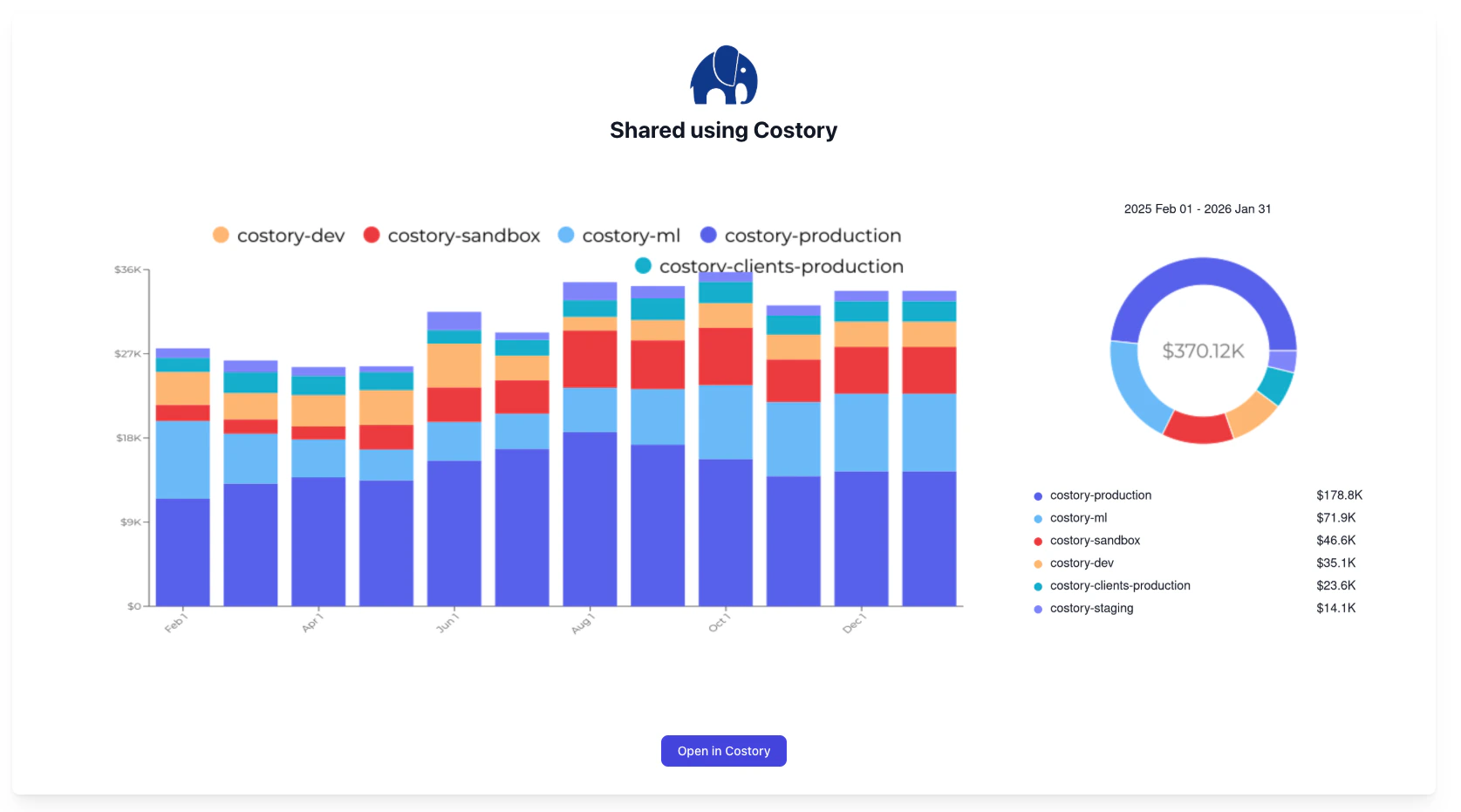 Share your analysis more easily than ever:
* **Image sharing**: export any Explorer view as an image to share with your team
* **[Slack previews](/features/slack-reports)**: shared views now render a rich preview directly in Slack, so recipients get context before clicking through
* **Public share pages**: generate a shareable link for any view, accessible without logging in
## Dashboard Widget Duplication
Duplicate any widget on a dashboard with a single click. The copy inherits all configuration — filters, groupings, and layout — so you can quickly create variations without starting from scratch.
## Templated Dashboards
Share your analysis more easily than ever:
* **Image sharing**: export any Explorer view as an image to share with your team
* **[Slack previews](/features/slack-reports)**: shared views now render a rich preview directly in Slack, so recipients get context before clicking through
* **Public share pages**: generate a shareable link for any view, accessible without logging in
## Dashboard Widget Duplication
Duplicate any widget on a dashboard with a single click. The copy inherits all configuration — filters, groupings, and layout — so you can quickly create variations without starting from scratch.
## Templated Dashboards
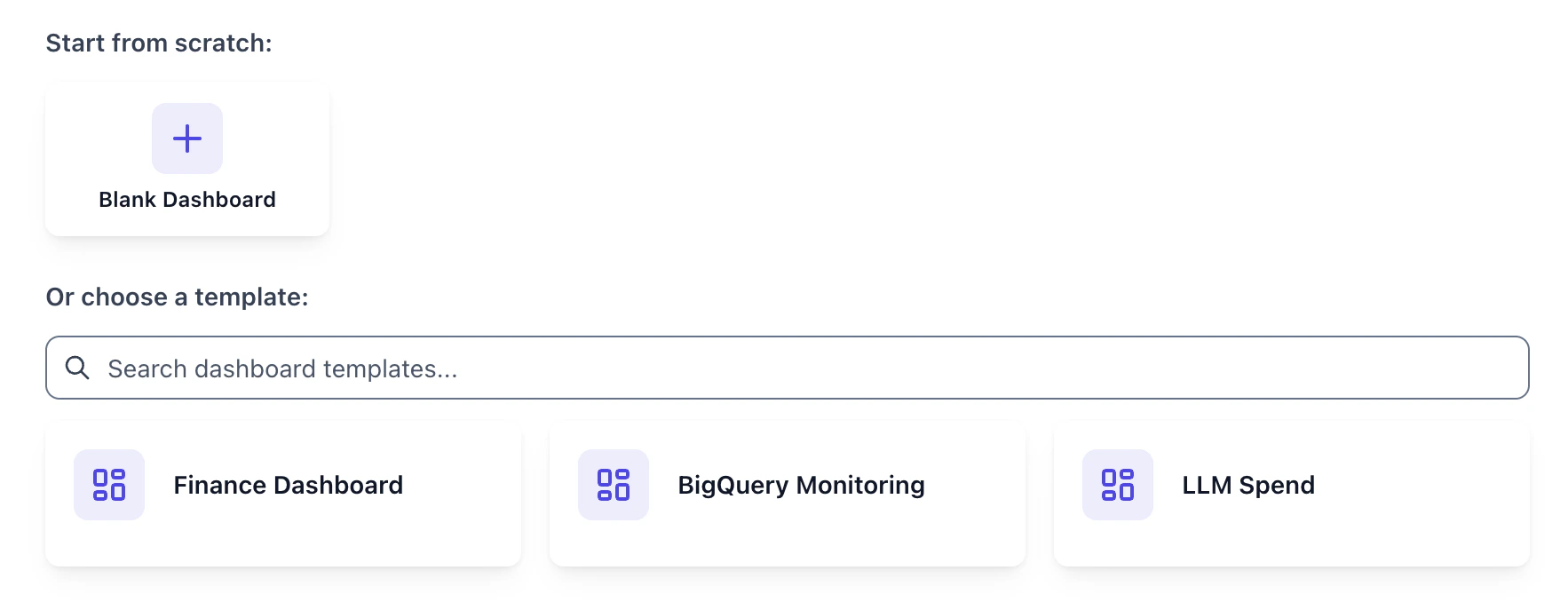 Get started faster with pre-built dashboard templates.
Instead of building from scratch, pick a template that matches your use case and customize from there — widgets, filters, and layouts are all pre-configured and fully editable.
## Reports from Explorer
Get started faster with pre-built dashboard templates.
Instead of building from scratch, pick a template that matches your use case and customize from there — widgets, filters, and layouts are all pre-configured and fully editable.
## Reports from Explorer
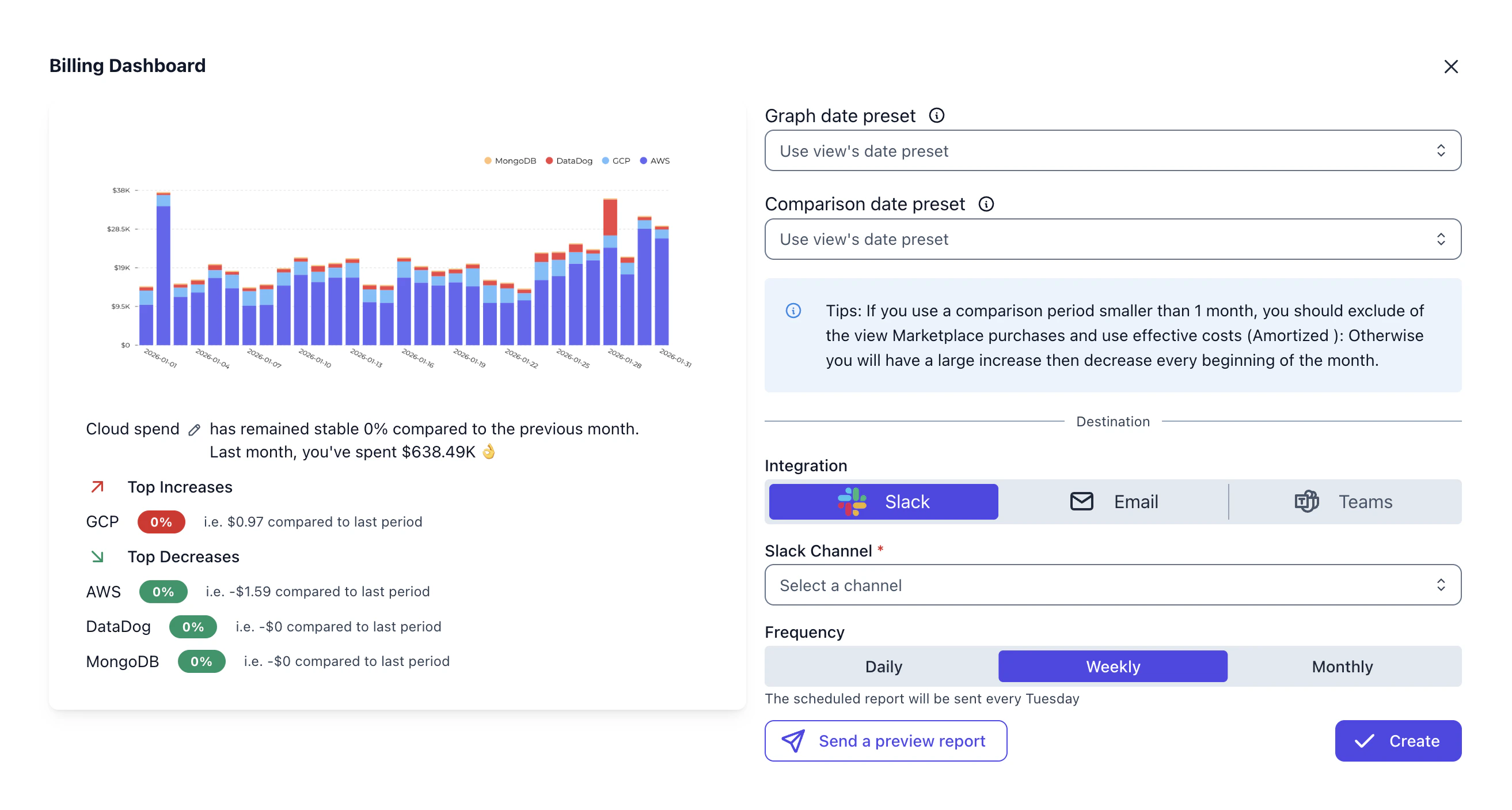 You can now [schedule reports](/features/slack-reports) directly from [Explorer](/features/cost-explorer).
Build a visualization with custom aggregations, formulas, and comparisons, then set it to deliver automatically on your preferred cadence.
We also introduced a new Reports tab inside the library, letting you find all your scheduled email and slack reports alongside existing views and dashboards.
## Dimensions
Consolidate scattered cost labels into clean, standardized dimensions with the [Dimensions](/features/tagging/dimensions) page:
You can now [schedule reports](/features/slack-reports) directly from [Explorer](/features/cost-explorer).
Build a visualization with custom aggregations, formulas, and comparisons, then set it to deliver automatically on your preferred cadence.
We also introduced a new Reports tab inside the library, letting you find all your scheduled email and slack reports alongside existing views and dashboards.
## Dimensions
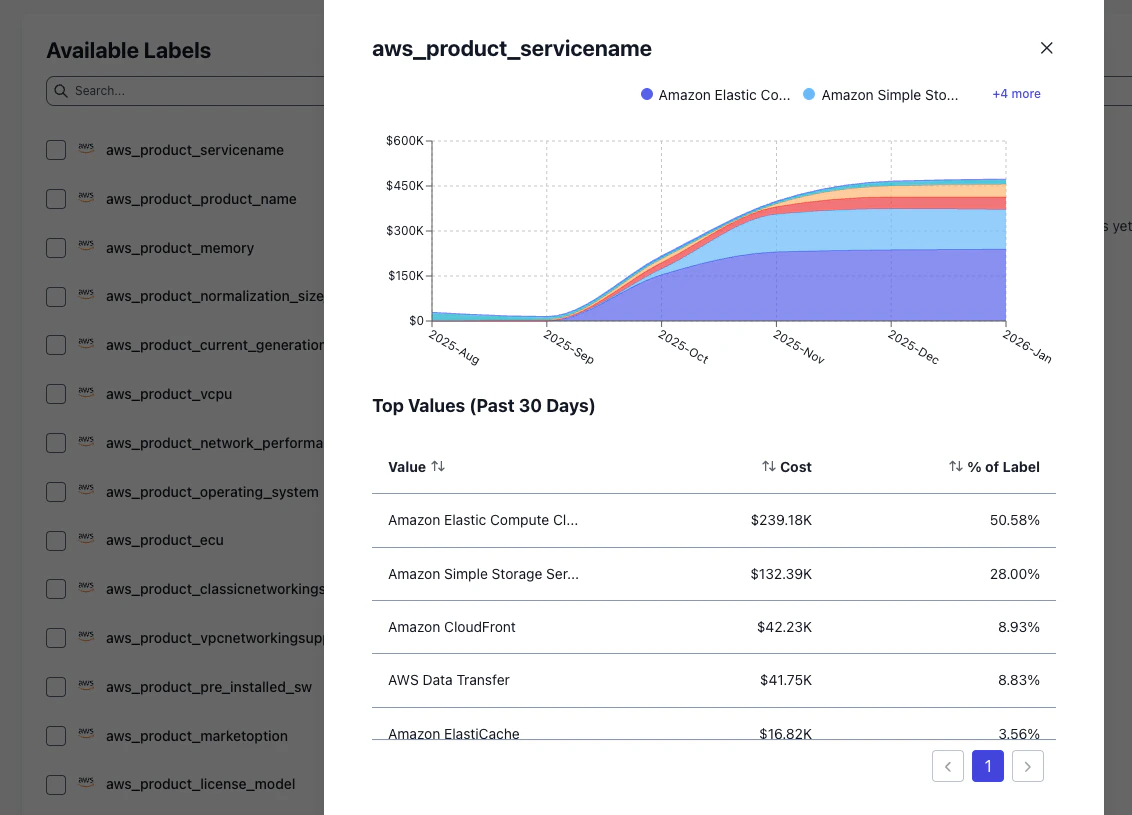
Consolidate scattered cost labels into clean, standardized dimensions with the [Dimensions](/features/tagging/dimensions) page:
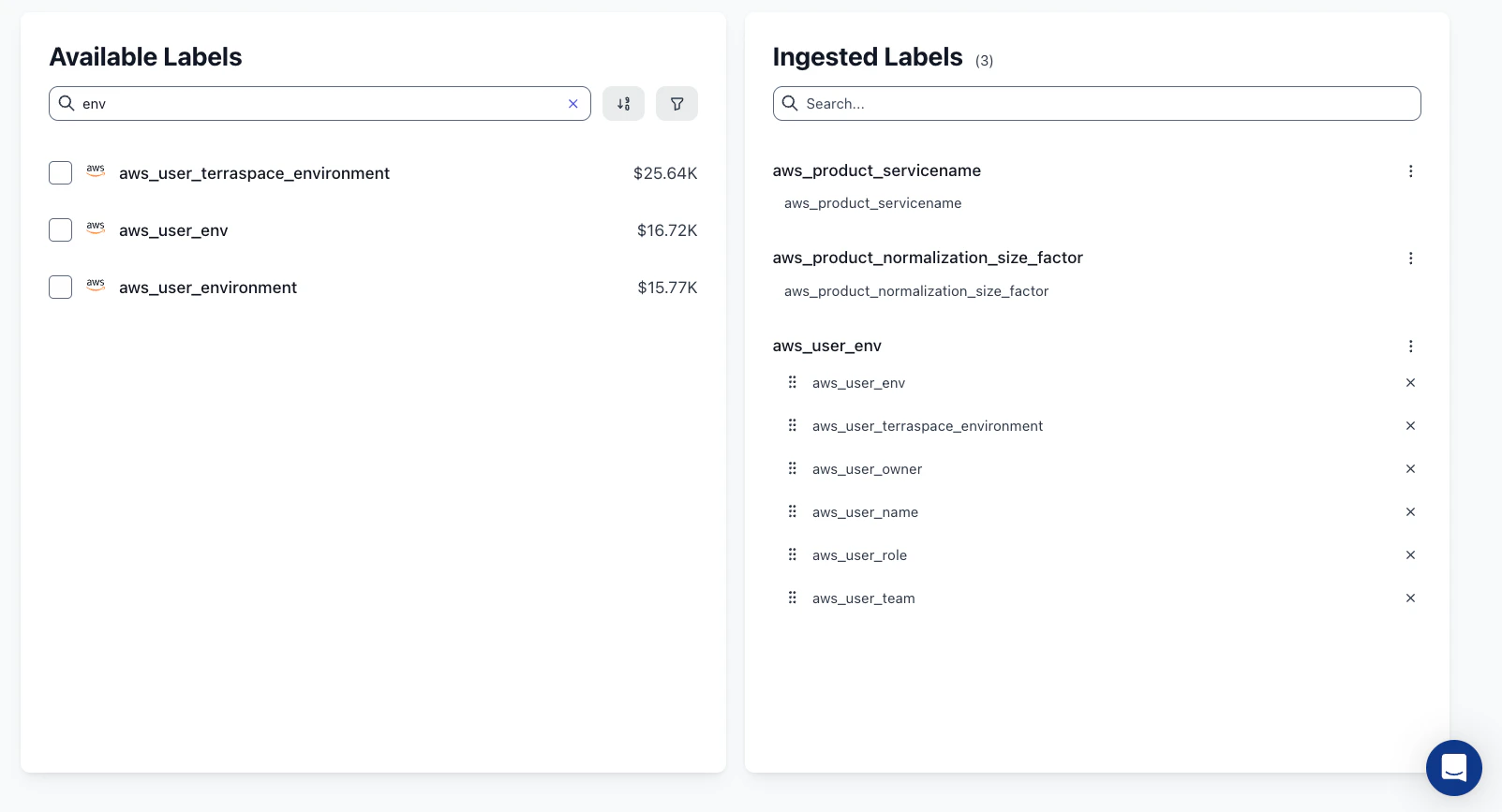 * Merge columns from multiple sources into a single logical label
* Map and rename values to standardize naming across providers (e.g., unify region names across AWS, GCP, and Azure)
* AI-powered similarity detection suggests values that should be grouped together, reducing manual effort
* Drag-and-drop reordering to organize your engineered labels
Preview label values and their cost impact before saving, with full data inspection modals for deeper analysis.
* Merge columns from multiple sources into a single logical label
* Map and rename values to standardize naming across providers (e.g., unify region names across AWS, GCP, and Azure)
* AI-powered similarity detection suggests values that should be grouped together, reducing manual effort
* Drag-and-drop reordering to organize your engineered labels
Preview label values and their cost impact before saving, with full data inspection modals for deeper analysis.
 ## Smarter Alerts for Cost and Budget Monitoring
Stay ahead of cost anomalies with a redesigned alerts system supporting multiple alert types and notification channels:
## Smarter Alerts for Cost and Budget Monitoring
Stay ahead of cost anomalies with a redesigned alerts system supporting multiple alert types and notification channels:
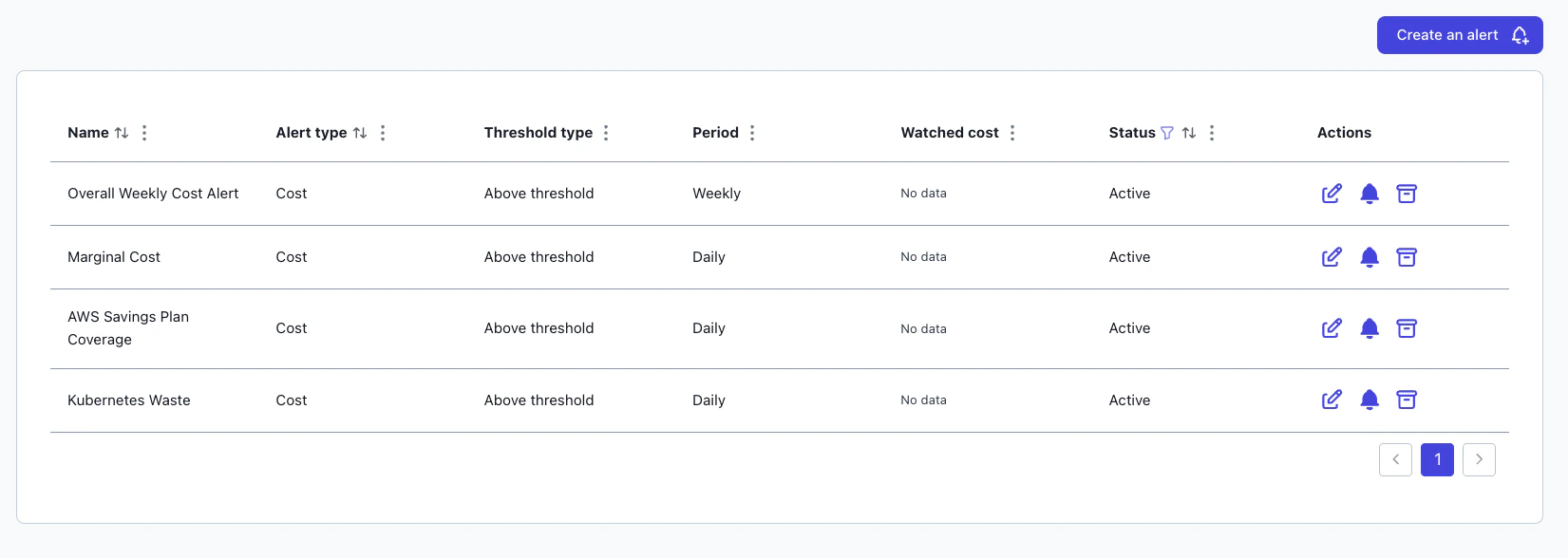 * Cost Alerts monitor actual spending against custom thresholds — get notified when costs spike or drop unexpectedly
* [Budget Alerts](/use-cases/automate_budget) track spend against allocated budgets with percentage-based triggers and automatic owner notifications
* Multi-threshold severity levels (Info, Warning, Alert) with daily, weekly, or monthly evaluation periods
* Cost Alerts monitor actual spending against custom thresholds — get notified when costs spike or drop unexpectedly
* [Budget Alerts](/use-cases/automate_budget) track spend against allocated budgets with percentage-based triggers and automatic owner notifications
* Multi-threshold severity levels (Info, Warning, Alert) with daily, weekly, or monthly evaluation periods
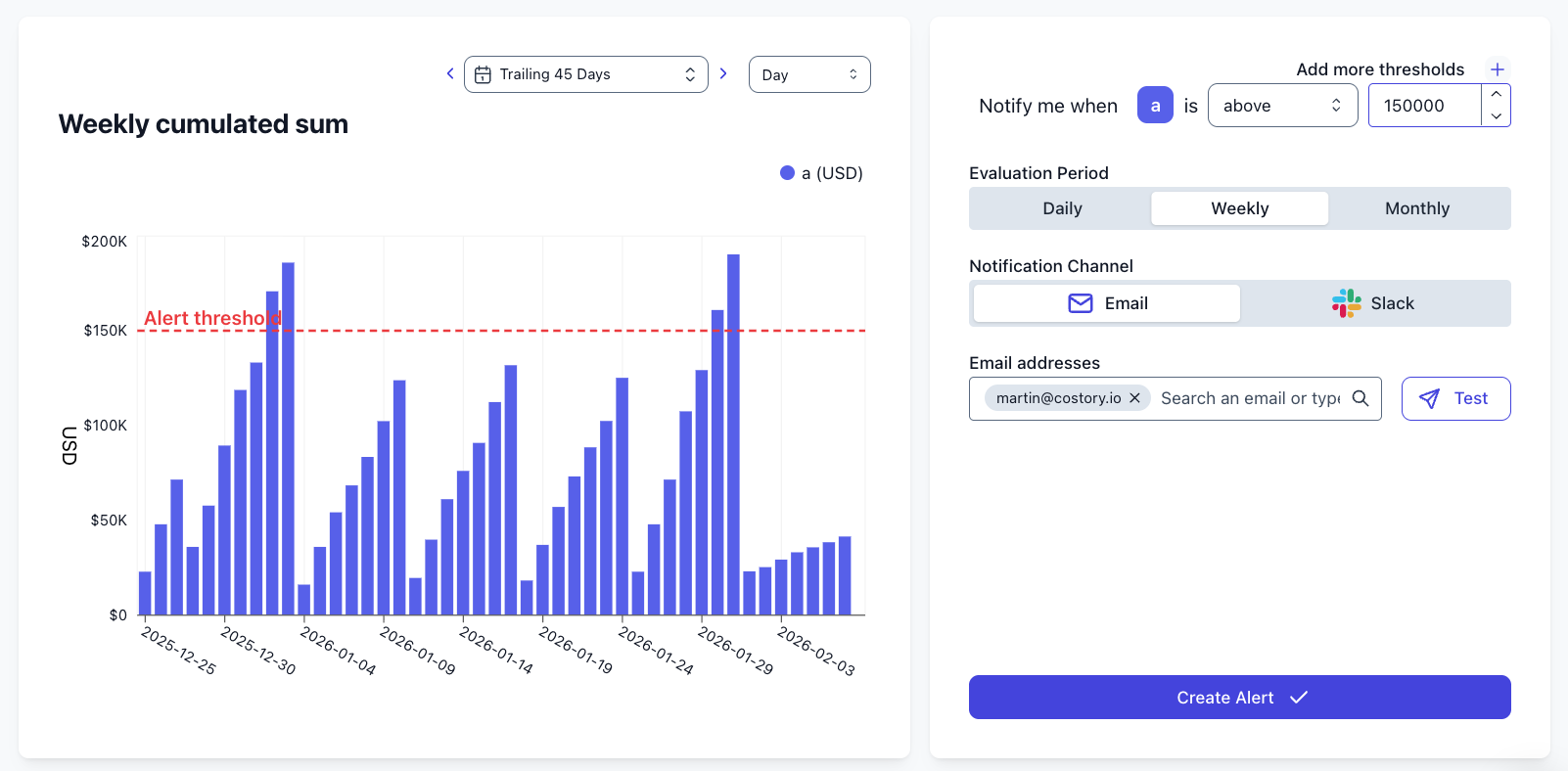
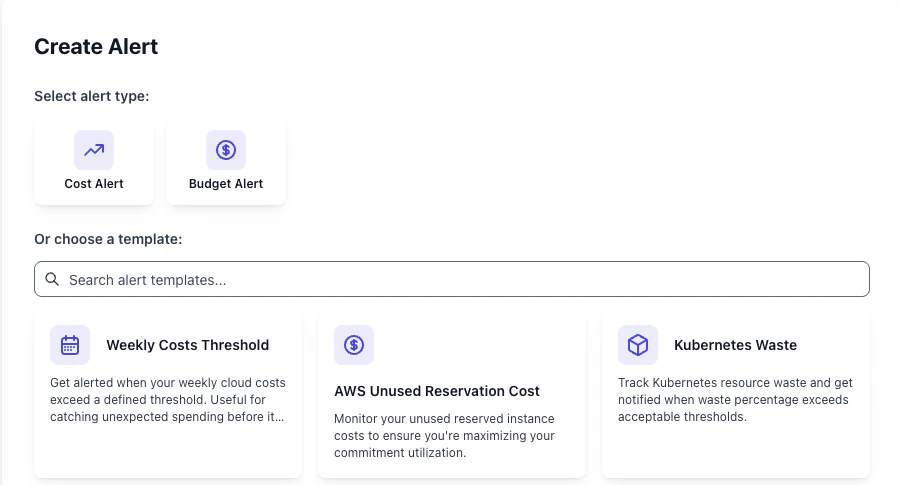 Deliver alerts directly to Slack channels or email recipients across your organization. Snooze alerts when needed, review historical triggers, and use pre-configured templates to get started quickly.
Weekly cumulative sums let you track running totals over the current week, so you can catch budget overruns before the month closes.
Deliver alerts directly to Slack channels or email recipients across your organization. Snooze alerts when needed, review historical triggers, and use pre-configured templates to get started quickly.
Weekly cumulative sums let you track running totals over the current week, so you can catch budget overruns before the month closes.
 ## Dashboards with Explorer
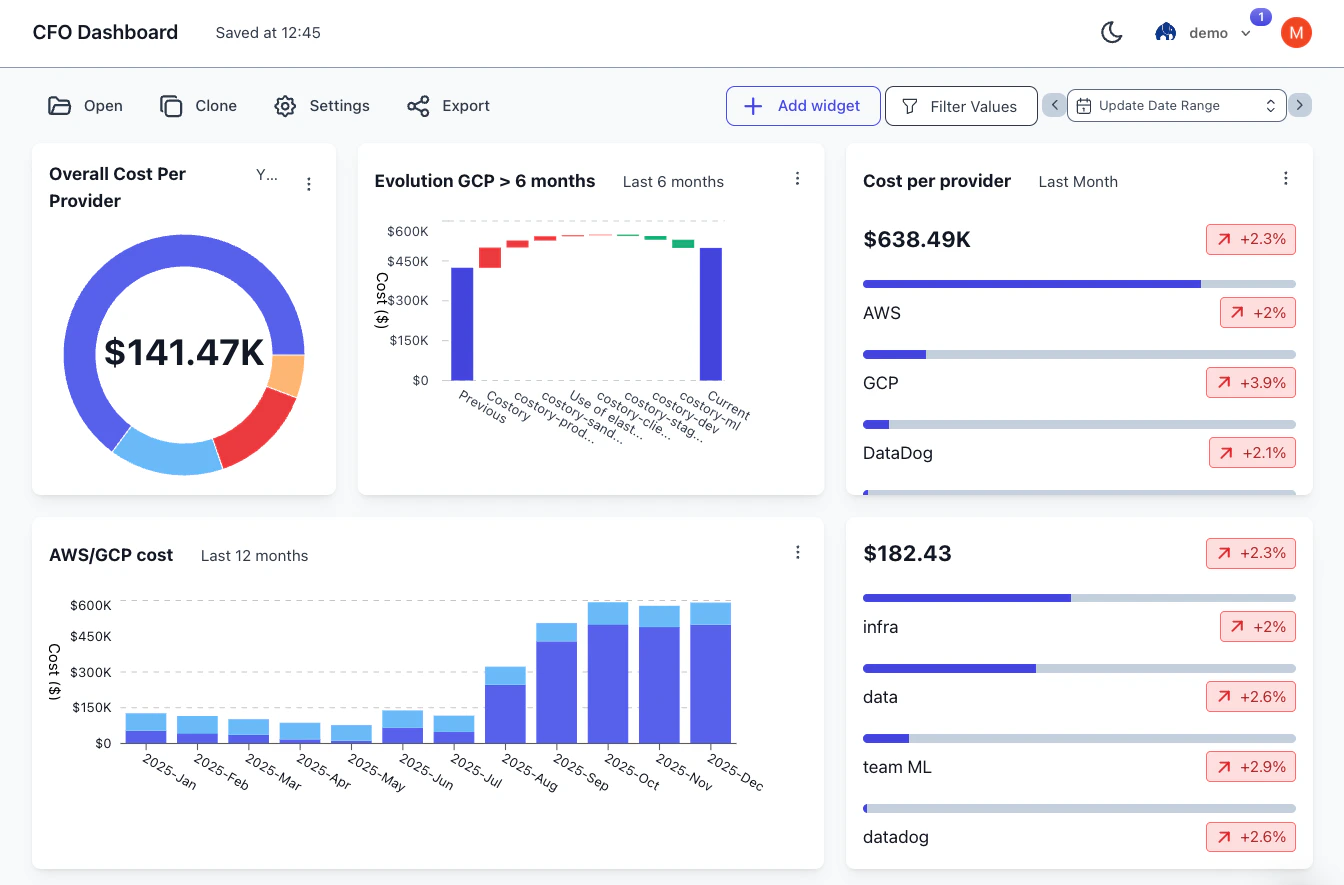
Dashboards can now be edited in-line in [Explorer](/features/cost-explorer), allowing you to change titles, resize tiles, and add and delete widgets with fewer clicks. Further changes:
* Creating a dashboard widget no longer requires saving a view
* Dashboards now support Text widgets for additional context
* Templates allowing you to get started faster than ever
## Dashboards with Explorer
Dashboards can now be edited in-line in [Explorer](/features/cost-explorer), allowing you to change titles, resize tiles, and add and delete widgets with fewer clicks. Further changes:
* Creating a dashboard widget no longer requires saving a view
* Dashboards now support Text widgets for additional context
* Templates allowing you to get started faster than ever
 ## Introducing the new Explorer
[Explorer](/features/cost-explorer) shows where your cloud spend goes and adds multiple metrics, formulas, anomaly drill-downs, and reusable views.
## Introducing the new Explorer
[Explorer](/features/cost-explorer) shows where your cloud spend goes and adds multiple metrics, formulas, anomaly drill-downs, and reusable views.
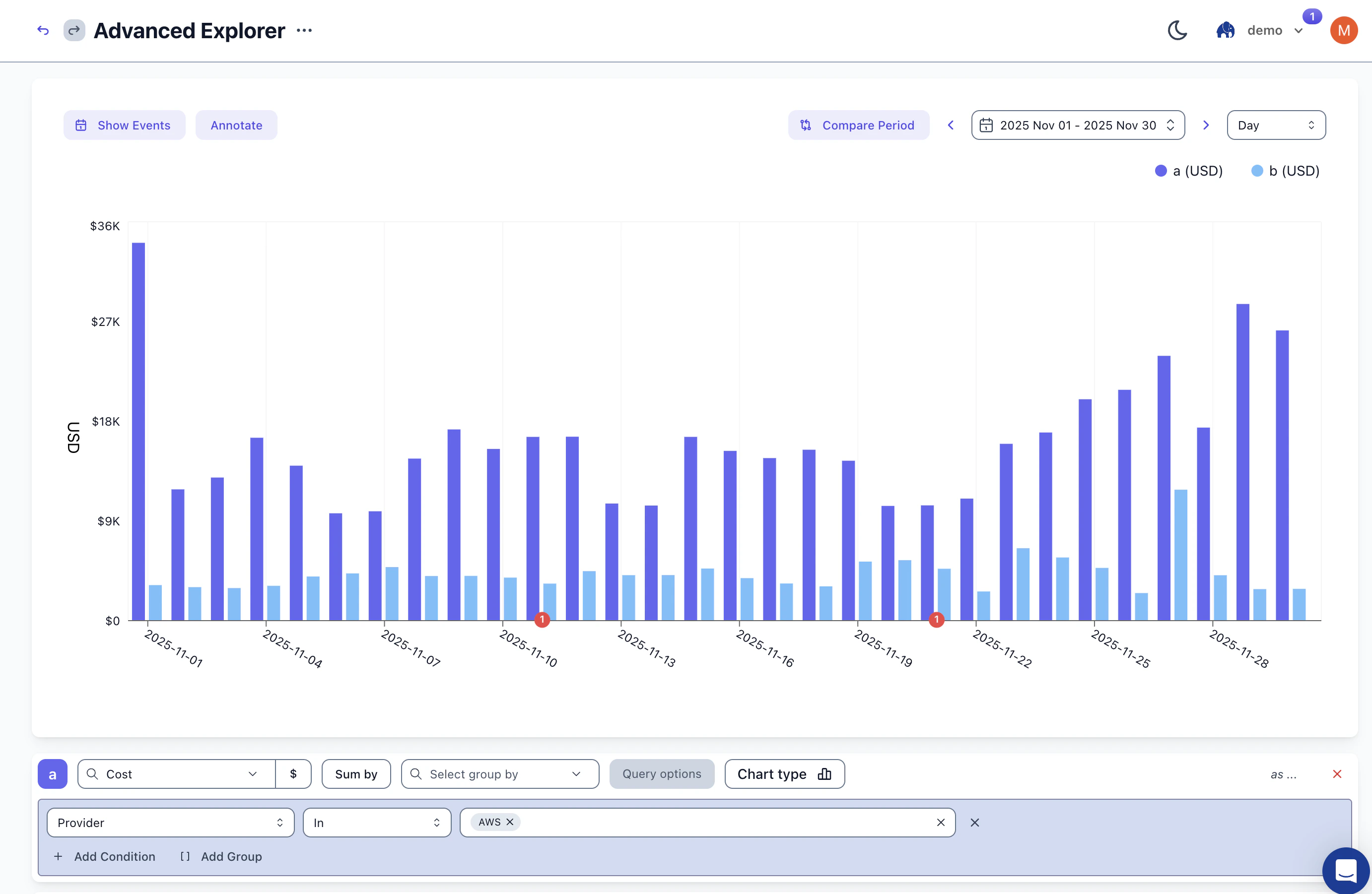 * **Multiple Metrics**: Plot cost alongside usage metrics, business KPIs, or custom data on the same chart. Each metric gets its own axis.
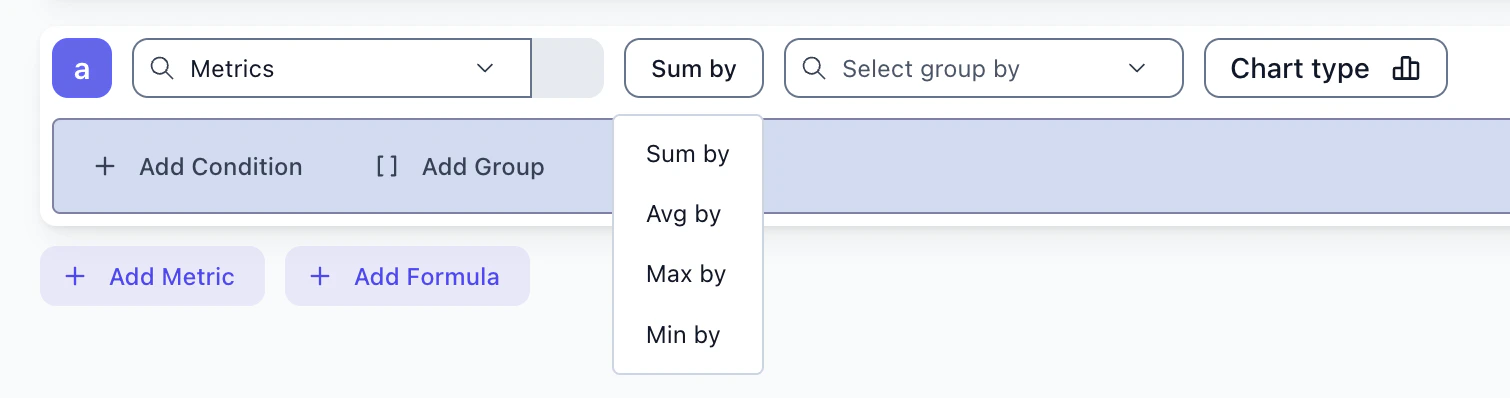
* **Ad-hoc Formulas**: Create calculated fields like cost-per-user or cost-per-request. Combine any metrics with arithmetic operations.
* **Aggregations**: Go beyond sum. Use average, max, or min to analyze your data the way you need.
* **Multiple Metrics**: Plot cost alongside usage metrics, business KPIs, or custom data on the same chart. Each metric gets its own axis.
* **Ad-hoc Formulas**: Create calculated fields like cost-per-user or cost-per-request. Combine any metrics with arithmetic operations.
* **Aggregations**: Go beyond sum. Use average, max, or min to analyze your data the way you need.
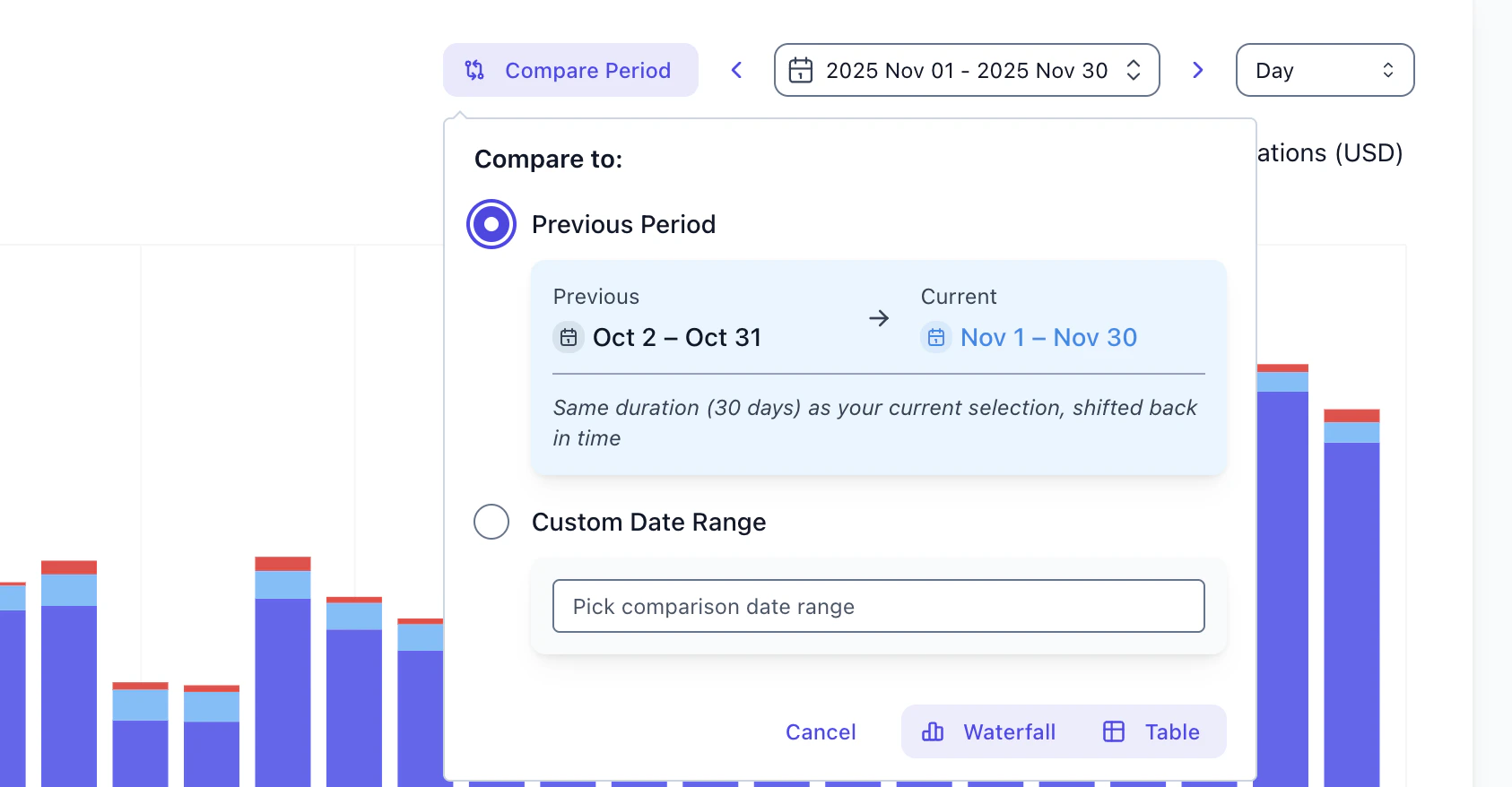
 **Flexible Comparison**: Enable comparison mode to see a waterfall chart breaking down exactly what changed between two time periods. Sort by absolute or percentage change.
 **Undo/Redo** — Cmd+Z to undo, Cmd+Shift+Z to redo. Explore freely without losing your work.
 **Time Navigation** — Arrow buttons slide your view backward or forward by one period. Last month becomes the month before with a single click.
 ## Stay Connected with Teams
Send digests and alerts directly to Teams channels alongside [Slack](/features/slack-reports).
## Stay Connected with Teams
Send digests and alerts directly to Teams channels alongside [Slack](/features/slack-reports).
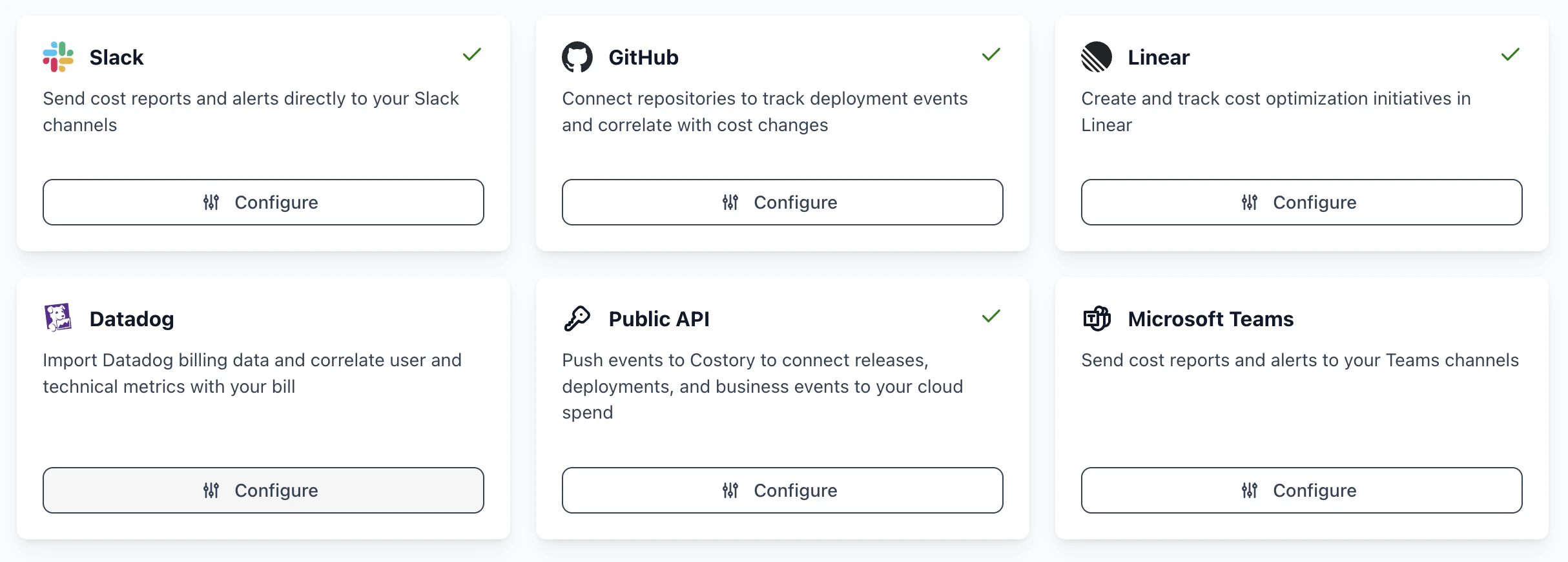 Keep your entire organization informed about cost changes and anomalies in the collaboration tools they already use.
## New Setup Flows for AWS and Azure
Step-by-step setup flows for [AWS](/setup/billing#aws) and [Azure](/setup/billing#azure) with copy-paste commands and real-time validation. Our guided wizards walk you through creating cost exports and configuring permissions, with instant feedback to ensure everything is set up correctly.
Keep your entire organization informed about cost changes and anomalies in the collaboration tools they already use.
## New Setup Flows for AWS and Azure
Step-by-step setup flows for [AWS](/setup/billing#aws) and [Azure](/setup/billing#azure) with copy-paste commands and real-time validation. Our guided wizards walk you through creating cost exports and configuring permissions, with instant feedback to ensure everything is set up correctly.
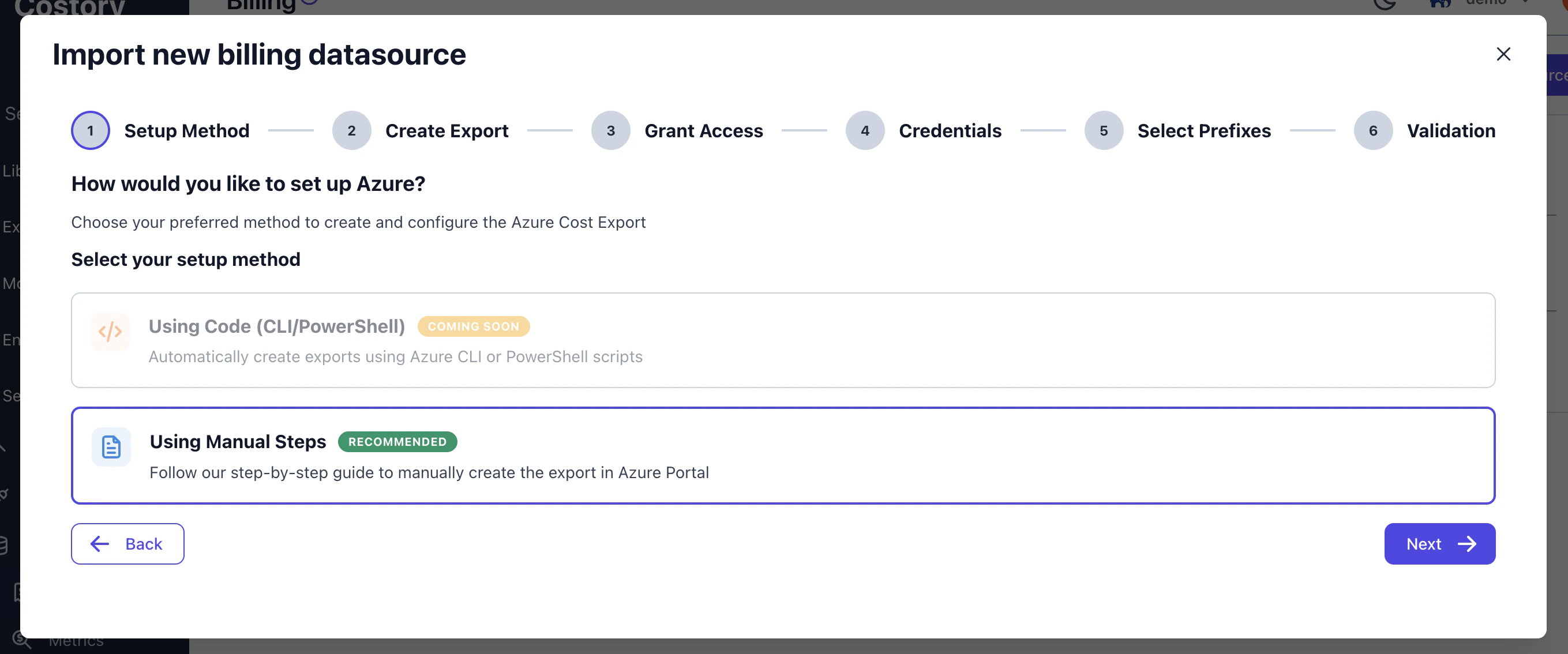 For [AWS](/setup/billing#aws), you can now set up billing exports using a one-click CloudFormation stack. The template creates the CUR 2.0 export and configures the IAM role with the required permissions automatically.
## Daily Scheduled Reports
[Scheduled reports](/features/slack-reports) now support daily frequency, so you can receive cost summaries every morning alongside your existing weekly and monthly schedules.
## Fully Automated Digest
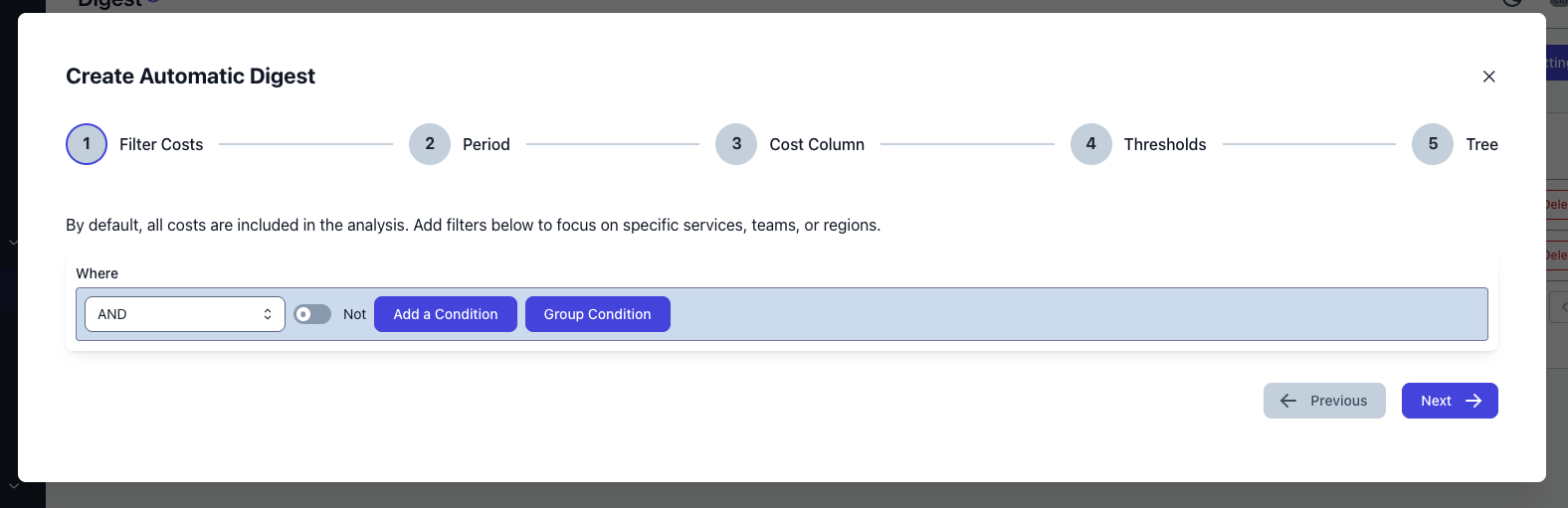
[Digests](/features/digest) are now fully automated — configure once and Costory generates your cost reports on schedule with background processing. Each digest includes markdown-rendered analysis with auto-generated charts, organized in a 5-step config modal for quick setup.
For [AWS](/setup/billing#aws), you can now set up billing exports using a one-click CloudFormation stack. The template creates the CUR 2.0 export and configures the IAM role with the required permissions automatically.
## Daily Scheduled Reports
[Scheduled reports](/features/slack-reports) now support daily frequency, so you can receive cost summaries every morning alongside your existing weekly and monthly schedules.
## Fully Automated Digest
[Digests](/features/digest) are now fully automated — configure once and Costory generates your cost reports on schedule with background processing. Each digest includes markdown-rendered analysis with auto-generated charts, organized in a 5-step config modal for quick setup.
 ## Amplitude Integration
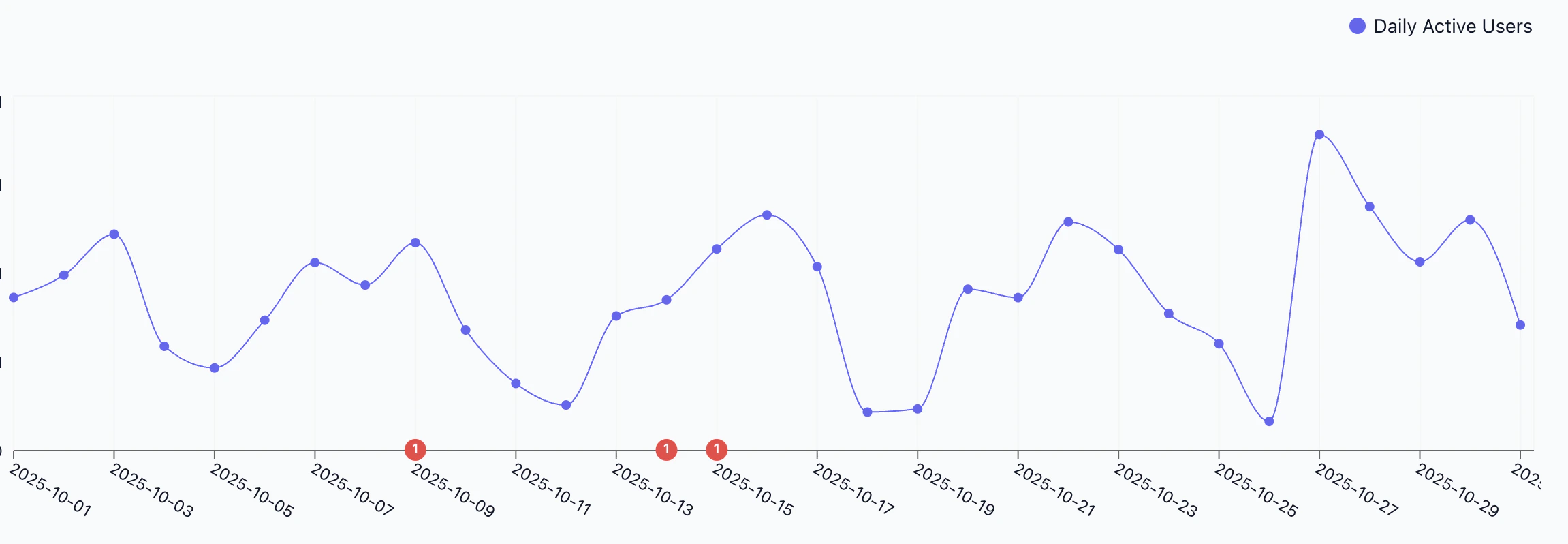
Correlate product usage with cloud costs. Connect your [Amplitude](/use-cases/amplitude/cost_per_active_users) project to bring [Daily Active Users](/setup/usage-metrics) into Costory, then visualize usage trends alongside infrastructure spend. Supports both US and EU data regions with 12 months of historical data synced automatically.
## Amplitude Integration
Correlate product usage with cloud costs. Connect your [Amplitude](/use-cases/amplitude/cost_per_active_users) project to bring [Daily Active Users](/setup/usage-metrics) into Costory, then visualize usage trends alongside infrastructure spend. Supports both US and EU data regions with 12 months of historical data synced automatically.
 ## Meet Costory Spotlight
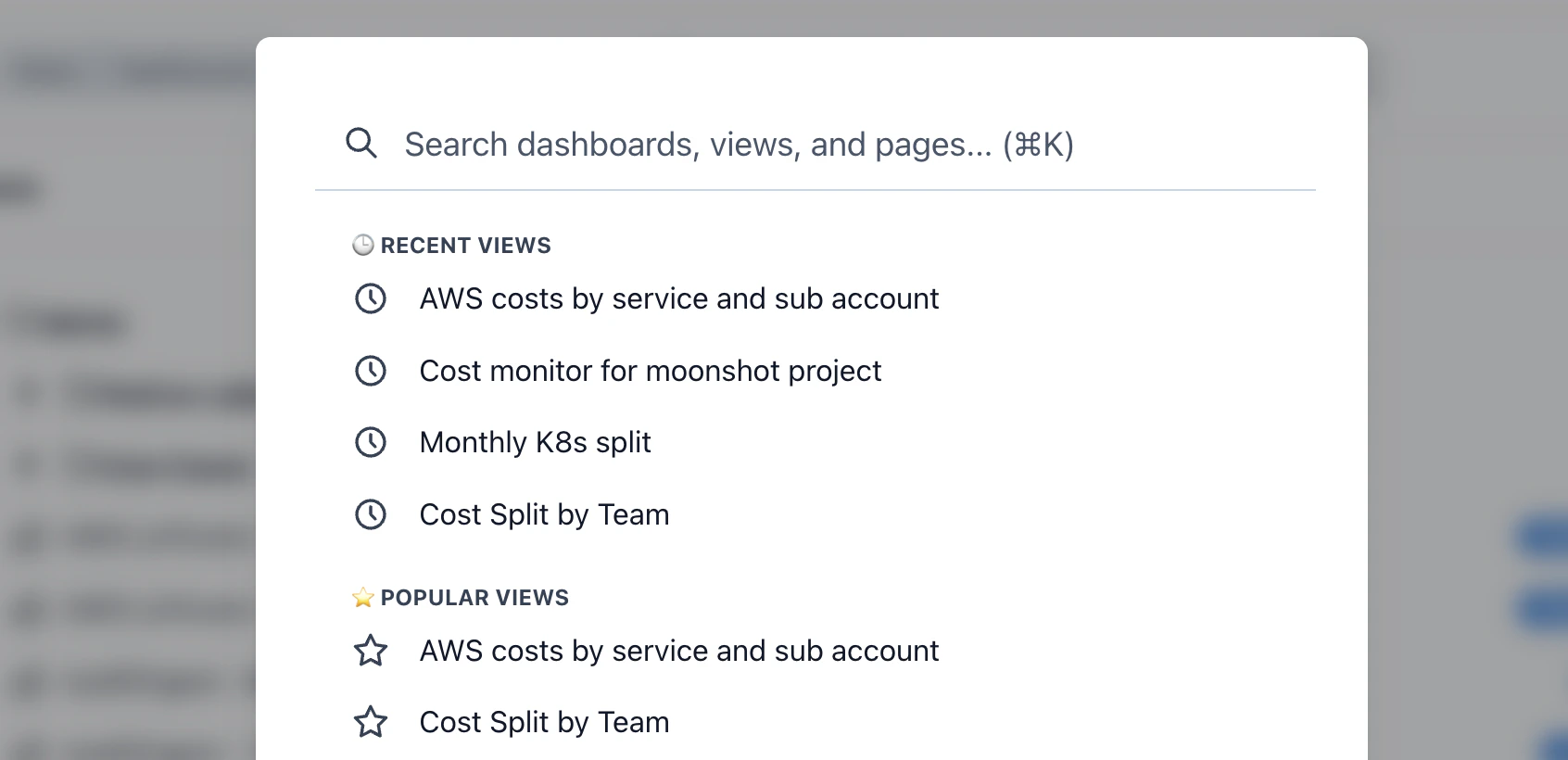
Press **Cmd/Ctrl+K** from anywhere to open Spotlight and navigate directly to your most-used views and features. Start typing to search across dashboards, saved views, metrics and more. Arrow keys navigate, Enter opens, Escape closes.
## Meet Costory Spotlight
Press **Cmd/Ctrl+K** from anywhere to open Spotlight and navigate directly to your most-used views and features. Start typing to search across dashboards, saved views, metrics and more. Arrow keys navigate, Enter opens, Escape closes.
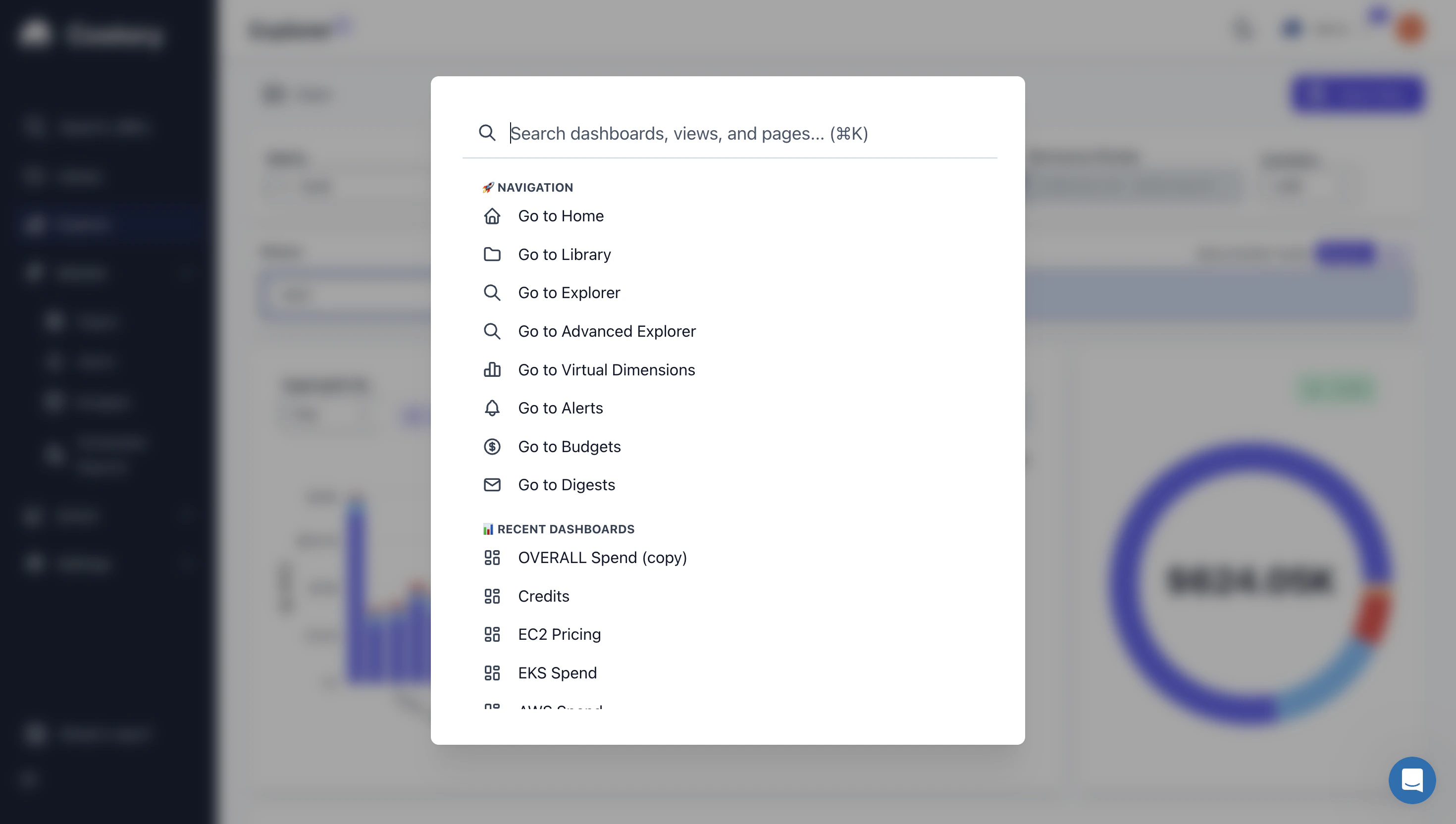 Spotlight adapts to your usage — you'll see your recent dashboards, recently accessed views, and the most popular views across your team from the last 30 days. Community templates give you ready-to-use starting points for common analyses.
 ## Smarter Cost Analysis with Billy
Billy got a major upgrade to how it understands and navigates your cost data. Improved vocabulary and column-naming awareness means Billy now interprets dimensions, labels, and groupings more accurately — fewer false leads, more relevant breakdowns.
Under the hood, heavy columns are now tokenized for faster processing, and a new prompt architecture gives Billy better guidance on when to drill deeper versus when to surface results. Combined with the group-by quality scoring introduced in November, Billy's investigations are sharper and faster than ever.
## Streamlined Onboarding
Organization creation is now fully automated during sign-up — no manual steps required. The onboarding flow also supports organization hierarchies for teams managing parent and child accounts, with smarter defaults and improved invite handling.
## Multi-Org Support, Exports & Quality of Life
* **Multi-organization support** — manage multiple organizations from a single account and switch between them seamlessly
* **Cleaner PNG exports** — exports now match exactly what you see on screen, with proper borders and shadows
* Rename metrics without recreating them, and delete dashboards and views from anywhere
## A New Look for Billy
Billy now generates full markdown for each node with **dynamic chart generation**. After identifying contributing factors for a cost spike, Billy picks the most relevant dimension to visualize the underlying cost drivers at a glance.
## Smarter Cost Analysis with Billy
Billy got a major upgrade to how it understands and navigates your cost data. Improved vocabulary and column-naming awareness means Billy now interprets dimensions, labels, and groupings more accurately — fewer false leads, more relevant breakdowns.
Under the hood, heavy columns are now tokenized for faster processing, and a new prompt architecture gives Billy better guidance on when to drill deeper versus when to surface results. Combined with the group-by quality scoring introduced in November, Billy's investigations are sharper and faster than ever.
## Streamlined Onboarding
Organization creation is now fully automated during sign-up — no manual steps required. The onboarding flow also supports organization hierarchies for teams managing parent and child accounts, with smarter defaults and improved invite handling.
## Multi-Org Support, Exports & Quality of Life
* **Multi-organization support** — manage multiple organizations from a single account and switch between them seamlessly
* **Cleaner PNG exports** — exports now match exactly what you see on screen, with proper borders and shadows
* Rename metrics without recreating them, and delete dashboards and views from anywhere
## A New Look for Billy
Billy now generates full markdown for each node with **dynamic chart generation**. After identifying contributing factors for a cost spike, Billy picks the most relevant dimension to visualize the underlying cost drivers at a glance.
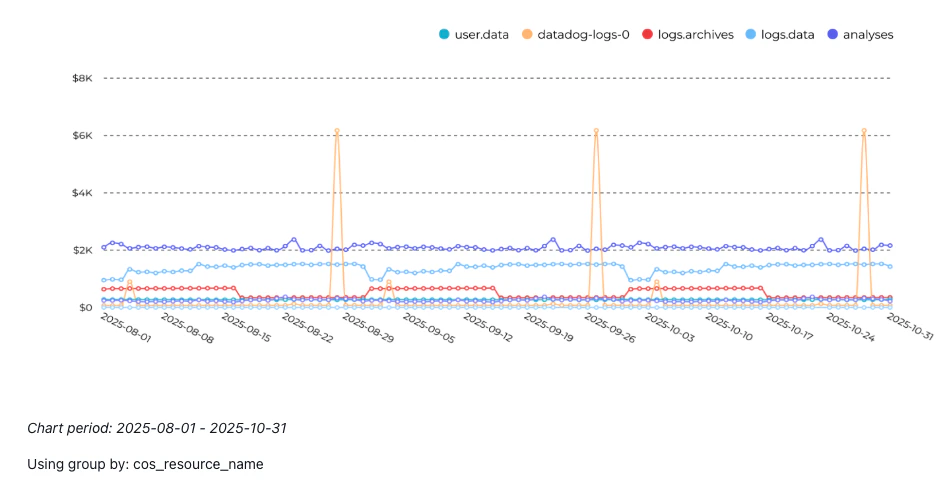 The digest modal got a visual refresh — cleaner layout, easier navigation, and quick toggles to show or hide charts while reading.
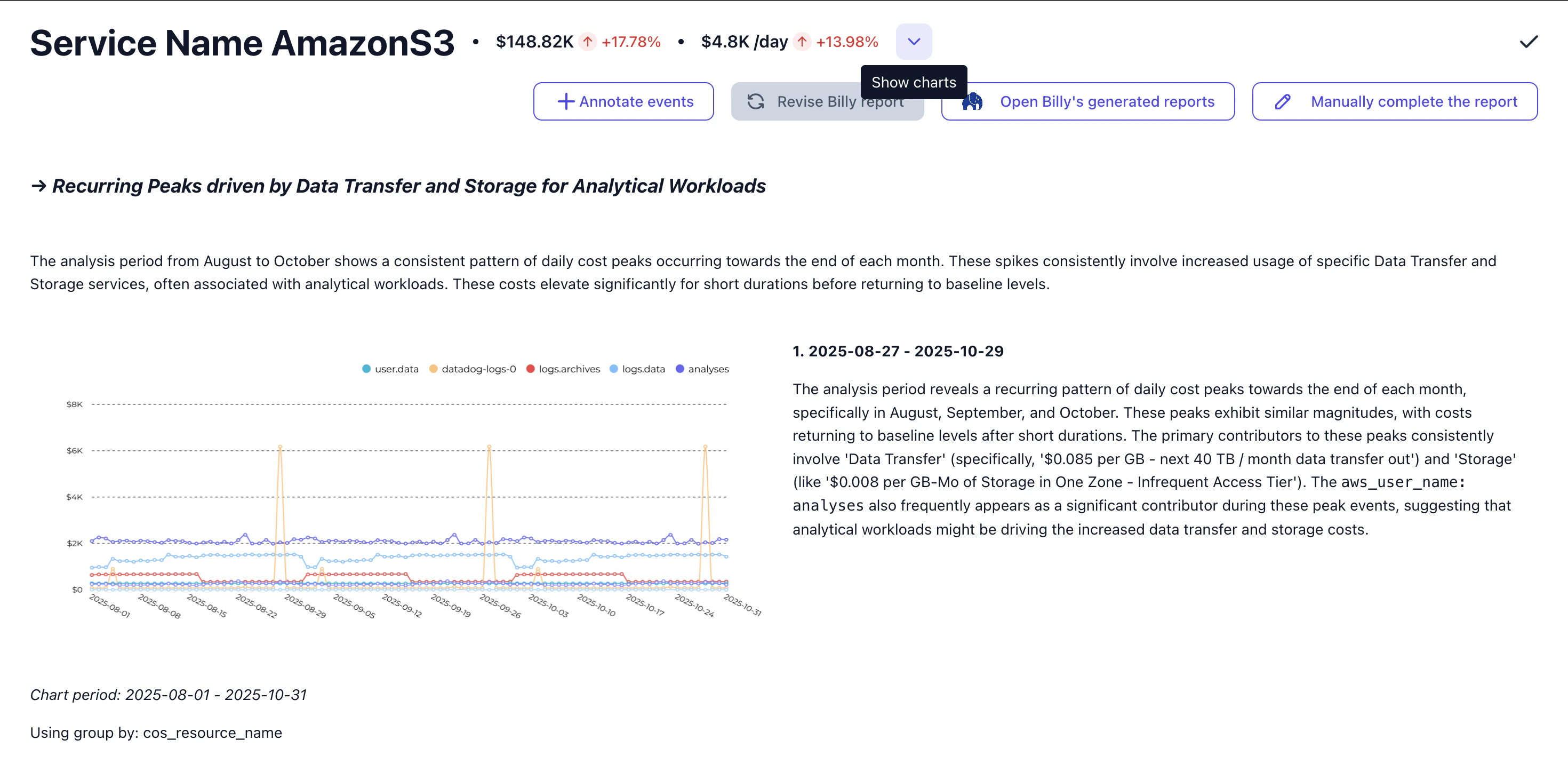 **Interactive Feedback and Continuity** — provide feedback to Billy and specify how to update an existing report. Billy regenerates each node according to your specifications, and all previous versions are saved so you can pick up where you left off.
 ## Under the Hood: Billy Becomes an AI Agent
Billy evolved from a fixed analysis pipeline into an autonomous AI agent powered by Gemini. Instead of following predetermined steps, Billy now reasons about your data — deciding which dimensions to investigate, which statistical tests to run, and how to present findings.
Key changes under the hood:
* **Tool-based architecture** — Billy has its own toolbox: assess group-by quality, fetch timeseries, run contributing factor analysis, and pull historical cost context
* **Statistical dimension selection** — a concentration index scores each dimension before Billy drills in, so analysis focuses on what actually explains cost changes
* **Parallel data fetching** — timeseries queries now run concurrently, cutting investigation time significantly
* **Events & knowledge retrieval** — Billy can now pull events and organizational knowledge directly into its analysis, cross-referencing deployments, incidents, and internal context for richer explanations
## A New Look for the Explorer and Dashboards
The library is now **keyboard-first** — navigate everything with **Cmd/Ctrl+K**, arrow keys, and shortcuts. Consistent color schemes across all charts make it easier to track dimensions visually.
## Under the Hood: Billy Becomes an AI Agent
Billy evolved from a fixed analysis pipeline into an autonomous AI agent powered by Gemini. Instead of following predetermined steps, Billy now reasons about your data — deciding which dimensions to investigate, which statistical tests to run, and how to present findings.
Key changes under the hood:
* **Tool-based architecture** — Billy has its own toolbox: assess group-by quality, fetch timeseries, run contributing factor analysis, and pull historical cost context
* **Statistical dimension selection** — a concentration index scores each dimension before Billy drills in, so analysis focuses on what actually explains cost changes
* **Parallel data fetching** — timeseries queries now run concurrently, cutting investigation time significantly
* **Events & knowledge retrieval** — Billy can now pull events and organizational knowledge directly into its analysis, cross-referencing deployments, incidents, and internal context for richer explanations
## A New Look for the Explorer and Dashboards
The library is now **keyboard-first** — navigate everything with **Cmd/Ctrl+K**, arrow keys, and shortcuts. Consistent color schemes across all charts make it easier to track dimensions visually.
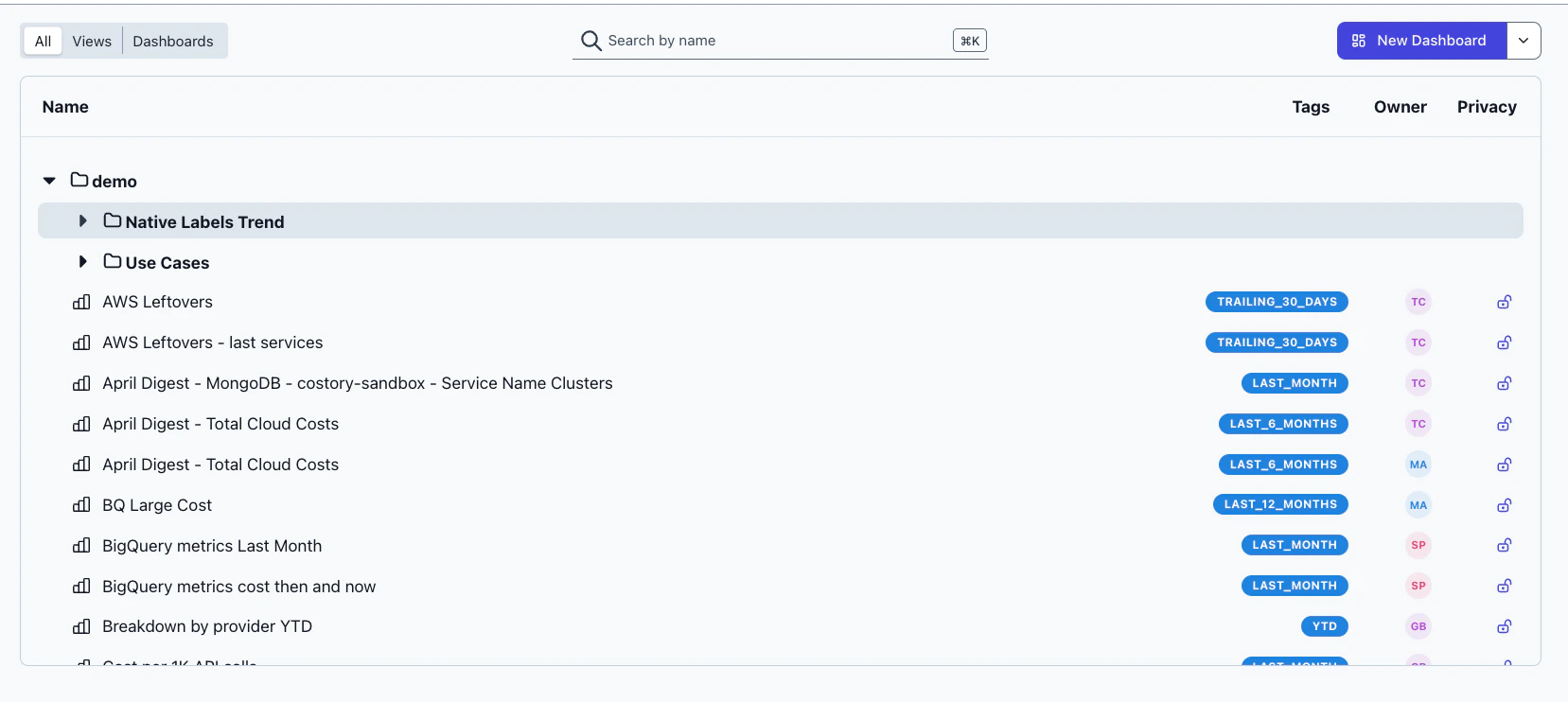 The query builder has been updated with a cleaner interface, and you can now **filter dashboards by view** to focus on the data that matters most.
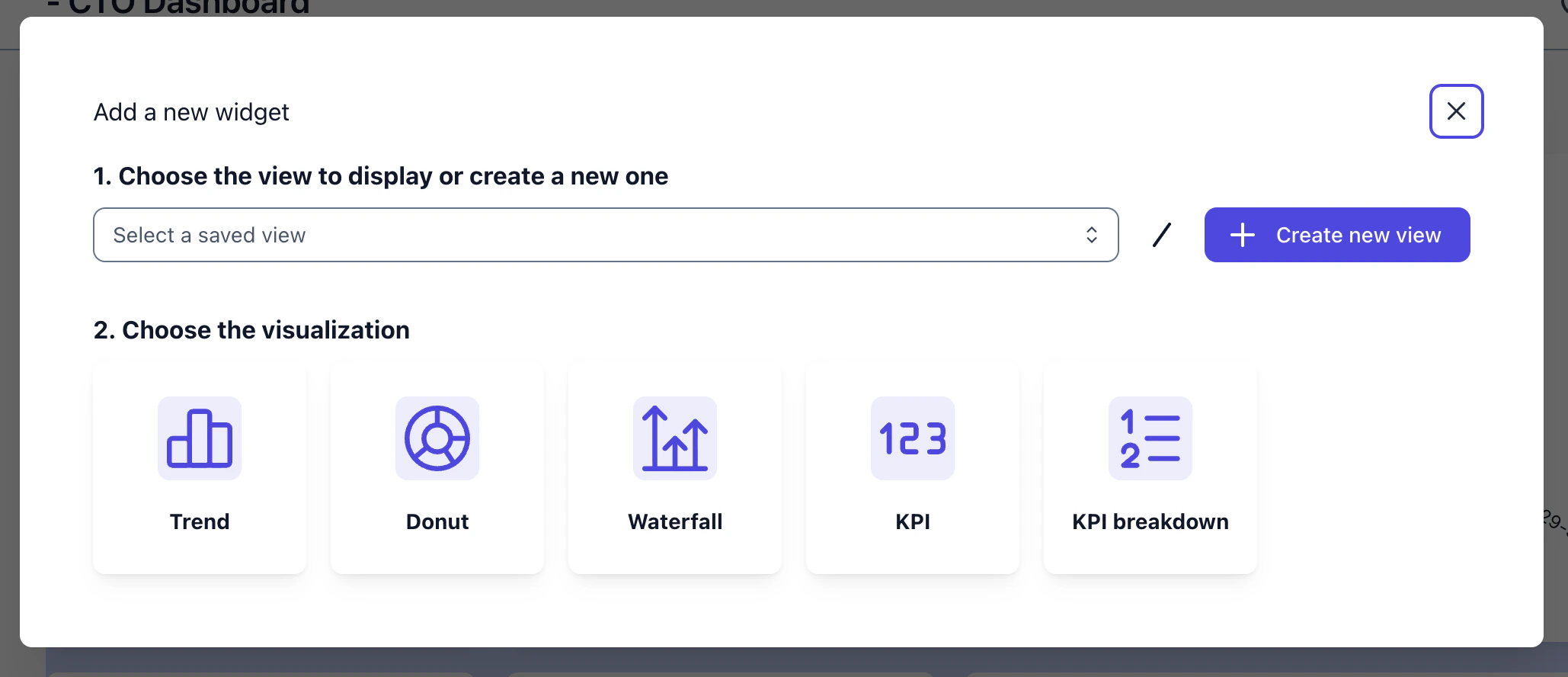
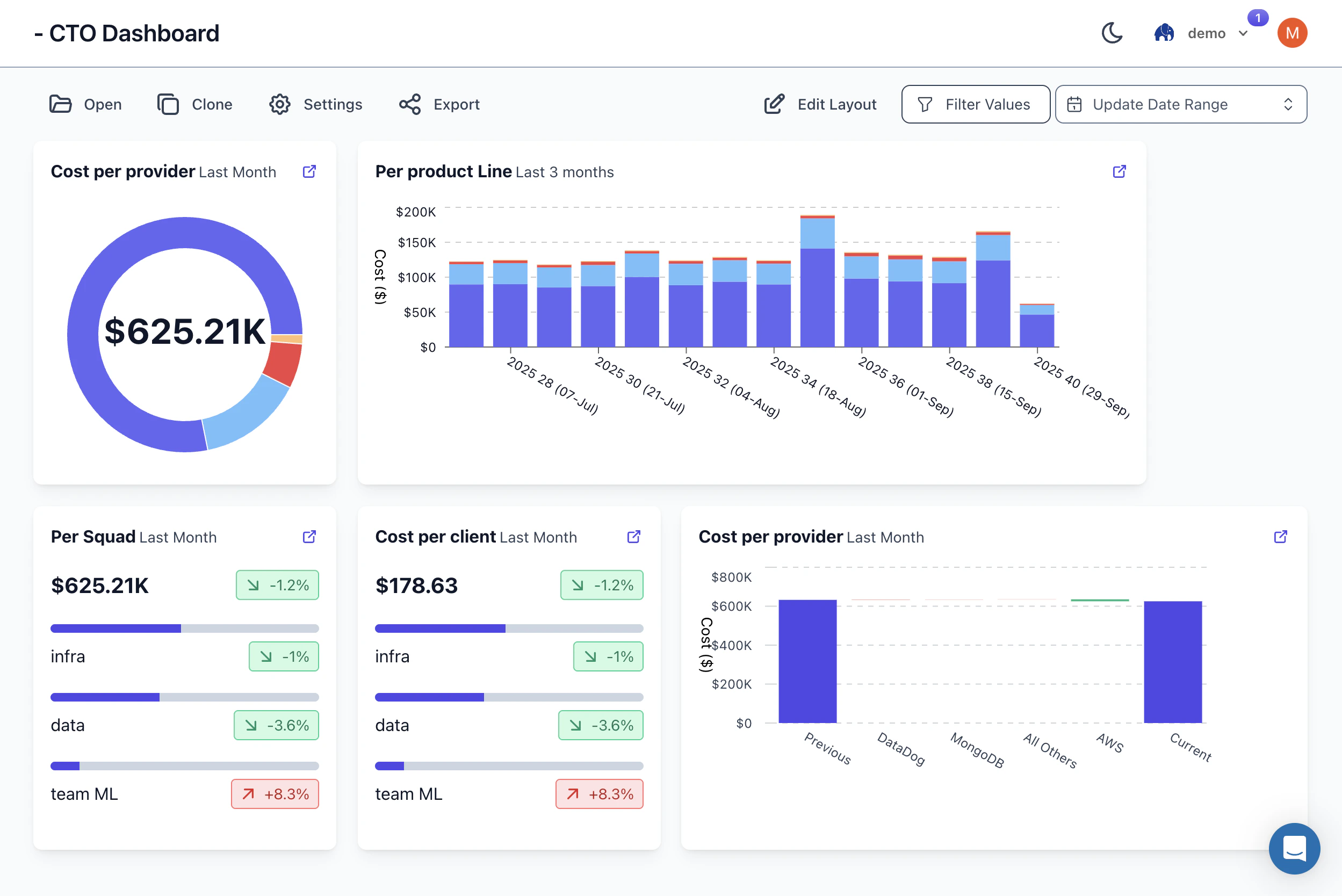 Inline editing lets you modify dashboards without leaving the page, and you can create new views directly from within dashboards. Change the time period on any dashboard without leaving the page, and create saved views straight from the dashboard modal.
 ## Consistent Color Palette & Mobile Sign-Up
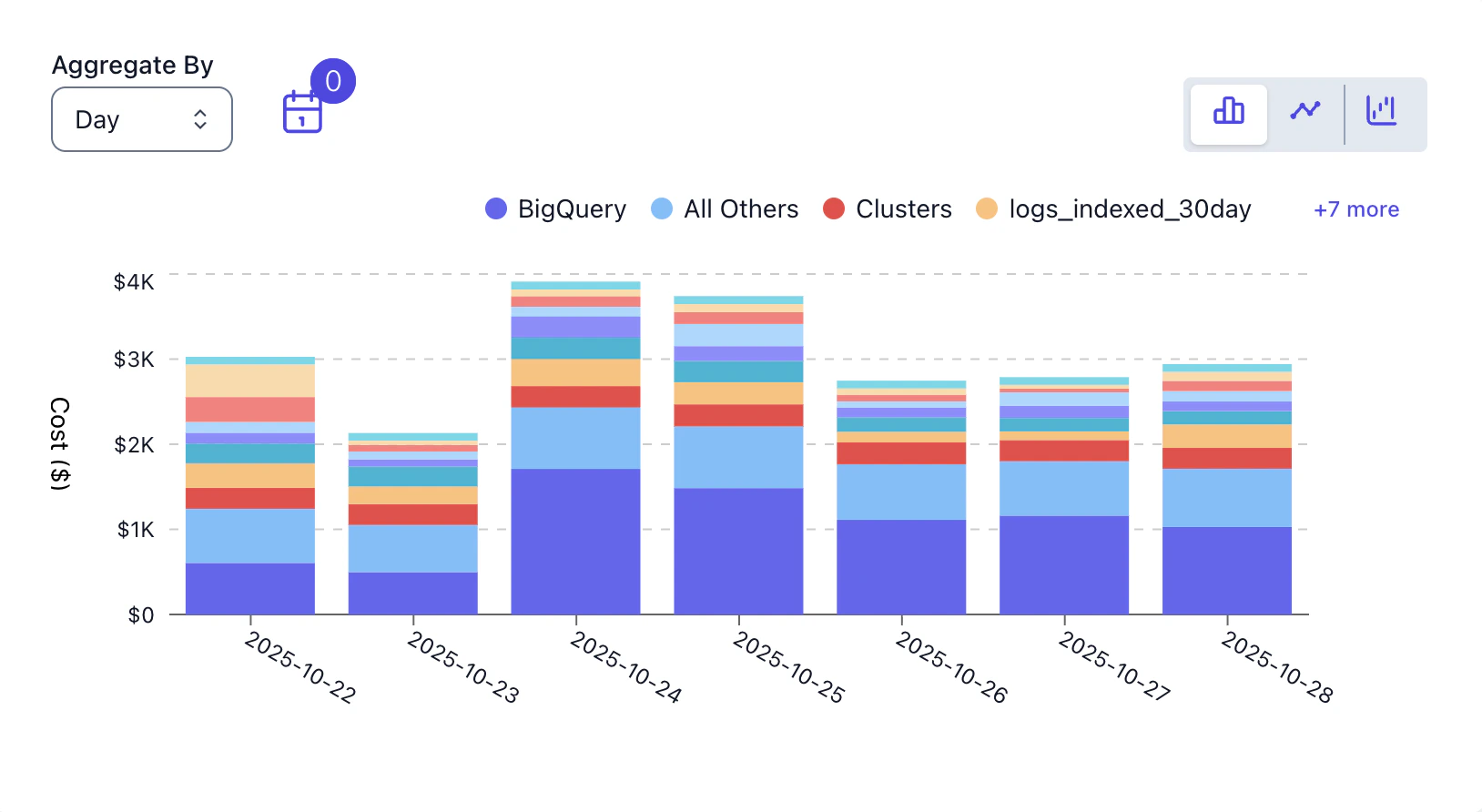
All charts now use a consistent color palette with full hex color support, making it easier to track dimensions visually across views and dashboards. The sign-up page is also now fully optimized for mobile.
## Consistent Color Palette & Mobile Sign-Up
All charts now use a consistent color palette with full hex color support, making it easier to track dimensions visually across views and dashboards. The sign-up page is also now fully optimized for mobile.
 ## Aiven Billing Integration
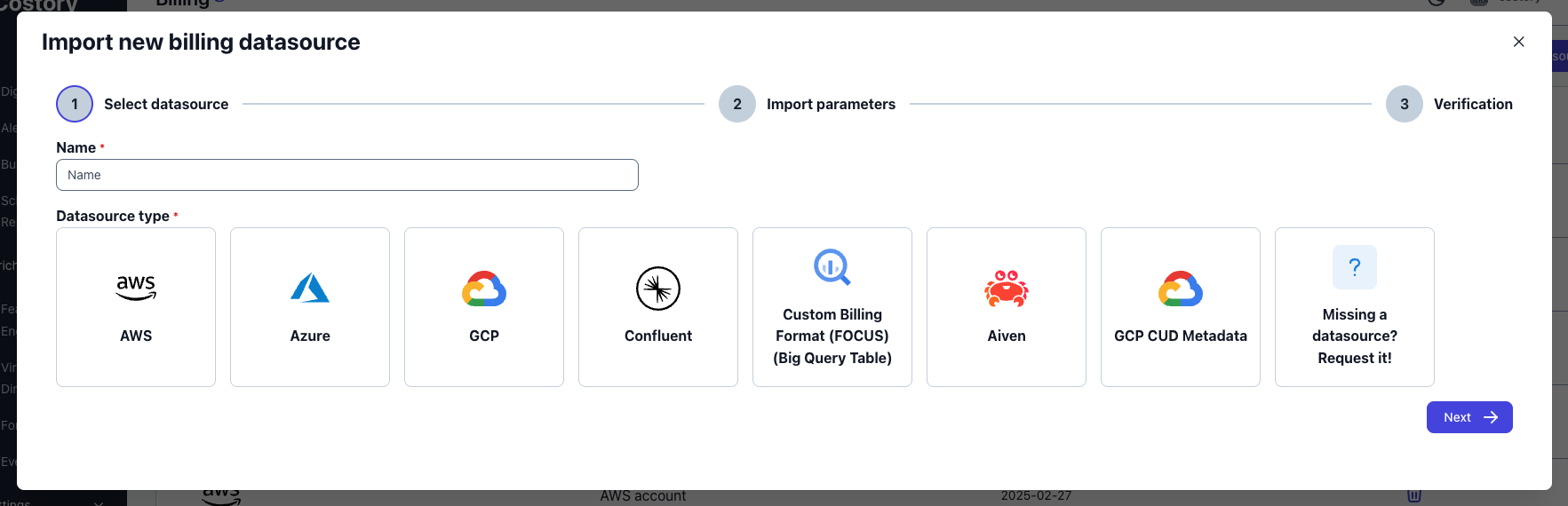
Track your Aiven managed service costs alongside other cloud providers. Billing data syncs automatically with full historical import.
## Aiven Billing Integration
Track your Aiven managed service costs alongside other cloud providers. Billing data syncs automatically with full historical import.
 ## Redesigned Onboarding & Sign-Up
A completely overhauled onboarding flow with automated organization creation, smarter defaults (start date now defaults to 3 months ago), and a redesigned sign-up page optimized for mobile. Setup wizards now link directly to the relevant documentation.
## Event Correlations & Advanced Cost Metrics
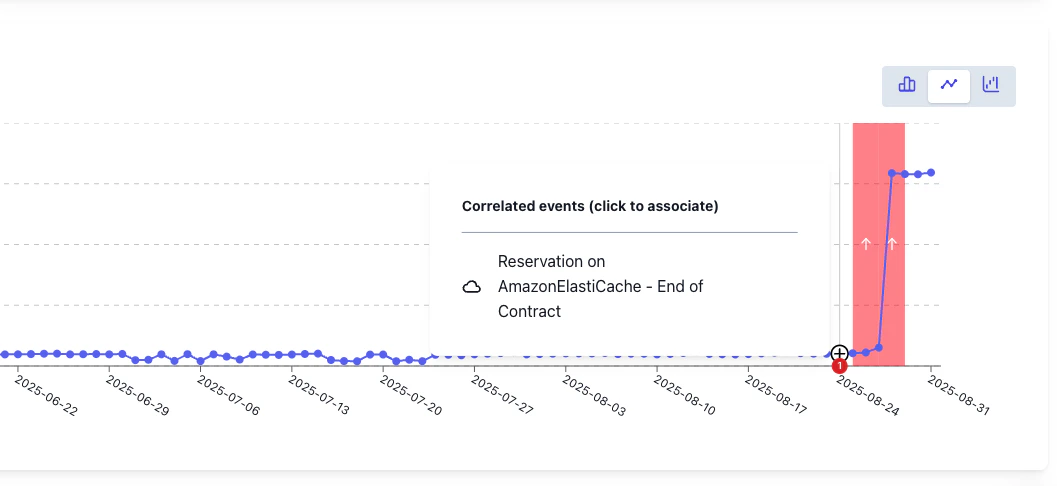
**[Events](/setup/events) Correlations in the Digest** — correlated events now appear for every cost change and trend, helping you identify root causes and share findings with your organization.
## Redesigned Onboarding & Sign-Up
A completely overhauled onboarding flow with automated organization creation, smarter defaults (start date now defaults to 3 months ago), and a redesigned sign-up page optimized for mobile. Setup wizards now link directly to the relevant documentation.
## Event Correlations & Advanced Cost Metrics
**[Events](/setup/events) Correlations in the Digest** — correlated events now appear for every cost change and trend, helping you identify root causes and share findings with your organization.
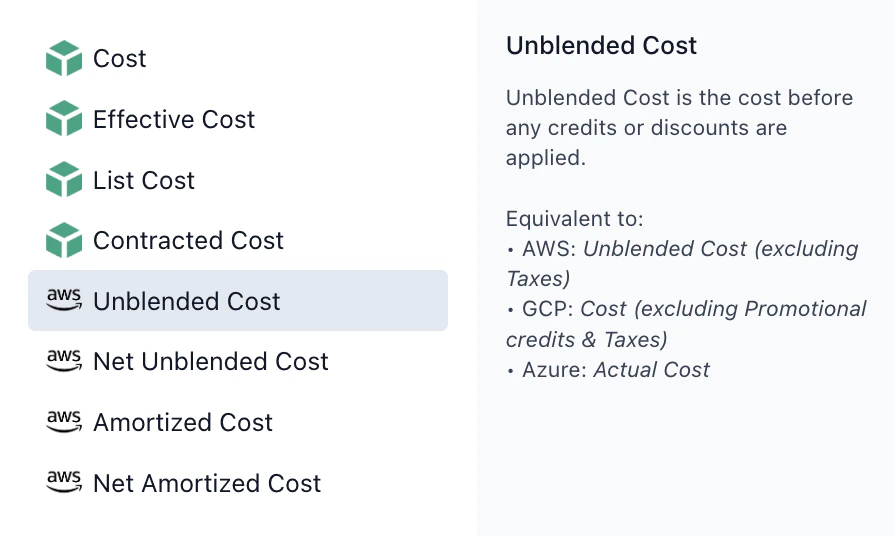
 Also new: **GBP currency support** and advanced AWS [cost metrics](/docs/cost-metrics) including Unblended, Net Unblended, Amortized, and Net Amortized cost views. The "Others" category in the explorer now shows up to 200 items for deeper analysis.
 ## Dimensions in Labels Explorer
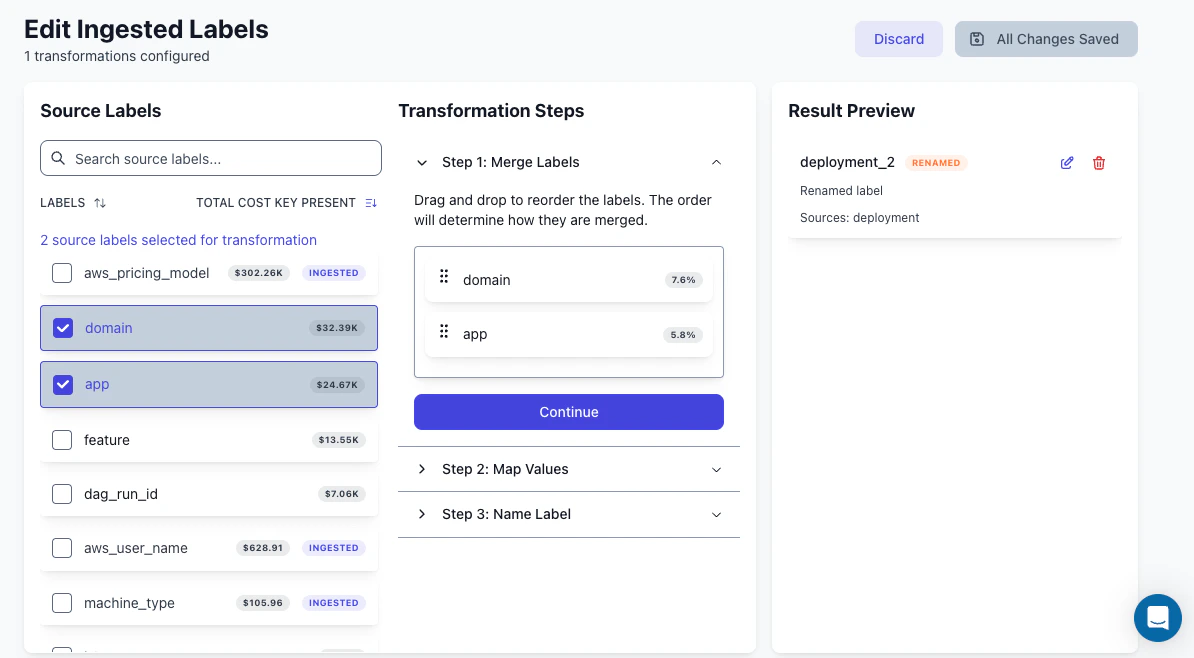
Introducing **[Dimensions](/features/tagging/dimensions)** in the Labels Explorer, a way to standardize and transform cost labels across all cloud providers.
* **Select & Merge Labels**: choose multiple labels from different sources and merge them into a single, unified label
* **Map Values**: standardize disparate values (e.g., map "prod", "production", "prd" all to "Production")
* **Name & Save**: give your new label a clear name and save it for use across all analyses
## Dimensions in Labels Explorer
Introducing **[Dimensions](/features/tagging/dimensions)** in the Labels Explorer, a way to standardize and transform cost labels across all cloud providers.
* **Select & Merge Labels**: choose multiple labels from different sources and merge them into a single, unified label
* **Map Values**: standardize disparate values (e.g., map "prod", "production", "prd" all to "Production")
* **Name & Save**: give your new label a clear name and save it for use across all analyses
 ## Trends Detection & New Charts
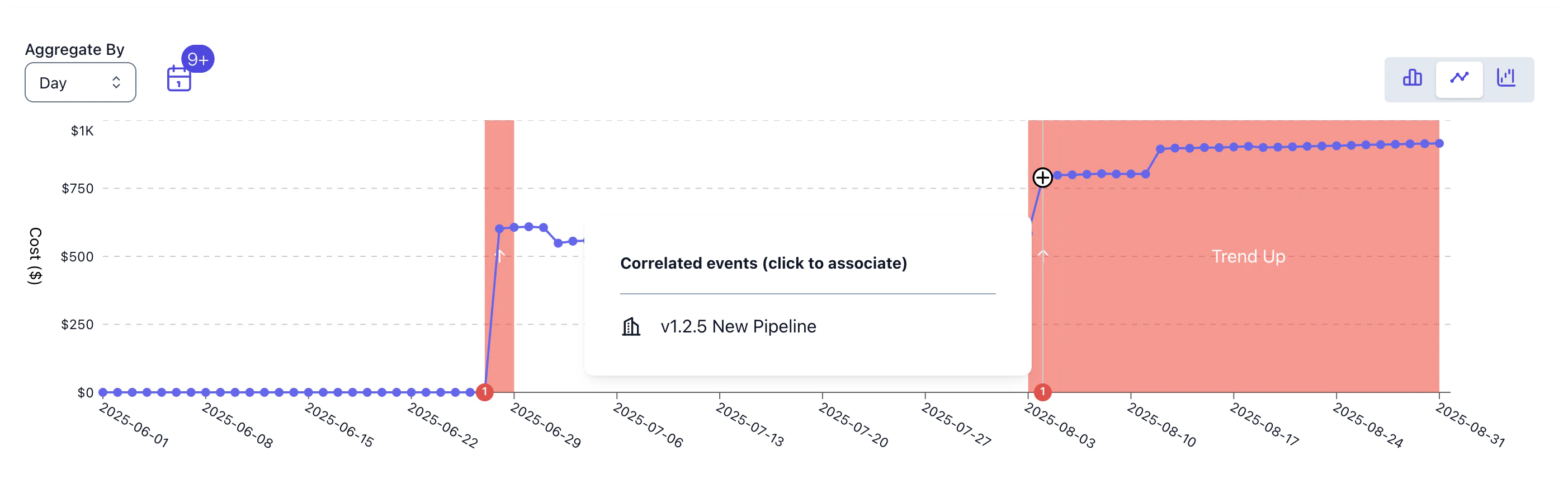
Billy now analyzes your spending and overlays **trends directly on charts**, helping you distinguish signal from noise. In digests, trend charts with event markers let you correlate changes with deployments, incidents, or infrastructure updates.
## Trends Detection & New Charts
Billy now analyzes your spending and overlays **trends directly on charts**, helping you distinguish signal from noise. In digests, trend charts with event markers let you correlate changes with deployments, incidents, or infrastructure updates.
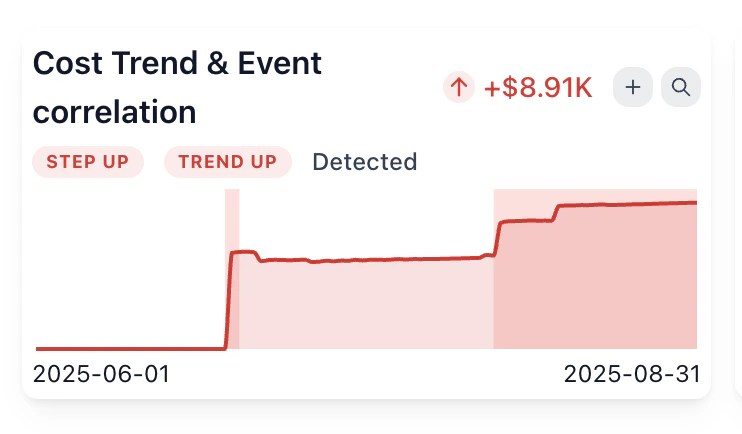 PNG exports now include event markers with labels and descriptions, rendered with smart positioning — making exported charts presentation-ready with full context.
**Better chart controls** — interactive legends let you highlight series on hover and hide/show specific data by clicking. Tooltips sort values in descending order for quick identification of top contributors.
PNG exports now include event markers with labels and descriptions, rendered with smart positioning — making exported charts presentation-ready with full context.
**Better chart controls** — interactive legends let you highlight series on hover and hide/show specific data by clicking. Tooltips sort values in descending order for quick identification of top contributors.
 ## Digests Redesigned
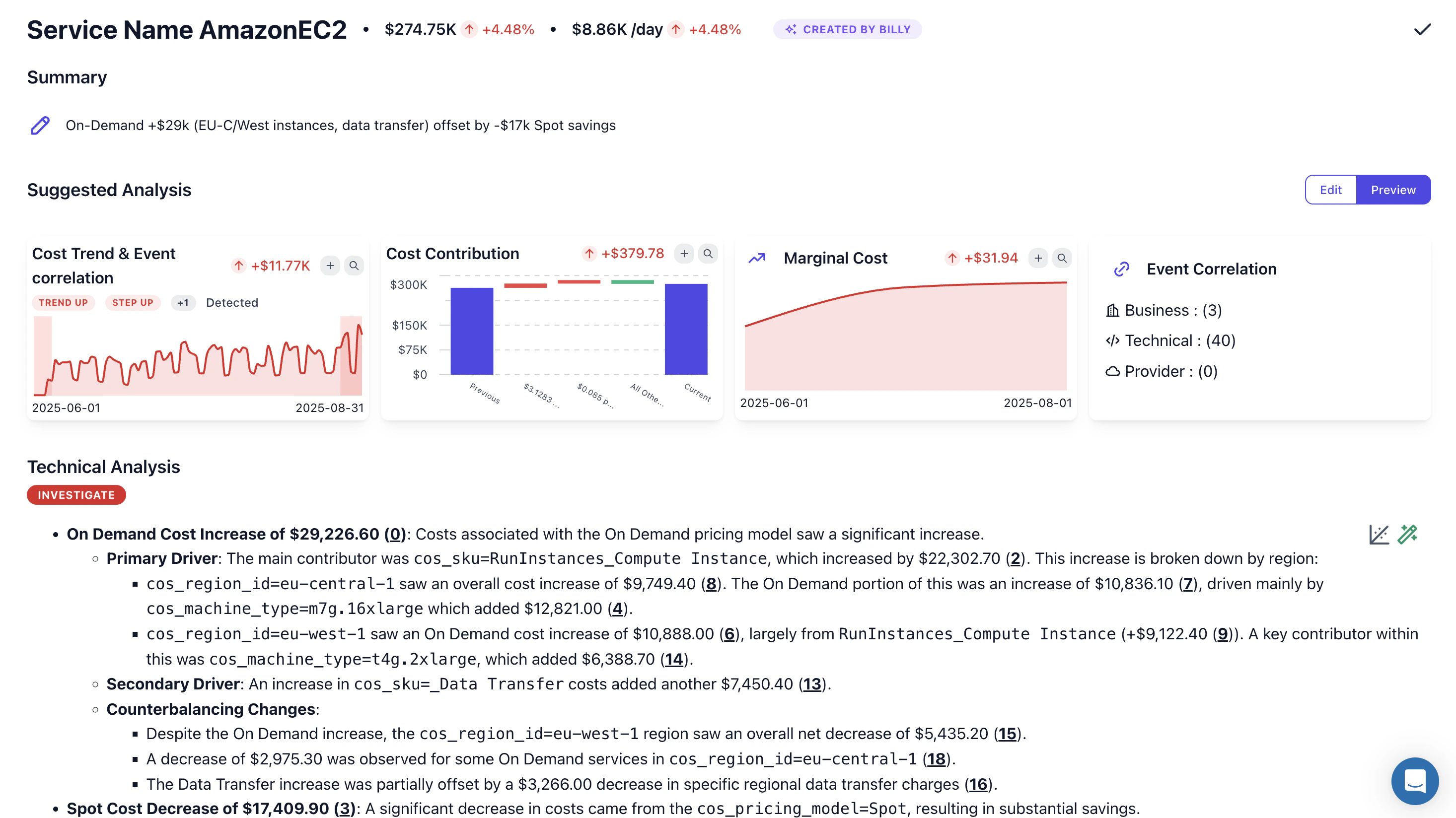
**Digests redesigned from the ground up** — a cleaner modal with badge-based organization. Collapse and expand sections as you review, with "Expand All" / "Collapse All" for quick navigation. **Compare periods side by side** with current month in solid blue and previous in dashed gray, with percentage changes in tooltips.
## Digests Redesigned
**Digests redesigned from the ground up** — a cleaner modal with badge-based organization. Collapse and expand sections as you review, with "Expand All" / "Collapse All" for quick navigation. **Compare periods side by side** with current month in solid blue and previous in dashed gray, with percentage changes in tooltips.
 ## Datadog Billing & Events in Saved Views
**Datadog billing integration** — track observability costs alongside cloud infrastructure with a setup wizard supporting both US and EU instances.
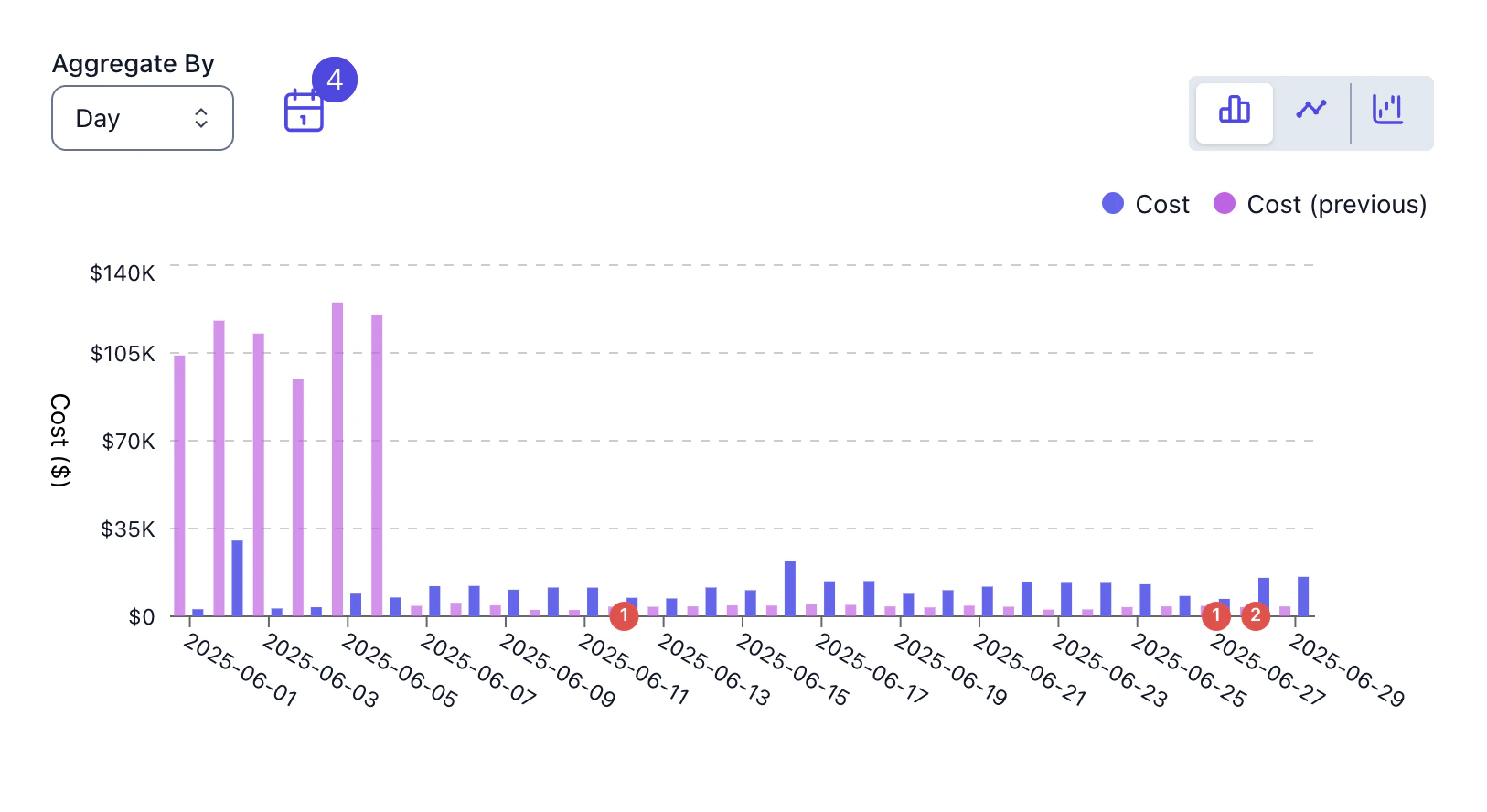
**[Events](/setup/events) in saved views** — bookmark deployments, incidents, and releases to have them automatically appear on relevant dashboards. Event filters now save with your views.
## Datadog Billing & Events in Saved Views
**Datadog billing integration** — track observability costs alongside cloud infrastructure with a setup wizard supporting both US and EU instances.
**[Events](/setup/events) in saved views** — bookmark deployments, incidents, and releases to have them automatically appear on relevant dashboards. Event filters now save with your views.
 ## Billy Investigates Your Cost Spikes
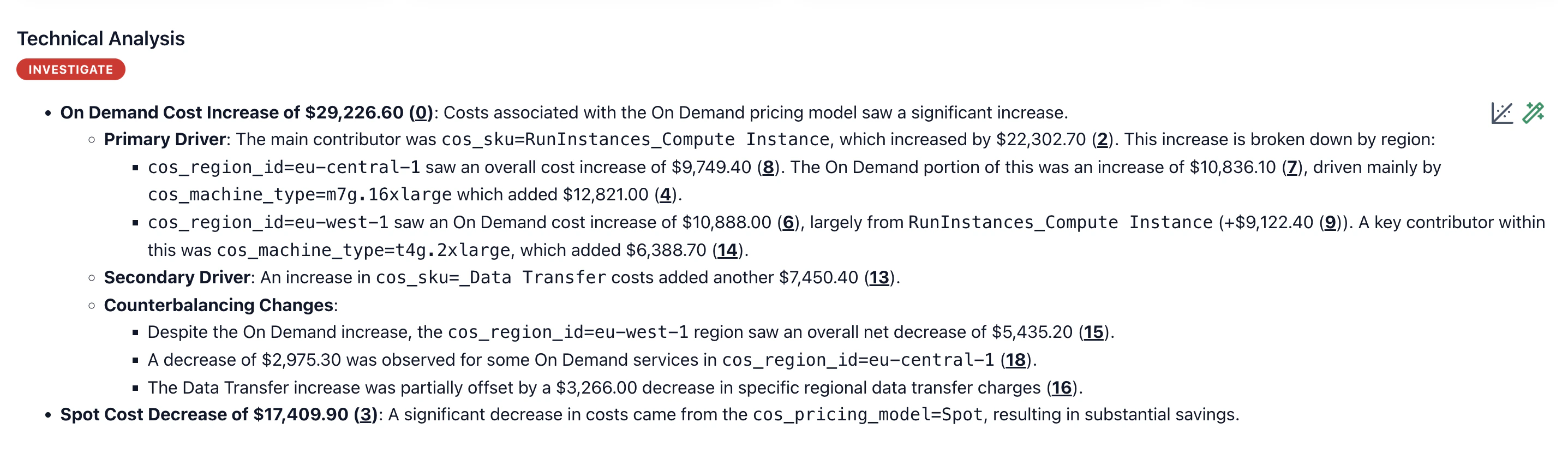
When Costory detects unusual spending, Billy automatically analyzes the spike and identifies contributing factors — within minutes. The analysis appears directly in your digest and respects your exclusion filters, so you only see what matters.
## Billy Investigates Your Cost Spikes
When Costory detects unusual spending, Billy automatically analyzes the spike and identifies contributing factors — within minutes. The analysis appears directly in your digest and respects your exclusion filters, so you only see what matters.
 ## Modern Group By & Events from Anywhere
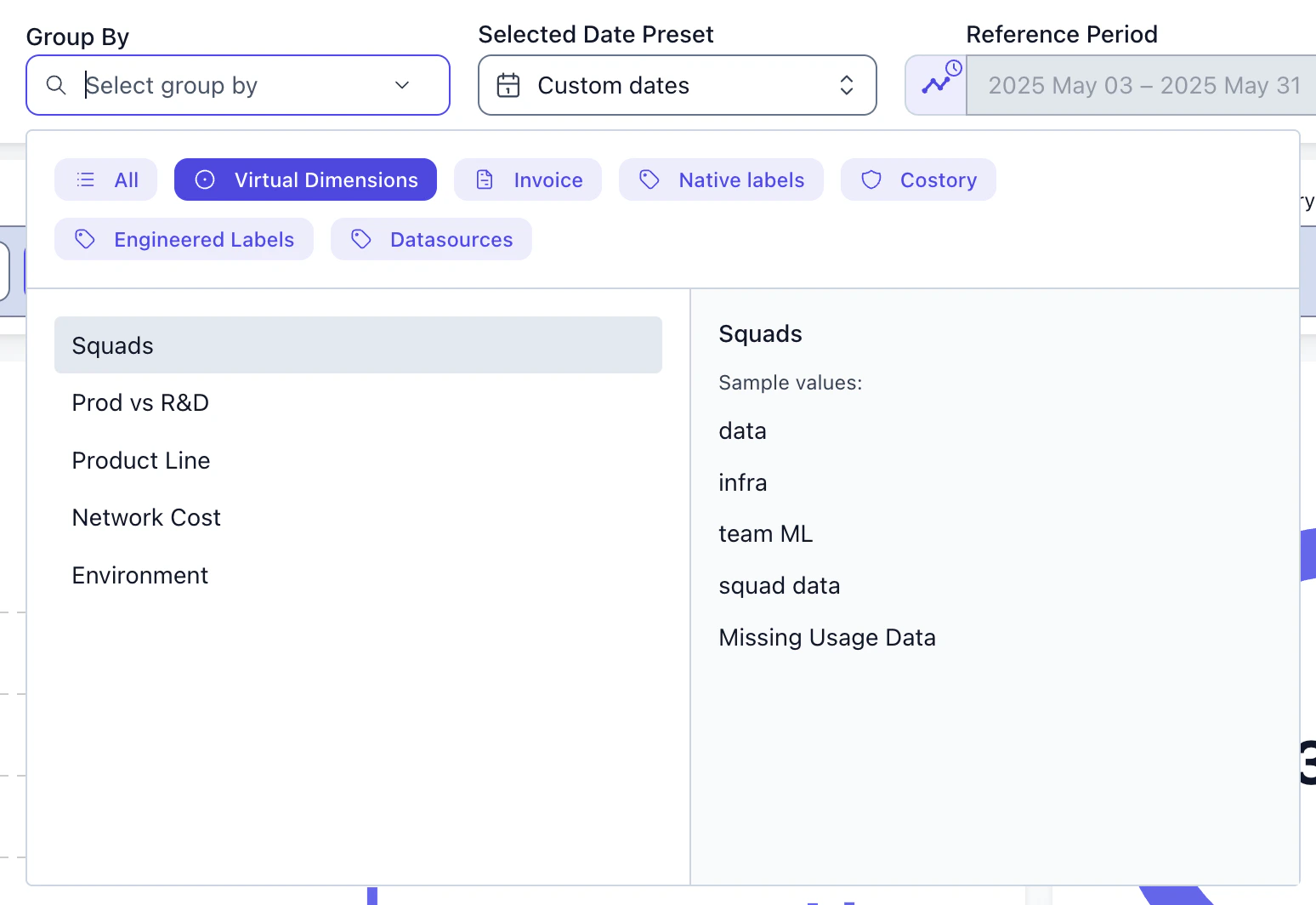
The redesigned **group by** widget uses color-coded pills for different dimension categories (Infrastructure, Applications, etc.). Search finds dimensions by their actual values, not just names — searching "prod" finds dimensions containing "production" values. Full keyboard navigation makes exploration fast.
## Modern Group By & Events from Anywhere
The redesigned **group by** widget uses color-coded pills for different dimension categories (Infrastructure, Applications, etc.). Search finds dimensions by their actual values, not just names — searching "prod" finds dimensions containing "production" values. Full keyboard navigation makes exploration fast.
 **[Events](/setup/events) from anywhere** — create events via public API from CI/CD pipelines, monitoring tools, or ticketing systems. Track AWS price changes, Reserved Instance purchases, and Savings Plan commitments automatically. GitHub integration monitors pull request merges, repository creation, and releases.
## AI Suggests the Dimensions That Matter
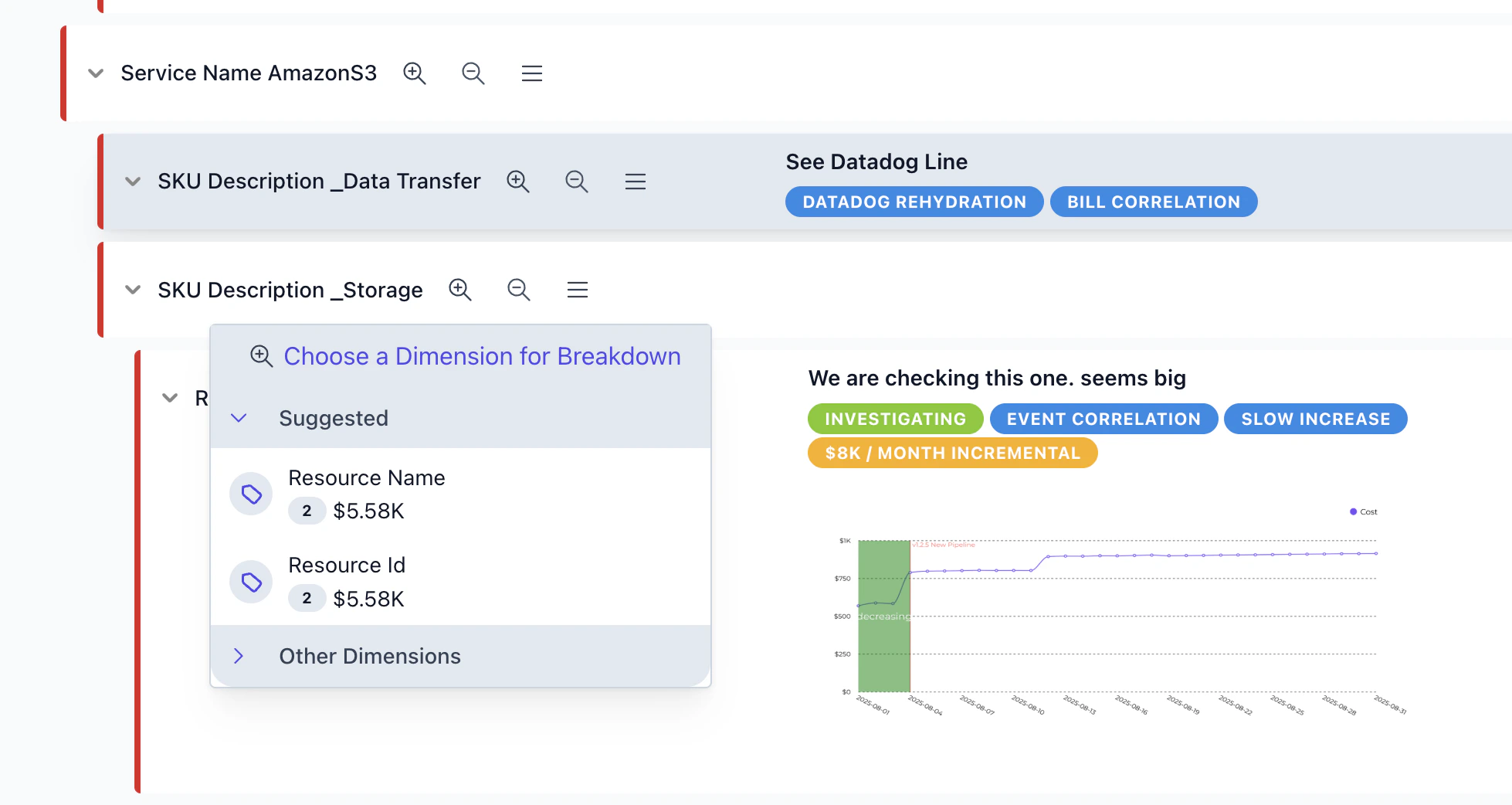
Billy now analyzes your data and suggests the most relevant dimensions to group by. The **suggested axes** feature scores dimensions by impact, showing which ones have the highest explanatory power. A sparkle icon marks suggestions, and you can auto-select them for instant insights.
**[Events](/setup/events) from anywhere** — create events via public API from CI/CD pipelines, monitoring tools, or ticketing systems. Track AWS price changes, Reserved Instance purchases, and Savings Plan commitments automatically. GitHub integration monitors pull request merges, repository creation, and releases.
## AI Suggests the Dimensions That Matter
Billy now analyzes your data and suggests the most relevant dimensions to group by. The **suggested axes** feature scores dimensions by impact, showing which ones have the highest explanatory power. A sparkle icon marks suggestions, and you can auto-select them for instant insights.
 ## Confluent Cloud, Split Costs & Integration Improvements
**Confluent Cloud billing** with automated BigQuery sync and historical data import. Datadog metrics got centralized configuration with faster previews. Custom BigQuery mappings now support 40+ fields.
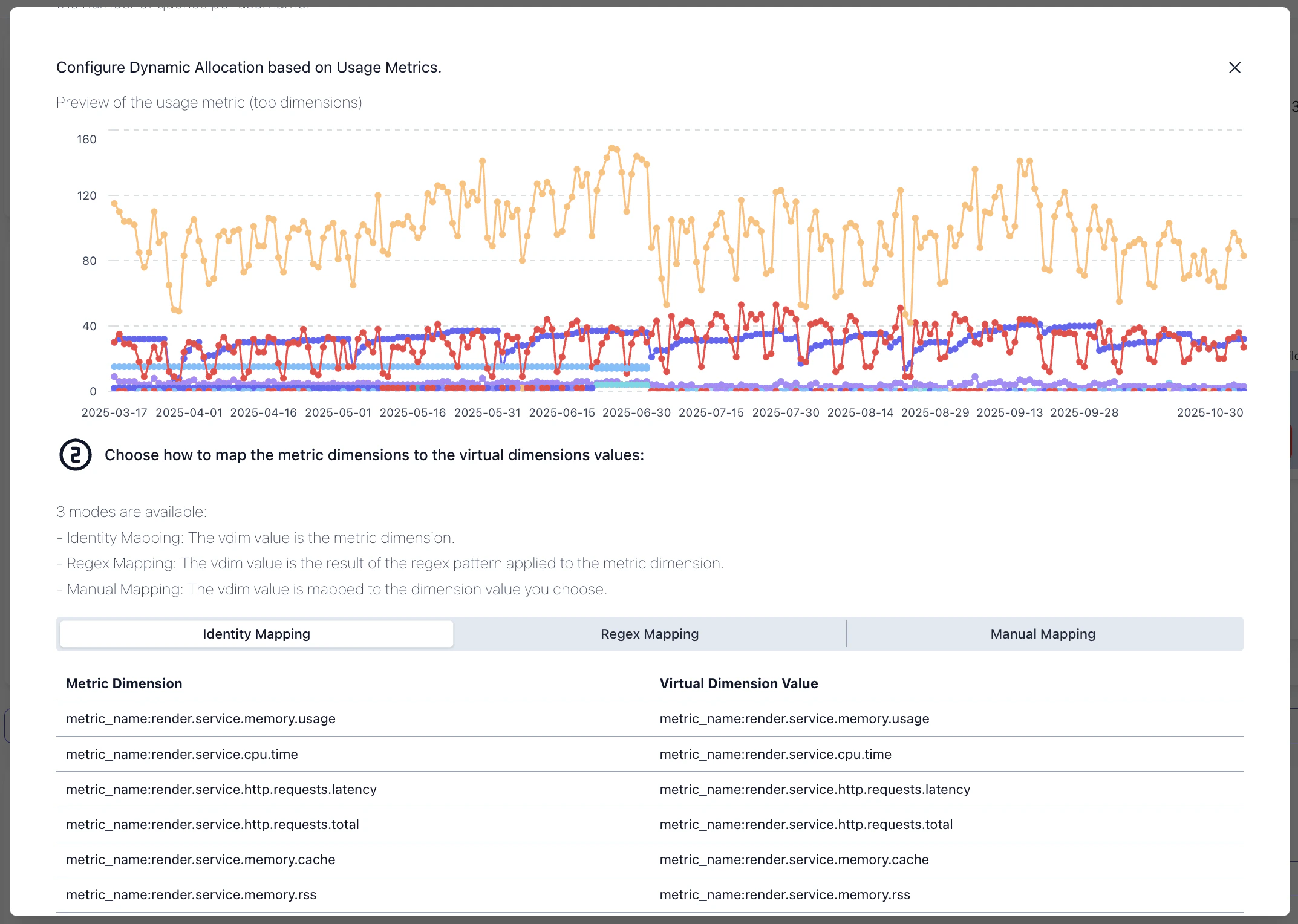
**[Split costs](/use-cases/allocate_shared_cloud_sql_database/allocate) by actual usage** — allocate shared costs based on telemetry from Datadog, CSV, Google Sheets, AWS, or CI visibility metrics. Map cost centers to usage metrics with visual previews showing top consumers over time.
## Confluent Cloud, Split Costs & Integration Improvements
**Confluent Cloud billing** with automated BigQuery sync and historical data import. Datadog metrics got centralized configuration with faster previews. Custom BigQuery mappings now support 40+ fields.
**[Split costs](/use-cases/allocate_shared_cloud_sql_database/allocate) by actual usage** — allocate shared costs based on telemetry from Datadog, CSV, Google Sheets, AWS, or CI visibility metrics. Map cost centers to usage metrics with visual previews showing top consumers over time.
 ## Track Costs Alongside Deployments, Incidents, and Releases
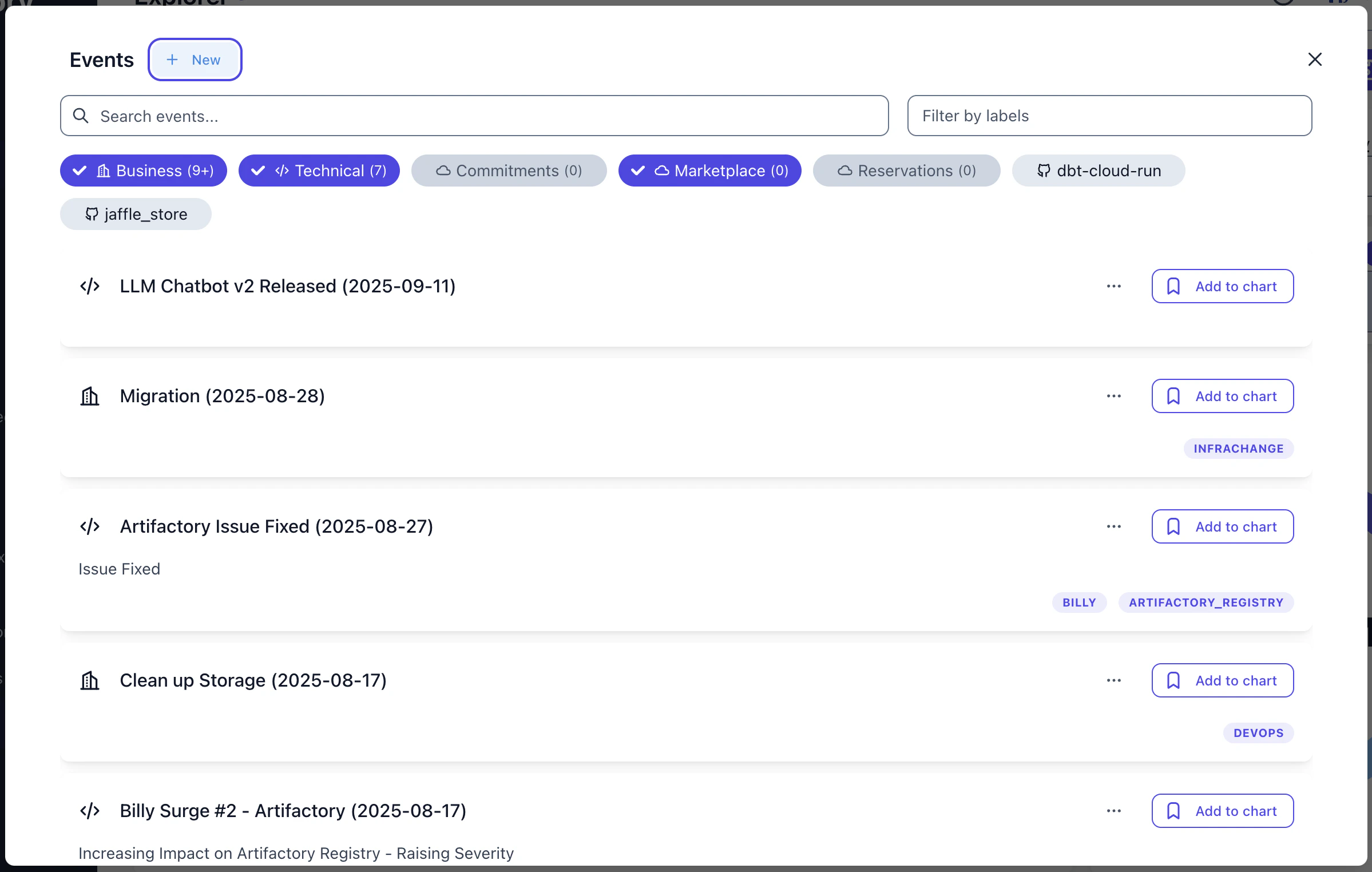
Track deployments, incidents, and releases directly on your cost charts. [Events](/setup/events) appear as visual markers on timelines, letting you instantly correlate cost spikes with real-world changes. Organize events into **BUSINESS**, **TECHNICAL**, and **PROVIDER** categories with reusable labels across your organization.
## Track Costs Alongside Deployments, Incidents, and Releases
Track deployments, incidents, and releases directly on your cost charts. [Events](/setup/events) appear as visual markers on timelines, letting you instantly correlate cost spikes with real-world changes. Organize events into **BUSINESS**, **TECHNICAL**, and **PROVIDER** categories with reusable labels across your organization.
 ## Introducing the Costory Digest
Engineering teams shouldn't have to dig through dashboards every month to figure out what changed. The [Costory Digest](/features/digest) does the work for you — it automatically analyzes your cloud costs, identifies the biggest movers, and delivers a clear summary straight to [Slack](/features/slack-reports) on your schedule.
## Introducing the Costory Digest
Engineering teams shouldn't have to dig through dashboards every month to figure out what changed. The [Costory Digest](/features/digest) does the work for you — it automatically analyzes your cloud costs, identifies the biggest movers, and delivers a clear summary straight to [Slack](/features/slack-reports) on your schedule.
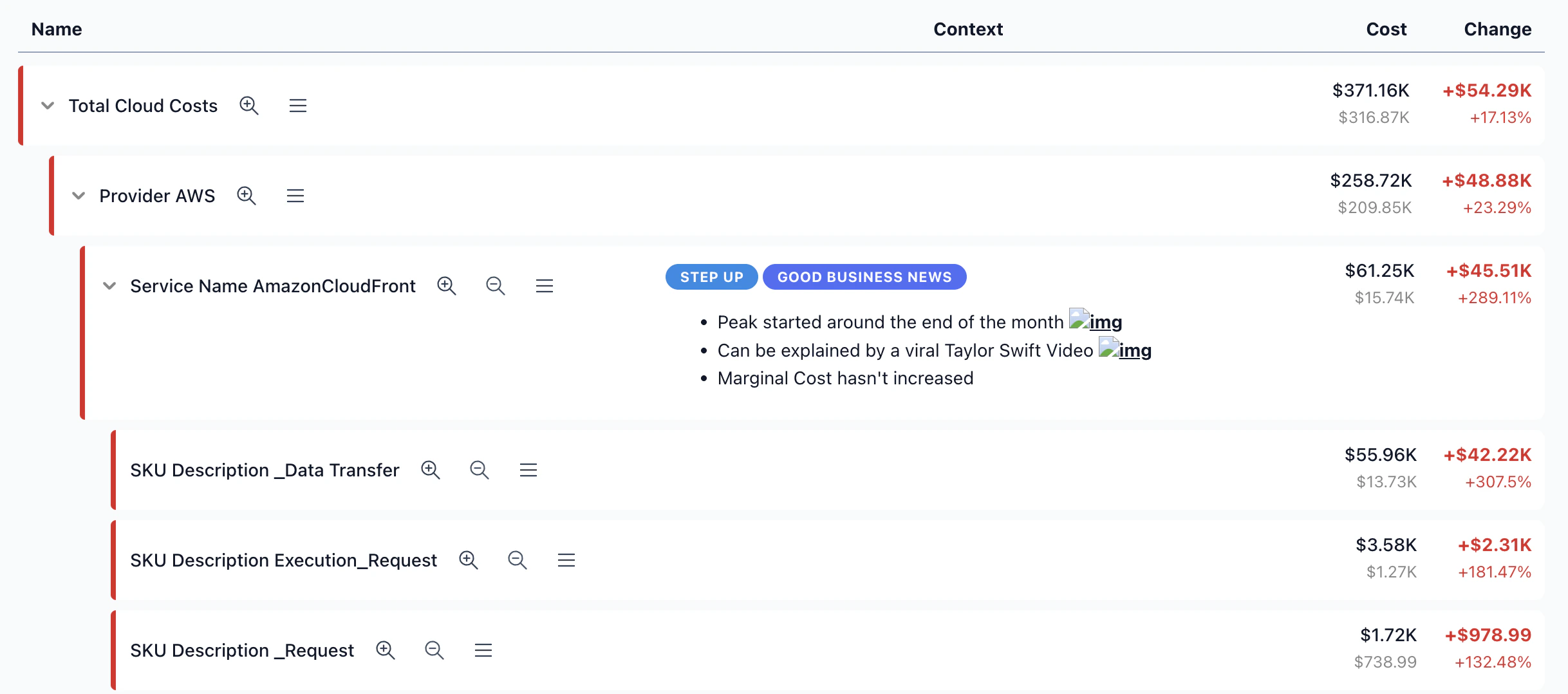 * **Configurable scope** — choose the time period, group-by dimensions, and filters to match what matters to your team
* **Interactive charts** with trend lines that highlight cost movements at a glance
* **"Others" rollup** so smaller line items don't clutter the picture
* **Drawer view** for quick exploration without leaving your workflow
* **Scheduled delivery to Slack** so your Monday morning standups always start with the full picture
* **Configurable scope** — choose the time period, group-by dimensions, and filters to match what matters to your team
* **Interactive charts** with trend lines that highlight cost movements at a glance
* **"Others" rollup** so smaller line items don't clutter the picture
* **Drawer view** for quick exploration without leaving your workflow
* **Scheduled delivery to Slack** so your Monday morning standups always start with the full picture