> ## Documentation Index
> Fetch the complete documentation index at: https://docs.costory.io/llms.txt
> Use this file to discover all available pages before exploring further.
# Explorer
> Use Costory Explorer to query AWS, GCP, and Azure costs with filters, group-bys, comparison periods, and saved context before turning the result into dashboards, alerts, reports, or MCP prompts.
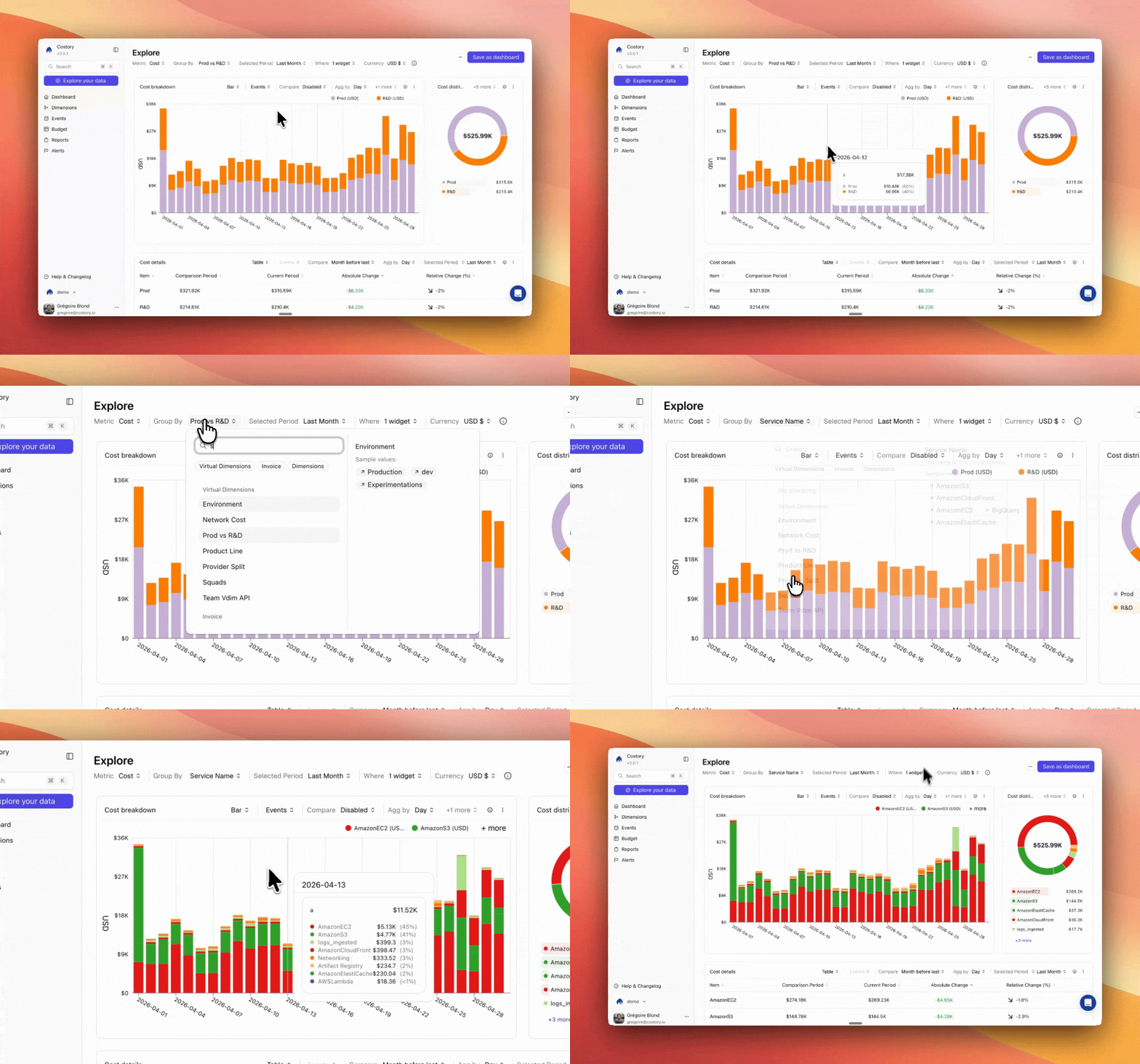
**Explorer** is the interactive workspace for answering cloud cost questions. Use it when you need to narrow a cost issue with a `Where` clause, group spend by the right dimension, compare periods, and decide what should happen next.
 ## Overview
Explorer is built for investigation. You start with a cost question, refine the query, and use the result as context for another workflow.
Most teams use Explorer to:
* Identify which service, account, region, team, resource, or [dimension](/features/tagging/dimensions) explains a cost change
* Compare the selected period with a reference period to understand absolute and relative movement
* Combine cost metrics, usage metrics, and formulas for unit economics analysis
* Save the query as a dashboard widget, alert, report, or context for the [FinOps MCP](/features/mcp)
## Build a cost query
The query bar controls what data Explorer returns.
| Control | What it does |
| -------------- | ---------------------------------------------------------------------------------------------------------------------------------------------------------------------------------------------------------------------------------------------------------------------------------------------------------------------------------------------------------- |
| **Metric** | Select total cost, Contracted Cost, list cost, usage metrics, budgets, or formulas. |
| **Group by** | Break costs down by provider, service, account, region, tag, imported dimension, or [virtual dimension](/features/tagging/dimensions#virtual-dimensions). |
| **Date range** | Set the analysis period and aggregation granularity. |
| **Compare** | Add a reference period so each result shows absolute and percentage change. |
| **Where** | Filter the query to a specific scope. Combine conditions with `AND` or `OR`, or use `Not` to exclude values. |
Use **Scopes** in the top toolbar to apply a saved team, environment, or business-unit filter without rebuilding the `Where` clause.
## What to do with the result
Explorer is often the starting point for a recurring workflow.
Turn a useful query into a persistent dashboard widget.
Monitor the same cost surface and notify owners when a condition is met.
Send a recurring snapshot to Slack, Microsoft Teams, or email.
Copy the query context into Claude, Cursor, VS Code, or Dust through the FinOps MCP.
## Frequently asked questions
Explorer supports [AWS](/setup/billing/aws), [GCP](/setup/billing/gcp), and [Azure](/setup/billing/azure). Costory normalizes billing data so you can query providers together or filter to one provider for native tags and resource-level fields.
Yes. Save the query as a dashboard widget when you want a recurring view, or use it as the basis for an alert or scheduled Cost Report.
Yes. Add [usage metrics](/setup/usage-metrics) and formulas in Explorer to calculate ratios such as cost per user or cost per transaction. See [Unit Economics](/features/unit-economics) for the full workflow.
Costory processes cloud billing data daily, typically within 24 hours of your cloud provider publishing it. See [Data Refresh](/docs/data-refresh) for details.
## Related links
Build persistent views from Explorer queries.
Add metrics and formulas to cost analysis.
Query Costory data and create FinOps workflows from an AI assistant.
Deliver recurring cost snapshots to Slack, Teams, or email.
## Overview
Explorer is built for investigation. You start with a cost question, refine the query, and use the result as context for another workflow.
Most teams use Explorer to:
* Identify which service, account, region, team, resource, or [dimension](/features/tagging/dimensions) explains a cost change
* Compare the selected period with a reference period to understand absolute and relative movement
* Combine cost metrics, usage metrics, and formulas for unit economics analysis
* Save the query as a dashboard widget, alert, report, or context for the [FinOps MCP](/features/mcp)
## Build a cost query
The query bar controls what data Explorer returns.
| Control | What it does |
| -------------- | ---------------------------------------------------------------------------------------------------------------------------------------------------------------------------------------------------------------------------------------------------------------------------------------------------------------------------------------------------------- |
| **Metric** | Select total cost, Contracted Cost, list cost, usage metrics, budgets, or formulas. |
| **Group by** | Break costs down by provider, service, account, region, tag, imported dimension, or [virtual dimension](/features/tagging/dimensions#virtual-dimensions). |
| **Date range** | Set the analysis period and aggregation granularity. |
| **Compare** | Add a reference period so each result shows absolute and percentage change. |
| **Where** | Filter the query to a specific scope. Combine conditions with `AND` or `OR`, or use `Not` to exclude values. |
Use **Scopes** in the top toolbar to apply a saved team, environment, or business-unit filter without rebuilding the `Where` clause.
## What to do with the result
Explorer is often the starting point for a recurring workflow.
Turn a useful query into a persistent dashboard widget.
Monitor the same cost surface and notify owners when a condition is met.
Send a recurring snapshot to Slack, Microsoft Teams, or email.
Copy the query context into Claude, Cursor, VS Code, or Dust through the FinOps MCP.
## Frequently asked questions
Explorer supports [AWS](/setup/billing/aws), [GCP](/setup/billing/gcp), and [Azure](/setup/billing/azure). Costory normalizes billing data so you can query providers together or filter to one provider for native tags and resource-level fields.
Yes. Save the query as a dashboard widget when you want a recurring view, or use it as the basis for an alert or scheduled Cost Report.
Yes. Add [usage metrics](/setup/usage-metrics) and formulas in Explorer to calculate ratios such as cost per user or cost per transaction. See [Unit Economics](/features/unit-economics) for the full workflow.
Costory processes cloud billing data daily, typically within 24 hours of your cloud provider publishing it. See [Data Refresh](/docs/data-refresh) for details.
## Related links
Build persistent views from Explorer queries.
Add metrics and formulas to cost analysis.
Query Costory data and create FinOps workflows from an AI assistant.
Deliver recurring cost snapshots to Slack, Teams, or email.