> ## Documentation Index
> Fetch the complete documentation index at: https://docs.costory.io/llms.txt
> Use this file to discover all available pages before exploring further.
# Quick Share
> Share a Costory dashboard or dashboard widget with a public link for ad-hoc cloud cost collaboration in Slack, Microsoft Teams, pull requests, or incident threads.
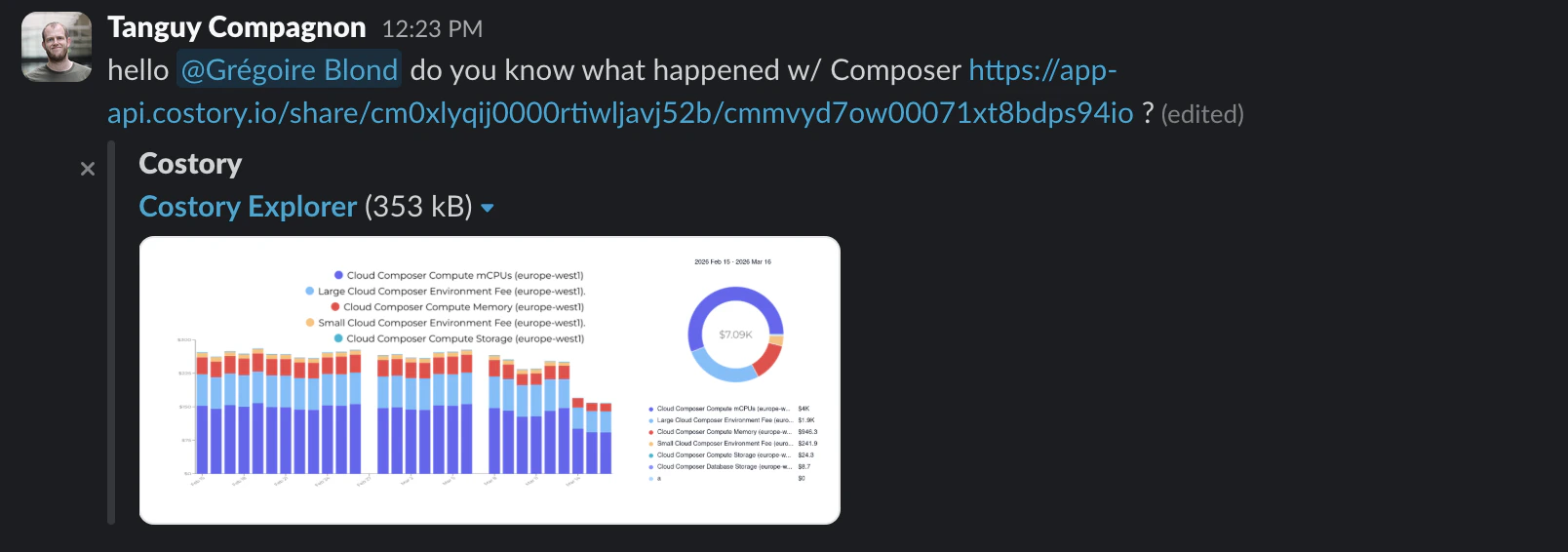
**Quick Share** creates a link for ad-hoc collaboration around a dashboard or dashboard widget. Use it when someone needs to see the exact cost context behind a discussion without building the dashboard in their own workspace.
 ## When to use Quick Share
Use Quick Share for short-lived collaboration:
* Send a dashboard widget to a teammate during a cost investigation
* Add cost context to a Slack or Microsoft Teams thread
* Link the cost impact of a change in a pull request
* Hand off a dashboard view to an on-call engineer during incident triage
* Share a budget or migration review snapshot with stakeholders who do not need recurring delivery
For recurring delivery, use [Cost Reports](/features/slack-reports). For ongoing monitoring, keep the view on a [dashboard](/features/dashboards).
## Share dashboard context
Navigate to the dashboard or widget you want to share.
Confirm the dashboard filters, widget filters, date range, comparison period, and event context are safe to share.
Click **Quick Share** or use the sharing action from the widget menu.
Paste the link in Slack, Microsoft Teams, a pull request, an incident thread, or email.
## When to use Quick Share
Use Quick Share for short-lived collaboration:
* Send a dashboard widget to a teammate during a cost investigation
* Add cost context to a Slack or Microsoft Teams thread
* Link the cost impact of a change in a pull request
* Hand off a dashboard view to an on-call engineer during incident triage
* Share a budget or migration review snapshot with stakeholders who do not need recurring delivery
For recurring delivery, use [Cost Reports](/features/slack-reports). For ongoing monitoring, keep the view on a [dashboard](/features/dashboards).
## Share dashboard context
Navigate to the dashboard or widget you want to share.
Confirm the dashboard filters, widget filters, date range, comparison period, and event context are safe to share.
Click **Quick Share** or use the sharing action from the widget menu.
Paste the link in Slack, Microsoft Teams, a pull request, an incident thread, or email.
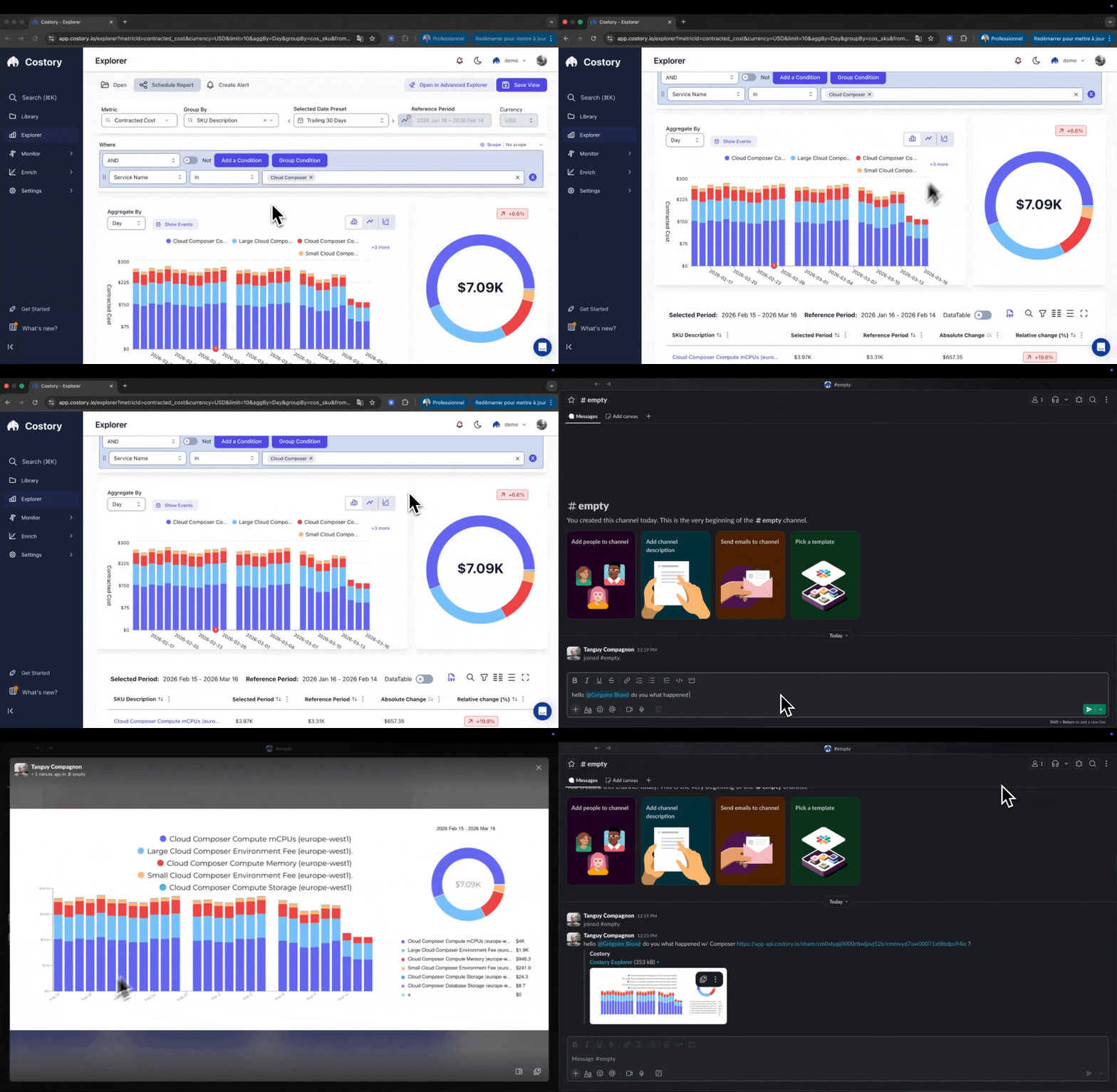 The shared link is read-only. Recipients can review the cost context without changing the original dashboard or widget.
## Quick Share compared with other sharing options
| Method | Best for |
| --------------------------------------- | ----------------------------------------------------------------- |
| Quick Share | Short-lived collaboration around a dashboard or widget |
| Dashboard URL | Internal Costory users who need ongoing access |
| [Cost Reports](/features/slack-reports) | Recurring snapshots to Slack, Microsoft Teams, or email |
| [Digest](/features/digest) | Automated cost-change summaries and AI-generated incident reports |
## Security and privacy
Quick Share links are publicly accessible URLs. Anyone with the link can view the shared cost context without logging in to Costory.
Review the dashboard or widget before sharing. Viewers see the cost data according to your permissions at the time you create the link.
* Shared links expire after 90 days.
* Recipients cannot modify the original dashboard or widget.
* Treat shared links like public document links.
## Frequently asked questions
Yes. Quick Share links are publicly accessible, so anyone with the URL can view the shared cost context until the link expires.
No. Quick Share is read-only for recipients and does not modify the original dashboard or widget.
Shared links cannot be revoked manually today. They expire automatically after 90 days. If you shared sensitive data by mistake, contact support.
## Related links
Build the dashboard or widget you want to share.
Create dashboards from Explorer or an empty canvas.
Schedule recurring cost snapshots to Slack, Teams, or email.
Share automated cost-change analysis.
The shared link is read-only. Recipients can review the cost context without changing the original dashboard or widget.
## Quick Share compared with other sharing options
| Method | Best for |
| --------------------------------------- | ----------------------------------------------------------------- |
| Quick Share | Short-lived collaboration around a dashboard or widget |
| Dashboard URL | Internal Costory users who need ongoing access |
| [Cost Reports](/features/slack-reports) | Recurring snapshots to Slack, Microsoft Teams, or email |
| [Digest](/features/digest) | Automated cost-change summaries and AI-generated incident reports |
## Security and privacy
Quick Share links are publicly accessible URLs. Anyone with the link can view the shared cost context without logging in to Costory.
Review the dashboard or widget before sharing. Viewers see the cost data according to your permissions at the time you create the link.
* Shared links expire after 90 days.
* Recipients cannot modify the original dashboard or widget.
* Treat shared links like public document links.
## Frequently asked questions
Yes. Quick Share links are publicly accessible, so anyone with the URL can view the shared cost context until the link expires.
No. Quick Share is read-only for recipients and does not modify the original dashboard or widget.
Shared links cannot be revoked manually today. They expire automatically after 90 days. If you shared sensitive data by mistake, contact support.
## Related links
Build the dashboard or widget you want to share.
Create dashboards from Explorer or an empty canvas.
Schedule recurring cost snapshots to Slack, Teams, or email.
Share automated cost-change analysis.