> ## Documentation Index
> Fetch the complete documentation index at: https://docs.costory.io/llms.txt
> Use this file to discover all available pages before exploring further.
# FinOps MCP: Cloud Cost Automation for AI Assistants
> Use the Costory FinOps MCP to query AWS, GCP, and Azure spend from Claude, Cursor, or VS Code. Investigate cost spikes, create alerts, and send Cost Reports via Model Context Protocol.
Connect the Costory FinOps MCP to Claude, Cursor, VS Code, or Dust and ask cost questions in chat instead of rebuilding queries in the billing console. Once your [billing data is connected](/get-started/welcome), the assistant calls structured MCP tools against normalized, allocated spend in your Costory workspace.
## What is a FinOps MCP?
A **FinOps MCP** is a [Model Context Protocol](https://modelcontextprotocol.io) server that exposes cloud billing, allocation, and automation tools to AI assistants. Instead of pasting CUR exports into chat, the assistant calls tools like `query`, `create_alert`, and `create_report` against live data.
Costory FinOps MCP adds workspace context on top of raw provider billing: Dimensions, Event Correlation, dashboards, alerts, and saved views.
| | Raw provider billing MCP | Costory FinOps MCP |
| -------------------- | ---------------------------------- | -------------------------------------------------------- |
| Data shape | Provider-native line items | Normalized, allocated spend across AWS, GCP, Azure, SaaS |
| Scope filters | Account, service, tag (if tagged) | Team, product, environment via dimensions |
| Explain cost changes | Billing deltas only | Cost diffs + deploys, metrics, and custom events |
| Actions from chat | Query only | Alerts, reports, dashboards, event annotations |
| Setup | IAM roles, local server, or Docker | One URL + OAuth |
## Add Costory MCP to your Cursor / Claude / Dust
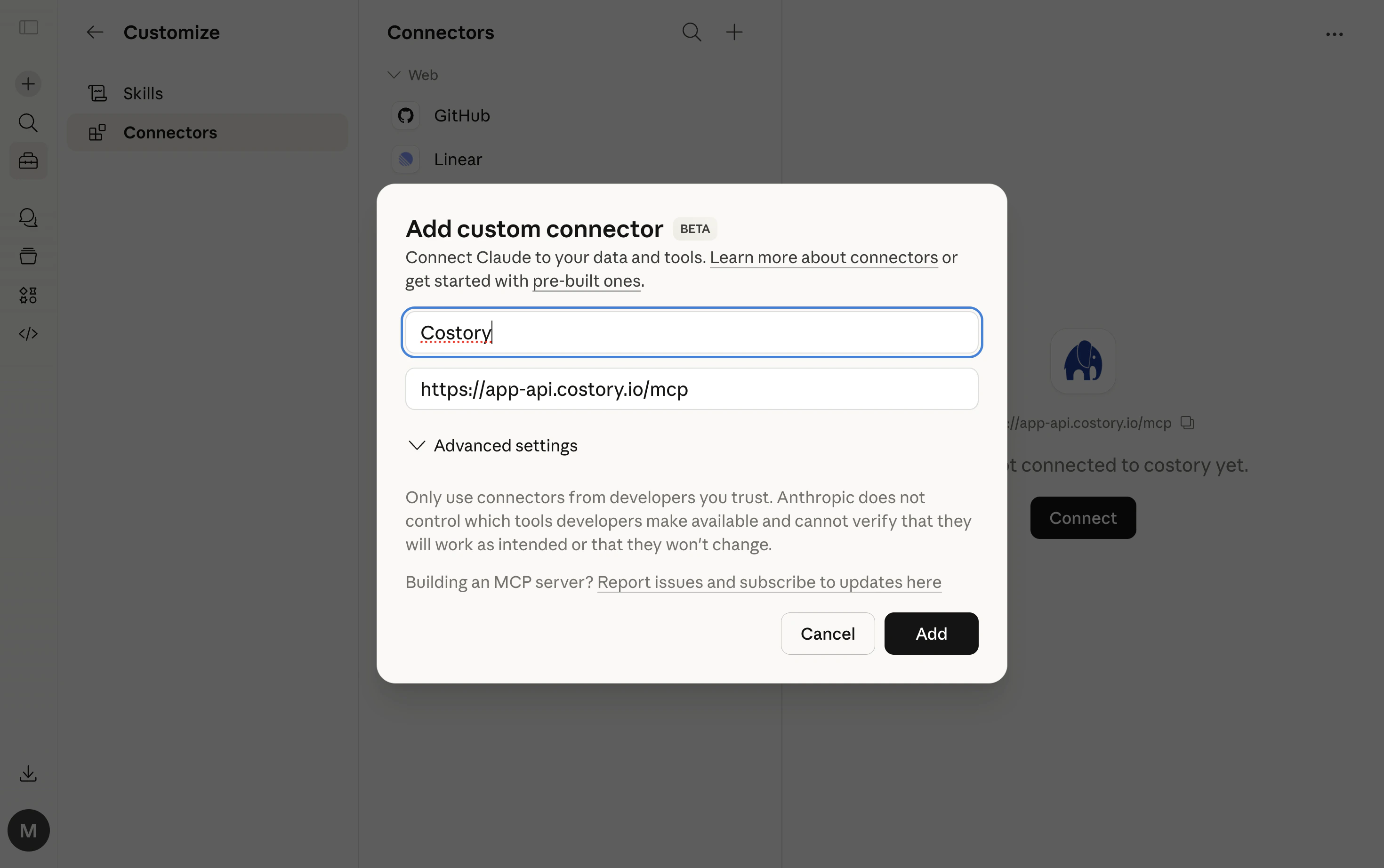
Claude Desktop supports MCP connectors natively. No local server or Node.js required.
1. Open Claude Desktop settings
2. Go to **Connectors**
3. Click **Add custom connector**
4. Enter **Costory** as the name and `https://app-api.costory.io/mcp` as the URL
5. Click **Add**, then **Connect**
6. A browser window will open. Log in with your Costory account
7. Start asking about your costs
You can also add the server via the developer config file (**Developer** > **Edit Config**). This method requires [Node.js](https://nodejs.org/):
```json theme={null}
{
"mcpServers": {
"costory": {
"command": "npx",
"args": ["-y", "mcp-remote", "https://app-api.costory.io/mcp"]
}
}
}
```
Claude Code connects natively over HTTP with OAuth. No `npx` or Node.js required.
Run this in your terminal:
```bash theme={null}
claude mcp add --transport http costory https://app-api.costory.io/mcp
```
Then inside Claude Code, run `/mcp` and select **Authenticate**. A browser window will open for you to log in with your Costory account.
For built-in FinOps skills and the Claude Code marketplace plugin, see the [costory-plugin repository](https://github.com/costory-io/costory-plugin).
You can also add the server directly to your project's `.mcp.json`:
```json theme={null}
{
"mcpServers": {
"costory": {
"type": "http",
"url": "https://app-api.costory.io/mcp"
}
}
}
```
Add to your `.vscode/mcp.json`:
```json theme={null}
{
"servers": {
"costory": {
"type": "http",
"url": "https://app-api.costory.io/mcp"
}
}
}
```
If the native HTTP connection doesn't work, you can use the `mcp-remote` bridge instead (requires [Node.js](https://nodejs.org/)):
```json theme={null}
{
"servers": {
"costory": {
"command": "npx",
"args": ["-y", "mcp-remote", "https://app-api.costory.io/mcp"]
}
}
}
```
Add to your Cursor MCP settings:
```json theme={null}
{
"mcpServers": {
"costory": {
"type": "http",
"url": "https://app-api.costory.io/mcp"
}
}
}
```
If the native HTTP connection doesn't work, you can use the `mcp-remote` bridge instead (requires [Node.js](https://nodejs.org/)):
```json theme={null}
{
"mcpServers": {
"costory": {
"command": "npx",
"args": ["-y", "mcp-remote", "https://app-api.costory.io/mcp"]
}
}
}
```
Dust supports remote MCP servers from the **Spaces** > **Tools** catalog.
1. In Dust, open **Spaces** > **Tools**.
2. Click **Add Tool**.
3. Click **Add MCP Server**.
4. Enter `https://app-api.costory.io/mcp` as the server URL.
5. Select **Automatic** authentication.
6. Complete the OAuth login flow with your Costory account.
7. Add the synced Costory tool to the Space where your agent runs.
8. Ask your cost questions in Dust.
On first connection, a browser window will open for you to log in with your Costory account. The `mcp-remote` fallback requires [Node.js](https://nodejs.org/) to be installed.
## Example FinOps prompts
### Explore costs
Ask questions in natural language and the assistant will query your cost data:
* *"How much is the platform team spending on compute this month?"*
* *"Show me infrastructure costs for the recommendations API, broken down by service"*
* *"What's our total AI spend across Anthropic, OpenAI, and Bedrock?"*
* *"How much are we spending on storage?"*
### Compare periods
Understand how costs have changed over time:
* *"What's driving the cost increase on our data pipeline this week? Any related deploys or traffic changes?"*
* *"Did the March 15th release affect our search service costs?"*
* *"Compare this week's spend to last week for the data squad"*
* *"How have our compute costs changed compared to last month?"*
### Find information
Search across your entire Costory workspace:
* *"Find the saved view for the data team's Kubernetes costs"*
* *"What dashboards do we have for AI spend across providers?"*
* *"Show me alert history related to BigQuery pipelines"*
### Get recommendations
The assistant can suggest what to look at:
* *"What dimension should I group by to explain the billing-api cost spike?"*
* *"Based on deploy and metric history, what should I investigate next on the data pipeline increase?"*
### Take action
Go beyond analysis. Create views, alerts, events, and share reports:
* *"Save this query as a view called 'Recommendations API Infra Cost'"*
* *"Set up an alert if platform team compute costs go above \$10,000 this month"*
* *"Log an event: deployed billing-api v2 on March 15th"*
* *"Send this cross-provider AI cost report to the #finops Slack channel"*
## FinOps MCP workflows
Each workflow below shows a natural-language prompt, the MCP tools the assistant calls, and the JSON payload shape. These examples are specific to Costory workspace context. For plugin install and additional reference examples, see the [costory-plugin repository](https://github.com/costory-io/costory-plugin).
**Prompt:** *"Did the March 15 billing-api deploy affect our API service costs? Compare the week before and after."*
**Tools:** `query` with period comparison, then `list_events` to pull deploy markers in the same window.
**Result:** A side-by-side cost breakdown by service plus a timeline of deploys that overlapped the spike.
**`query`**
```json theme={null}
{
"queries": [{
"type": "cost",
"name": "a",
"metricId": "cost",
"currency": "USD",
"filterCel": "cos_service_name in [\"AmazonECS\", \"AmazonEKS\"] && cos_feature == \"billing-api\""
}],
"from": "2026-03-08",
"to": "2026-03-21",
"compare": { "from": "2026-03-01", "to": "2026-03-07" },
"groupBy": "cos_service_name",
"aggBy": "DAY"
}
```
**`list_events`**
```json theme={null}
{
"from": "2026-03-08",
"to": "2026-03-21",
"tags": ["billing-api"]
}
```
**Prompt:** *"How much is the platform team spending on compute in production this month?"*
**Tools:** `query` with a `filterCel` scope built from your [dimensions](/features/tagging/dimensions).
**Result:** Monthly compute spend for the platform team in production, grouped by cloud service.
**`query`**
```json theme={null}
{
"queries": [{ "type": "cost", "name": "a", "metricId": "cost", "currency": "USD" }],
"from": "2026-03-01",
"to": "2026-03-31",
"filterCel": "cos_team == \"platform\" && cos_environment == \"production\" && cos_category == \"compute\"",
"groupBy": "cos_service_name"
}
```
**Prompt:** *"What is our cloud cost per DAU this month vs last month?"*
**Tools:** `list_metrics` to resolve the metric ID, then `query` with a `formula`.
**Result:** Unit cost trend with period-over-period comparison. See [Unit Economics](/features/unit-economics) for the same analysis in Explorer.
**`query`**
```json theme={null}
{
"queries": [
{ "type": "cost", "name": "cost", "metricId": "cost", "currency": "USD" },
{ "type": "metric", "name": "dau", "metricId": "your-metric-id" }
],
"formula": "cost / dau",
"from": "2026-03-01",
"to": "2026-03-31",
"compare": { "from": "2026-02-01", "to": "2026-02-28" }
}
```
**Prompt:** *"Something spiked on our data pipeline this week. What dimension should I split by?"*
**Tools:** `suggest_groupby`, then `query` using the recommended dimension.
**Result:** The assistant picks the most explanatory split (for example `cos_k8s_namespace` or `cos_service_name`) and drills down automatically.
**Step 1: `suggest_groupby`**
```json theme={null}
{
"from": "2026-03-17",
"to": "2026-03-24",
"filterCel": "cos_feature == \"etl-jobs\""
}
```
**Step 2: `query` (using the suggested dimension)**
```json theme={null}
{
"queries": [{ "type": "cost", "name": "a", "metricId": "cost", "currency": "USD" }],
"from": "2026-03-17",
"to": "2026-03-24",
"filterCel": "cos_feature == \"etl-jobs\"",
"groupBy": "cos_k8s_namespace",
"compare": { "from": "2026-03-10", "to": "2026-03-16" }
}
```
**Prompt:** *"Alert me if daily BigQuery costs exceed \$2,000, but only if it would have fired at least once in the last 45 days."*
**Tools:** `preview_alert` to backtest, then `create_alert` with the same condition. Resolve the Slack channel via `list_available_destinations`.
**Result:** A validated alert with historical firing days and a link to edit it in Costory. Requires [Slack integration](/setup/collaboration/slack).
**`preview_alert`**
```json theme={null}
{
"queries": [{
"type": "cost",
"name": "a",
"metricId": "cost",
"currency": "USD",
"filterCel": "cos_service_name in [\"BigQuery\"]"
}],
"condition": "a > 2000",
"dedup": { "kind": "CALENDAR", "calendarUnit": "DAY" },
"lookbackDays": 45
}
```
**`create_alert` (after preview passes)**
```json theme={null}
{
"name": "Daily BigQuery threshold",
"queries": [{
"type": "cost",
"name": "a",
"metricId": "cost",
"currency": "USD",
"filterCel": "cos_service_name in [\"BigQuery\"]"
}],
"from": "2026-03-01",
"to": "2026-03-31",
"condition": "a > 2000",
"dedup": { "kind": "CALENDAR", "calendarUnit": "DAY" },
"notificationChannel": "SLACK",
"slackChannelId": "YOUR_SLACK_CHANNEL_ID"
}
```
**Prompt:** *"Build a dashboard for the billing-api outage: daily cost by service, filtered to billing-api, last 30 days."*
**Tools:** `create_dashboard` with a scoped context and one or more widgets.
**Result:** A shareable dashboard URL your team can reuse after incidents or cost reviews.
**`create_dashboard`**
```json theme={null}
{
"name": "Billing API outage - March 2026",
"context": {
"metricId": "cost",
"currency": "USD",
"conditionsCel": "cos_feature == \"billing-api\"",
"from": "2026-02-24",
"to": "2026-03-25"
},
"widgets": [{
"type": "LINE",
"queries": [{ "type": "cost", "name": "a", "metricId": "cost", "currency": "USD" }],
"groupBy": "cos_service_name",
"extendDashboardConditions": true,
"aggBy": "DAY"
}]
}
```
## Example conversations
**You:** *"Why did our costs go up last week?"*
The assistant will:
1. Call `get_context` to load dimensions and recent dashboards
2. Run `query` with a week-over-week comparison
3. Call `list_events` for deploys and provider events in the same period
4. Highlight likely causes with a timeline of what changed first
5. Call `suggest_actions` for follow-ups (drill deeper, set up an alert, share to Slack)
**`query`**
```json theme={null}
{
"queries": [{ "type": "cost", "name": "a", "metricId": "cost", "currency": "USD" }],
"from": "2026-03-17",
"to": "2026-03-24",
"compare": { "from": "2026-03-10", "to": "2026-03-16" },
"groupBy": "cos_service_name",
"aggBy": "DAY"
}
```
**`list_events`**
```json theme={null}
{
"from": "2026-03-17",
"to": "2026-03-24"
}
```
**You:** *"What's our total AI spend across Anthropic, OpenAI, and Bedrock this month? Break it down by team and model."*
The assistant will:
1. Query AI-related spend across Anthropic, OpenAI, and AWS Bedrock
2. Combine results into one total with a provider-level breakdown
3. Break down the same spend by team and model
4. Offer to save the view or send the report to Slack
**`query`**
```json theme={null}
{
"queries": [{
"type": "cost",
"name": "a",
"metricId": "cost",
"currency": "USD",
"filterCel": "cos_provider in [\"Anthropic\", \"OpenAI\", \"AWS\"] && cos_category == \"ai\""
}],
"from": "2026-03-01",
"to": "2026-03-31",
"groupBy": "cos_team"
}
```
**You:** *"Show me our top 5 services by cost this month, then send it to #cloud-costs on Slack"*
The assistant will:
1. Query costs grouped by service for the current month
2. Schedule a report via `create_report`
3. Deliver a formatted chart to the Slack channel
**`create_report`**
```json theme={null}
{
"scheduledPeriod": "WEEKLY",
"widget": {
"type": "TOP_FLOP",
"queries": [{
"type": "cost",
"name": "a",
"metricId": "cost",
"currency": "USD",
"groupBy": "cos_service_name"
}],
"topN": 5,
"flopN": 0
},
"destinations": [{ "destinationType": "SLACK", "channelId": "YOUR_SLACK_CHANNEL_ID" }]
}
```
**You:** *"Create an alert if our daily compute costs go above \$5,000"*
The assistant will:
1. Run `preview_alert` to confirm the threshold would have fired recently
2. Create a cost alert with `create_alert`
3. Return a link to review and edit the alert in Costory
**`create_alert`**
```json theme={null}
{
"name": "Daily compute threshold",
"queries": [{
"type": "cost",
"name": "a",
"metricId": "cost",
"currency": "USD",
"filterCel": "cos_category == \"compute\""
}],
"from": "2026-03-01",
"to": "2026-03-31",
"condition": "a > 5000",
"dedup": { "kind": "CALENDAR", "calendarUnit": "DAY" },
"notificationChannel": "SLACK",
"slackChannelId": "YOUR_SLACK_CHANNEL_ID"
}
```
## Why Costory MCP?
Direct access to AWS CUR or a GCP MCP server gives you provider-native line items and dimensions. Costory MCP adds your Costory workspace context so you can ask higher-level cost questions and take action in the same flow.
* Query spend by team, product, or feature because dimensions and cost allocation are already modeled.
* Ask one question across AWS, GCP, Azure, Datadog, Anthropic, OpenAI, and Cursor instead of wiring and maintaining separate MCP servers per provider.
* Explain **why** costs moved by using Event Correlation with deploys, Datadog metrics, and provider events in the same investigation.
* Continue from saved views, dashboards, team structures, alert history, and prior investigations so your assistant has persistent workspace context.
* Connect with one URL and OAuth (no IAM credentials, Docker, or local server setup), and use it in Claude, Cursor, VS Code, or Claude Code.
* Take action directly from chat by creating alerts, saving views, logging events, and sending Cost Reports.
* Use pre-computed allocation rules and shared costs so each query starts from resolved context instead of rebuilding logic from raw CUR data.
## MCP tools reference
For plugin install, FinOps skills, and the full tool catalog grouped by workflow, see the [costory-plugin repository](https://github.com/costory-io/costory-plugin).
### Discovery and context
| Tool | Description | Key parameters |
| ----------------------- | ------------------------------------------------------------------------------------------------------------------------------------------------------------------------------ | ------------------------------------ |
| `get_context` | Returns a workspace overview: all available dimensions (with top values), popular group-by dimensions, and recently updated dashboards. Call this first in every conversation. | None |
| `list_organizations` | Lists all organizations the authenticated user has access to. Use when you belong to multiple organizations. | None |
| `search` | Unified full-text search across dimension values, events, alerts, dashboards (with `conditionsCel`), templates, reports, virtual dimensions, budgets, and metrics. | `query` |
| `suggest_groupby` | Recommends the best dimension to group costs by, given an optional scope filter and date range. | `from`, `to`, `filterCel` (optional) |
| `list_metrics` | Lists all custom business metrics for the organization. Returns IDs usable in `query` as `{ type: "metric", metricId: "..." }`. | None |
| `suggest_usage_metrics` | Suggests infrastructure usage metric units (e.g. `k8s_cpu_hours`, `network_bytes_out`) relevant to a billing scope. Call before combining cost with usage in `query`. | `filterCel` (optional) |
### Query and data
| Tool | Description | Key parameters |
| ---------------------------- | ------------------------------------------------------------------------------------------------------------------------------------------------------------------------------------------------------------------------------------------------------------------------ | ---------------------------------------------------------------------------------------------------- |
| `query` | Core data tool. Runs unified queries for cloud costs, custom business metrics, usage metrics, budgets, period comparisons, and formulas. Supports query types: `cost`, `metric`, `usage`, `budget`, `formula`. Chart types: `BAR`, `LINE`, `AREA`, `WATERFALL`, `TABLE`. | `queries[]`, `from`, `to`, `aggBy`, `compare` (optional), `filterCel`, `groupBy`, `limit` (optional) |
| `get` | Fetches a full resource by ID: dashboard, budget, or cost alert. Budget responses include `budgetVersionId` and alignment filters. Dashboard responses include widget grid positions and query configs. Alert responses include `firingHistory`. | `id` |
| `get_dashboard_widget_data` | Runs a saved dashboard widget and returns its data without re-specifying the query config. Applies dashboard `conditionsCel` when the widget has `extendDashboardConditions: true`. | `dashboardId`, `widgetId` |
| `get_dashboard_widget_image` | Renders a saved widget as a PNG chart, uploads to GCS, and returns the image URL (and optionally inline base64). Does not work for text/table-only widgets. | `dashboardId`, `widgetId`, `includeBinaryImage` (optional) |
#### `query` query types
| Type | Purpose | ID source |
| --------- | ------------------------------------------------ | ------------------------------------------------------------------ |
| `cost` | Cloud spend | `metricId` (default `"cost"`), `currency` (default `"USD"`) |
| `metric` | Custom business metric | `list_metrics` |
| `usage` | Infra usage metric (CPU hours, network bytes, …) | `suggest_usage_metrics` |
| `budget` | Budget line | `get` → `budgetVersionId` (not the parent budget ID from `search`) |
| `formula` | Math over named queries | e.g. `"a / b"` |
### Dashboards
| Tool | Description | Key parameters |
| ------------------ | ------------------------------------------------------------------------------------------------------------------------------------------------------------------------------------------------------------------------------------------------------------------------------------ | ------------------------------ |
| `create_dashboard` | Creates a new dashboard with one or more widgets. Dashboard-level `context` (metricId, groupBy, currency, `conditionsCel`, date preset) is inherited by widgets. Set `extendDashboardConditions: true` on widgets that should respect the dashboard filter. Returns a dashboard URL. | `name`, `context`, `widgets[]` |
| `update_dashboard` | Adds, replaces, or removes widgets on an existing dashboard. Operations are applied atomically. Returns a dashboard URL. | `dashboardId`, `operations[]` |
#### `update_dashboard` operations
| Op | Description |
| --------- | ------------------------------------------------------------------------------------- |
| `add` | Append a new widget. Optional `x`, `y`, `w`, `h` for grid placement (12-column grid). |
| `replace` | Overwrite an existing widget in place, keeping its grid position. |
| `remove` | Delete a widget by ID. |
### Alerts
| Tool | Description | Key parameters |
| --------------- | ----------------------------------------------------------------------------------------------------------------------------------------------------------------------------------------------------------------------------------------- | ------------------------------------------------------------------------------ |
| `list_alerts` | Lists all cost alerts and budget alerts with their current status and configuration. | `type` (`cost` \| `budget` \| `all`) |
| `preview_alert` | Backtests a cost-alert condition against historical data before creating it. Returns firing days, per-group fires, and notification count after dedup. | `queries[]`, `condition`, `dedup` (optional), `lookbackDays` (default 45) |
| `create_alert` | Creates a cost alert that monitors queries and notifies when a condition fires. Condition examples: `a > 1000`, `rollingSum(a, 7, DAY) > 50000`. Resolve Slack/Teams channel IDs via `list_available_destinations`. Returns an alert URL. | `name`, `queries[]`, `from`, `to`, `condition`, `dedup`, `notificationChannel` |
### Events
| Tool | Description | Key parameters |
| -------------- | ------------------------------------------------------------------------------------------------------------------------------------------- | ------------------------------------------------------------------------------------ |
| `list_events` | Lists events (deployments, business changes, provider updates) within a date range. Use to correlate cost changes with real-world events. | `from`, `to`, `category` (optional), `tags` (optional) |
| `create_event` | Creates an event annotation on the cost timeline. Strongly recommended: attach a `widget` definition tying the event to the relevant chart. | `name`, `date`, `description`, `category`, `tags` (optional), `widget` (recommended) |
### Reports and notifications
| Tool | Description | Key parameters |
| ----------------------------- | ------------------------------------------------------------------------------------------------------------------------------------------------------- | --------------------------------------------- |
| `list_available_destinations` | Lists every destination the org can deliver reports or alerts to: Slack channels, Teams channels, and email. Each provider includes a `connected` flag. | None |
| `create_report` | Schedules a recurring report digest via Slack, Teams, or email. Cadence: `DAILY`, `WEEKDAYS`, `WEEKLY`, `MONTHLY`. Returns a report URL. | `scheduledPeriod`, `widget`, `destinations[]` |
#### `create_report` widget types
| Type | Description |
| ---------------- | ------------------------------------------------------- |
| `DASHBOARD_PDF` | Snapshot of an existing dashboard (ID from `search`). |
| `GRAPH_SNAPSHOT` | Ad-hoc query snapshot (same config shape as `query`). |
| `TOP_FLOP` | Top N gainers + bottom N losers vs the previous period. |
### Organization metadata
| Tool | Description | Key parameters |
| -------------------- | -------------------------------------------------------------------------------------------------------------- | ----------------------- |
| `list_teams` | Lists teams the current user belongs to, including each team's scopes (pre-defined `filterCel` strings). | None |
| `list_tags` | Lists all tags in the organization with usage counts across dashboards, views, explorers, and alerts. | None |
| `set_dashboard_tags` | Sets (replaces) the full tag list on a dashboard. Pass existing tag IDs or new tag objects `{ name, color? }`. | `dashboardId`, `tags[]` |
| `set_dashboard_team` | Assigns a dashboard to a team, or removes it (`teamId: null`). | `dashboardId`, `teamId` |
| `delete_tag` | Deletes an unused tag. Only tags with zero tagged resources can be deleted. | `tagId` |
### Documentation
| Tool | Description | Key parameters |
| ------------------------ | ------------------------------------------------------------------------------------------------- | ----------------------------------------- |
| `search_documentation` | Searches the public Costory product documentation (guides, API references, feature explanations). | `query` |
| `get_documentation_page` | Retrieves the full content of a documentation page by path. Use after `search_documentation`. | `page` (e.g. `"use-cases/cost-explorer"`) |
### Agent helpers
| Tool | Description | Key parameters |
| ----------------- | ---------------------------------------------------------------------------------------------------------------------------------------------------------------------- | ---------------------- |
| `suggest_actions` | Suggests follow-up actions based on investigation context (save a view, set up an alert, share to Slack, drill down, compare periods, …). Call after `query` or `get`. | `hasEvents`, `hasDiff` |
## Tips
*"last 30 days"*, *"this quarter"*, *"March 2026"*. The assistant understands natural date ranges.
Mention service names, team names, or project names. The assistant searches your workspace to find the right dimensions.
After a query, drill deeper: *"now filter that to just eu-west-1"* or *"break that down by SKU"*.
If you belong to multiple organizations, just mention which one: *"show costs for acme-prod"*.
## FAQ
A FinOps MCP is a Model Context Protocol server that lets AI assistants query cloud billing data and run FinOps actions (alerts, reports, dashboards) through structured tool calls instead of raw CSV exports.
Provider billing MCPs return native line items for one cloud. Costory FinOps MCP returns normalized, allocated spend across AWS, GCP, Azure, and SaaS providers, with dimensions, event correlation, and automation tools in the same connection.
Costory FinOps MCP works with Claude Desktop, Claude Code, Cursor, VS Code (Copilot), and Dust. Connect with `https://app-api.costory.io/mcp` and authenticate via OAuth.
No. Costory FinOps MCP is a hosted remote server. Claude Desktop, Claude Code, Cursor, and VS Code connect over HTTP. A local `mcp-remote` bridge is available as a fallback if your client does not support HTTP transport natively.
Yes. The assistant can call `create_alert`, `create_report`, and `list_available_destinations` to set up [cloud cost alerts](/features/alerts) and [Cost Reports](/features/slack-reports) directly from chat.
## Troubleshooting
If using Claude Desktop's native connector, try disconnecting and reconnecting in **Settings** > **Connectors**. If using the `mcp-remote` fallback, make sure `npx` is available in your PATH.
Make sure you're using the native HTTP transport (`type: "http"`) rather than `mcp-remote`. Run `/mcp` in Claude Code, then select **Authenticate** to trigger the OAuth flow.
Your session may have expired. Restart the MCP server in your AI client to re-authenticate. In Claude Code, run `/mcp` and select **Authenticate**.
Specify which org you want in your message: *"show costs for \[your-org-slug]"*.
Try shorter, simpler search terms, e.g. *"kubernetes"* instead of *"kubernetes production dashboard"*.
## Related links
Connect billing data before using FinOps MCP
Build the queries your assistant reuses in chat
Allocate spend by team, product, or environment
Correlate deploys with cost charts
Build cost per user, request, or transaction
Schedule recurring cost snapshots to Slack, Teams, or email
Threshold and anomaly alerts with Slack notifications
Connect Slack so MCP can deliver reports and alerts
Claude Code marketplace install and FinOps skills