> ## Documentation Index
> Fetch the complete documentation index at: https://docs.costory.io/llms.txt
> Use this file to discover all available pages before exploring further.
# Share cost views
> Share a Costory Explorer view or cloud cost dashboard with a link, a public PNG snapshot, a PDF, or per-user Reader, Editor, and Can manage permissions.
You have a cost question answered in Explorer or on a dashboard, and you need someone else to see the same numbers. **Sharing** sends that exact view: filters, time window, and group-by, without asking the recipient to rebuild the query.
 ## Overview
Use a **Link** when the recipient has a Costory login. The URL opens the live query. Use a **Secure external link** or a dashboard PDF when they do not.
New objects start private. You grant access per user, or you make a dashboard public to the organization. Recurring delivery still belongs in [Cost Reports](/features/slack-reports).
Typical cases:
* Paste an Explorer investigation into Slack so a teammate lands on the same filter and date range
* Give finance **Reader** access to a dashboard they should not edit
* Send a PNG snapshot to a stakeholder who will not log in
* Recover a dashboard after an accidental edit with [dashboard versions](#dashboard-versions)
## Key terms used in this article
* **Link**: a URL that opens the live query. The recipient must log in to Costory.
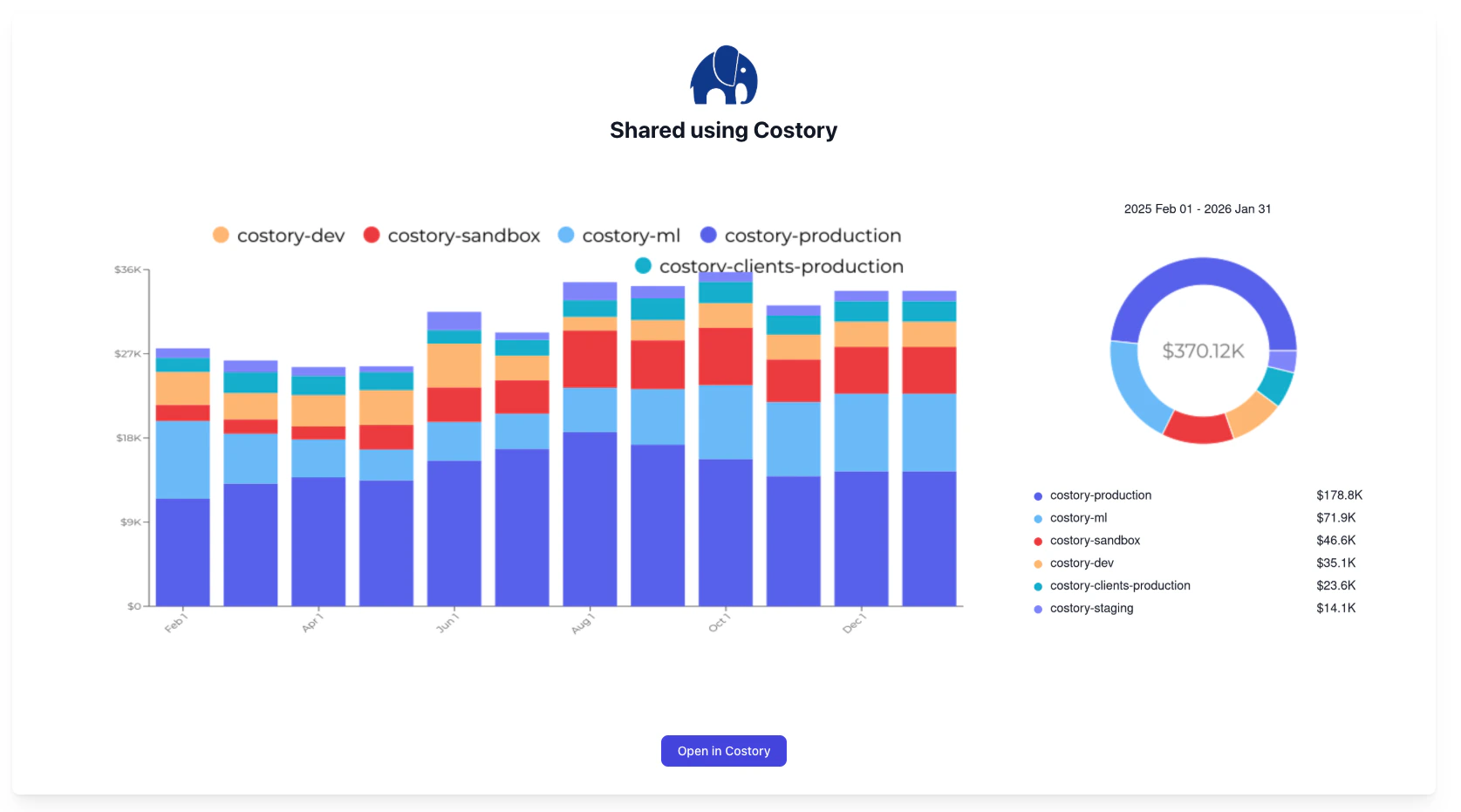
* **Secure external link**: a URL with a PNG snapshot of the current Explorer view. No login required.
* **Object permissions**: per-user **Reader**, **Editor**, or **Can manage** on a Costory object.
See the [Glossary](/docs/glossary) for a full list of terms.
## Choose a sharing method
| Goal | Method | Login required |
| --------------------------------------------------------------- | ---------------------------------------------------------------------- | ----------------------------- |
| Send the exact Explorer query | **Share → Link** | Yes |
| Send an Explorer chart to anyone | **Secure external link** (PNG snapshot) | No |
| Send dashboard top-bar context (where, dates, metric, group-by) | Dashboard **Share → Link** | Yes |
| Share one widget | **Share widget** or **Open in Explorer**, then share from Explorer | Yes for the live query |
| Send a dashboard to someone outside Costory | PDF export with a link back to the dashboard | No for the PDF |
| Keep a living dashboard for a team | Public dashboard, or per-user **Reader** / **Editor** / **Can manage** | Yes |
| Recurring snapshot in Slack, Teams, or email | [Cost Reports](/features/slack-reports) | No for the delivered snapshot |
## Share an Explorer view
Explorer sharing is the path for a single investigation. The link stores the current **Where** clause, date range, and group-by.
In [Explorer](/features/cost-explorer), set the metric, filters, date range, and group-by you want someone else to see.
Click **Share**.
Choose **Link**. The URL points at this exact view. A simple query opens in Explorer. A more complex query (multiple series, formulas) opens in Advanced Explorer.
Paste it in Slack, a ticket, or a pull request. The recipient must be able to log in to Costory and have permission to view the underlying data.
After you change a widget on a dashboard, use **Open in Explorer** and share from there. The dashboard URL does not store per-widget edits.
### Secure external link
A **Secure external link** is a URL with a PNG snapshot of the current Explorer view. Anyone with the URL can open it. They do not need a Costory account.
## Overview
Use a **Link** when the recipient has a Costory login. The URL opens the live query. Use a **Secure external link** or a dashboard PDF when they do not.
New objects start private. You grant access per user, or you make a dashboard public to the organization. Recurring delivery still belongs in [Cost Reports](/features/slack-reports).
Typical cases:
* Paste an Explorer investigation into Slack so a teammate lands on the same filter and date range
* Give finance **Reader** access to a dashboard they should not edit
* Send a PNG snapshot to a stakeholder who will not log in
* Recover a dashboard after an accidental edit with [dashboard versions](#dashboard-versions)
## Key terms used in this article
* **Link**: a URL that opens the live query. The recipient must log in to Costory.
* **Secure external link**: a URL with a PNG snapshot of the current Explorer view. No login required.
* **Object permissions**: per-user **Reader**, **Editor**, or **Can manage** on a Costory object.
See the [Glossary](/docs/glossary) for a full list of terms.
## Choose a sharing method
| Goal | Method | Login required |
| --------------------------------------------------------------- | ---------------------------------------------------------------------- | ----------------------------- |
| Send the exact Explorer query | **Share → Link** | Yes |
| Send an Explorer chart to anyone | **Secure external link** (PNG snapshot) | No |
| Send dashboard top-bar context (where, dates, metric, group-by) | Dashboard **Share → Link** | Yes |
| Share one widget | **Share widget** or **Open in Explorer**, then share from Explorer | Yes for the live query |
| Send a dashboard to someone outside Costory | PDF export with a link back to the dashboard | No for the PDF |
| Keep a living dashboard for a team | Public dashboard, or per-user **Reader** / **Editor** / **Can manage** | Yes |
| Recurring snapshot in Slack, Teams, or email | [Cost Reports](/features/slack-reports) | No for the delivered snapshot |
## Share an Explorer view
Explorer sharing is the path for a single investigation. The link stores the current **Where** clause, date range, and group-by.
In [Explorer](/features/cost-explorer), set the metric, filters, date range, and group-by you want someone else to see.
Click **Share**.
Choose **Link**. The URL points at this exact view. A simple query opens in Explorer. A more complex query (multiple series, formulas) opens in Advanced Explorer.
Paste it in Slack, a ticket, or a pull request. The recipient must be able to log in to Costory and have permission to view the underlying data.
After you change a widget on a dashboard, use **Open in Explorer** and share from there. The dashboard URL does not store per-widget edits.
### Secure external link
A **Secure external link** is a URL with a PNG snapshot of the current Explorer view. Anyone with the URL can open it. They do not need a Costory account.
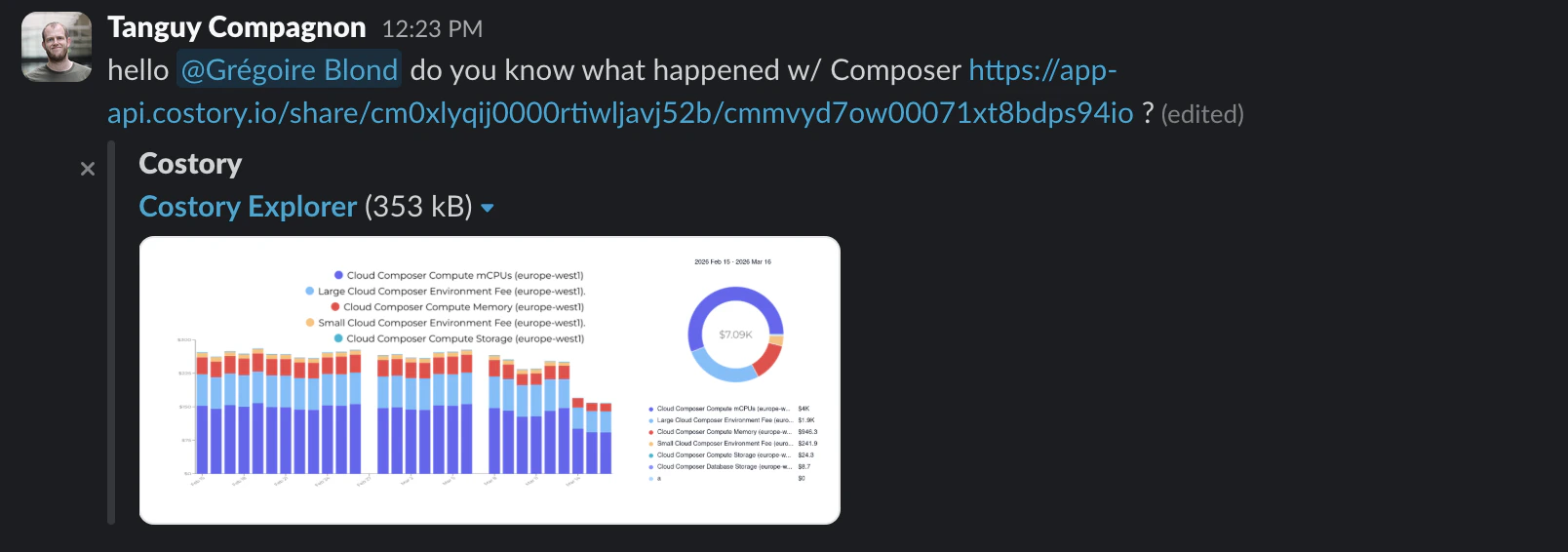 From Explorer, click **Share**.
Costory attaches a PNG of the view you are looking at.
Paste it to anyone who needs the snapshot. The page is view-only.
Anyone with the URL can see the snapshot. Review filters and the date range before you create the link. Treat it like a public document link.
## Share a dashboard
The dashboard URL encodes what is set in the top bar: **Where** clause, date preset, metric, and group-by. It does not capture edits made on an individual widget.
Open the [dashboard](/features/dashboards) and set the filters, date preset, metric, and group-by you want the recipient to land on.
Click **Share → Link**, or copy the dashboard URL from the address bar once those parameters are in it.
Recipients need a login and permission on that dashboard. They see the saved widgets with the top-bar context you copied.
### Share one widget
To change one widget and share that result:
1. Open the widget menu and click **Open in Explorer**. Costory takes the widget query, including your current edit, into Explorer.
2. Share from Explorer with **Link** or **Secure external link**.
**Share widget** still exists. Reopening a shared widget now lands in Explorer, not back on the dashboard. Use that when the recipient should investigate the query, not browse the rest of the dashboard.
### Save as copy
Use **Save as copy** for larger dashboard edits: adding widgets, changing layout, or trying a different breakdown without touching the original. The copy is a new dashboard. You grant access on the copy separately.
### External sharing for dashboards
For people outside Costory, export the dashboard as a **PDF**. The PDF includes a link back to the current dashboard context, so someone with access can open the live page after they read the snapshot.
For a scheduled PDF or image in Slack, Microsoft Teams, or email, use a [Cost Report](/features/slack-reports).
### Dashboard versions
Dashboards keep versions. Open the version history when someone saved a change by mistake, or when an older layout is the one you want to keep.
From a previous version you can:
* Revert the dashboard to that version
* Copy the old version as a new dashboard, then share that copy
Copy as a new dashboard when you want the old layout back without discarding the current one.
## Who can view or edit
The same roles apply to every Costory object: dashboards, reports, alerts, and the rest of the workspace.
| Role | Access |
| -------------- | ------------------------------- |
| **Reader** | View the object |
| **Editor** | View and edit |
| **Can manage** | Edit, and change who has access |
New objects are **private**. Only you can see them until you grant a user object permissions, or you make a dashboard **public** so everyone in the organization can view it.
Open the dashboard, report, or other object you want to share.
Add a user and choose **Reader**, **Editor**, or **Can manage**.
Use a public dashboard when the whole organization should be able to view it, without listing each person.
Stop using organization-wide admin rights as a way to share dashboards. Grant the people who need the view **Reader** or **Editor**, or make the dashboard public.
Existing dashboards currently grant **Can manage** to organization admins, so access matches the previous model. That grant is there so current dashboards keep working. Do not add new sharing through it. Move each dashboard to a public dashboard or to explicit per-user roles.
Team scopes in [Teams](/features/teams) still pre-filter Explorer and dashboards. They do not replace object permissions. Grant the team members the role they need on each dashboard.
## Frequently asked questions
No. Only the top bar is in the URL: where clause, date preset, metric, and group-by. To share a widget edit, use **Open in Explorer** and copy a **Link** from Explorer.
In Explorer, with that widget's query. It no longer reopens the dashboard.
No. **Link** requires login. Use a **Secure external link** from Explorer (PNG) or a dashboard PDF for people who will not log in.
Open dashboard versions. Revert to the version you want, or copy that version as another dashboard.
Use Teams for default metrics and cost scopes. Use object permissions (or a public dashboard) to decide who can view or edit. See [Teams](/features/teams).
## Related links
Build the query you want to share.
Save recurring views, then share the dashboard or a widget.
Schedule snapshots to Slack, Teams, or email.
Apply default scopes and metrics. Grant dashboard access on the object.
From Explorer, click **Share**.
Costory attaches a PNG of the view you are looking at.
Paste it to anyone who needs the snapshot. The page is view-only.
Anyone with the URL can see the snapshot. Review filters and the date range before you create the link. Treat it like a public document link.
## Share a dashboard
The dashboard URL encodes what is set in the top bar: **Where** clause, date preset, metric, and group-by. It does not capture edits made on an individual widget.
Open the [dashboard](/features/dashboards) and set the filters, date preset, metric, and group-by you want the recipient to land on.
Click **Share → Link**, or copy the dashboard URL from the address bar once those parameters are in it.
Recipients need a login and permission on that dashboard. They see the saved widgets with the top-bar context you copied.
### Share one widget
To change one widget and share that result:
1. Open the widget menu and click **Open in Explorer**. Costory takes the widget query, including your current edit, into Explorer.
2. Share from Explorer with **Link** or **Secure external link**.
**Share widget** still exists. Reopening a shared widget now lands in Explorer, not back on the dashboard. Use that when the recipient should investigate the query, not browse the rest of the dashboard.
### Save as copy
Use **Save as copy** for larger dashboard edits: adding widgets, changing layout, or trying a different breakdown without touching the original. The copy is a new dashboard. You grant access on the copy separately.
### External sharing for dashboards
For people outside Costory, export the dashboard as a **PDF**. The PDF includes a link back to the current dashboard context, so someone with access can open the live page after they read the snapshot.
For a scheduled PDF or image in Slack, Microsoft Teams, or email, use a [Cost Report](/features/slack-reports).
### Dashboard versions
Dashboards keep versions. Open the version history when someone saved a change by mistake, or when an older layout is the one you want to keep.
From a previous version you can:
* Revert the dashboard to that version
* Copy the old version as a new dashboard, then share that copy
Copy as a new dashboard when you want the old layout back without discarding the current one.
## Who can view or edit
The same roles apply to every Costory object: dashboards, reports, alerts, and the rest of the workspace.
| Role | Access |
| -------------- | ------------------------------- |
| **Reader** | View the object |
| **Editor** | View and edit |
| **Can manage** | Edit, and change who has access |
New objects are **private**. Only you can see them until you grant a user object permissions, or you make a dashboard **public** so everyone in the organization can view it.
Open the dashboard, report, or other object you want to share.
Add a user and choose **Reader**, **Editor**, or **Can manage**.
Use a public dashboard when the whole organization should be able to view it, without listing each person.
Stop using organization-wide admin rights as a way to share dashboards. Grant the people who need the view **Reader** or **Editor**, or make the dashboard public.
Existing dashboards currently grant **Can manage** to organization admins, so access matches the previous model. That grant is there so current dashboards keep working. Do not add new sharing through it. Move each dashboard to a public dashboard or to explicit per-user roles.
Team scopes in [Teams](/features/teams) still pre-filter Explorer and dashboards. They do not replace object permissions. Grant the team members the role they need on each dashboard.
## Frequently asked questions
No. Only the top bar is in the URL: where clause, date preset, metric, and group-by. To share a widget edit, use **Open in Explorer** and copy a **Link** from Explorer.
In Explorer, with that widget's query. It no longer reopens the dashboard.
No. **Link** requires login. Use a **Secure external link** from Explorer (PNG) or a dashboard PDF for people who will not log in.
Open dashboard versions. Revert to the version you want, or copy that version as another dashboard.
Use Teams for default metrics and cost scopes. Use object permissions (or a public dashboard) to decide who can view or edit. See [Teams](/features/teams).
## Related links
Build the query you want to share.
Save recurring views, then share the dashboard or a widget.
Schedule snapshots to Slack, Teams, or email.
Apply default scopes and metrics. Grant dashboard access on the object.