> ## Documentation Index
> Fetch the complete documentation index at: https://docs.costory.io/llms.txt
> Use this file to discover all available pages before exploring further.
# Welcome to Costory
> Cloud cost reporting for DevOps: connect AWS, GCP, and Azure billing, use Costory MCP with Claude or Cursor, and automate FinOps updates.
If you own infrastructure and get pulled into cost questions, you are in the right place. Costory is built for engineers who ship features and still answer "what changed on the bill?" without a dedicated [FinOps](/docs/glossary) team.
You might use Costory when:
* Finance or leadership asks for a monthly breakdown and you would rather not rebuild the same spreadsheet.
* Spend jumps and you need to know if it was a deploy, usage, or something the provider changed.
* You want teams to see their own numbers in Slack or Teams without you acting as a human report router.
You connect billing data from AWS, GCP, Azure, Datadog, [Elastic Cloud](/setup/billing/elastic-cloud), [Snowflake](/setup/billing/snowflake), and more. Costory normalizes it so you can explore, explain, and report without building your own data pipeline. In the first hour, you can also connect [Costory MCP](/features/mcp) to Claude or Cursor and start investigating costs from chat.
## What you can stop doing
* **Stop building and babysitting billing ETL** just to get a unified view. Connect exports or APIs, and Costory ingests line items without you owning pipelines or schemas. Start with [Billing data](/setup/billing).
* **Stop running the monthly cost review by hand.** Use the [Digest](/features/digest) to rank what moved and draft explanations. You tune the breakdown tree and share when it matches how your org talks about cost.
* **Stop copy-pasting numbers into Slack or slides.** Use [Cost Reports](/features/slack-reports) so each team gets the right view on a schedule.
* **Stop guessing why spend moved.** Correlate costs with deploys, incidents, and provider events in [Explorer](/features/cost-explorer), then add [Events](/features/events) and [Unit Economics](/features/unit-economics).
* **Stop starting every investigation from a blank dashboard.** Connect [Costory MCP](/features/mcp) to Claude or Cursor, ask the first cost questions in chat, and save the useful views for dashboards.
* **Stop untangling the same tags in every console.** Use [Dimensions](/features/tagging/dimensions) to clean labels and map costs to teams or environments.
## What Costory does
### See all your cloud costs in one place
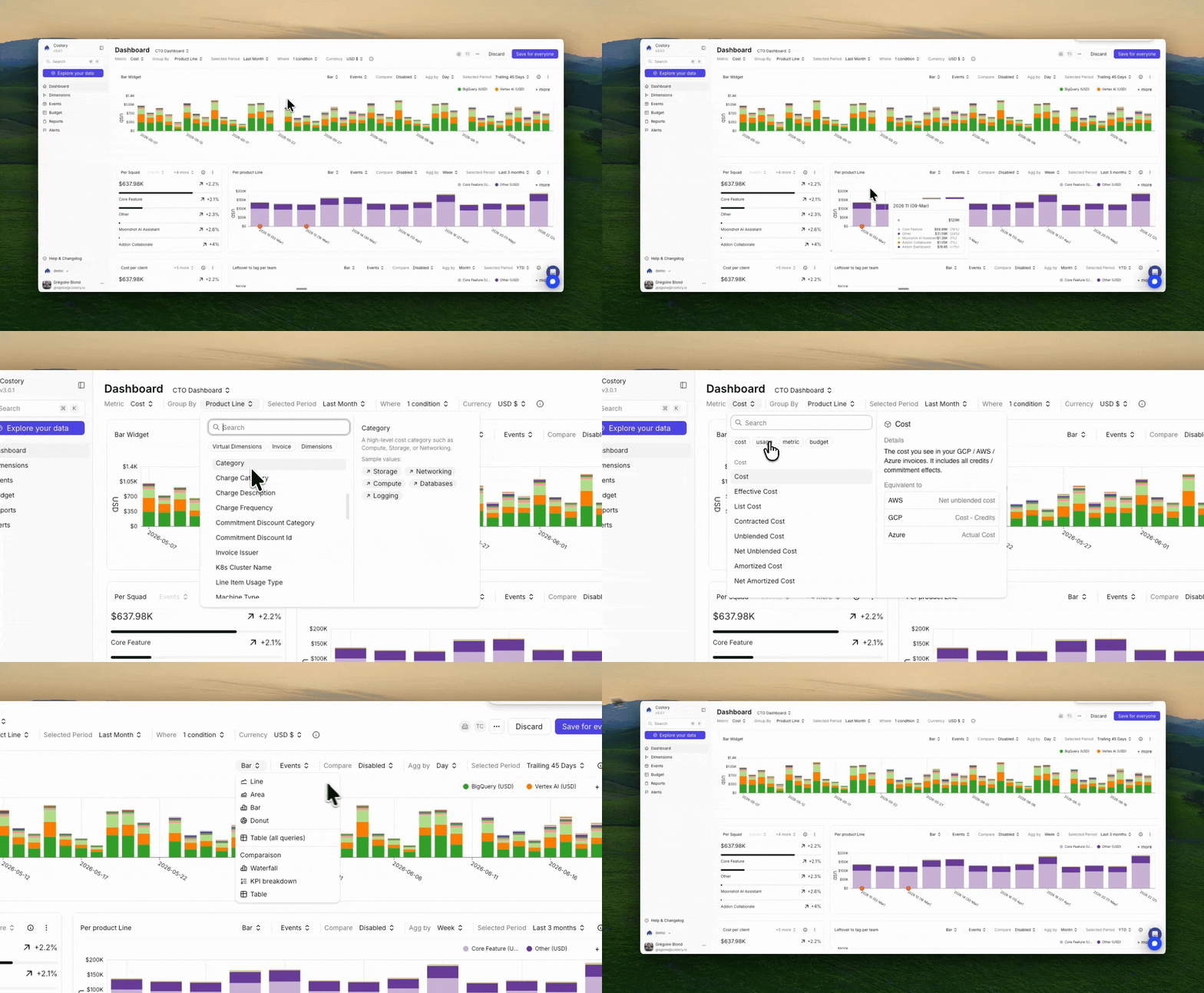
Costory pulls billing data from your providers and normalizes it into a single view. No more switching between consoles or stitching exports by hand.
AWS, GCP, Azure, Datadog, Elastic Cloud, OpenAI, MongoDB, Confluent Cloud. Explore everything in one [Explorer](/features/cost-explorer).
### Understand why costs changed
Costory ties spend movements to causes you already care about: GitHub deploys, Kubernetes signals, incidents, and provider events such as purchases.
When your bill moves, you can see whether it tracked a release, a usage spike, or a pricing change.
You always start by ingesting normalized billing into **Explorer**. Optionally, you connect event sources such as [GitHub](/setup/events/github), [CI/CD](/setup/events/ci-cd), or the [custom Events API](/setup/events/custom-api) so deploys, releases, and other signals appear as timeline markers. Those markers sit on the same time axis as your cost curves, so you can compare spend with what shipped or changed. See [Events](/features/events) and the [Events setup guides](/setup/events).
### Ask Claude or Cursor to investigate
[Costory MCP](/features/mcp) connects your Costory workspace to Claude, Cursor, VS Code, and other MCP-compatible assistants. Once billing data is connected, you can ask questions such as "what changed this week?", "which services should I group by?", or "prepare a dashboard for the data team."
Use the assistant to compare periods, find saved views, create alerts, send Cost Reports, and build the cost views that become dashboard widgets.
### Get reports automatically, not manually
The [Digest](/features/digest) breaks monthly spend into a tree and surfaces ranked changes with draft summaries. You adjust the Cost Breakdown Tree until the story matches your team, then share to Slack, Teams, Notion, or PowerPoint.
What used to take half a day to a full week can run on a schedule instead.
## Your first hour
Create your trial and follow the guided path: [Quickstart: automated cloud cost reporting in 30 minutes](/get-started/quickstart). Check [Prerequisites](/get-started/quickstart#prerequisites-for-costory-cloud-cost-management-setup) so billing access and collaboration apps are lined up before you start.
Link AWS, GCP, Azure, or other [billing datasources](/setup/billing). Costory uses **read-only** access to ingest exports or APIs. You do not manage warehouse schemas or sync jobs.
Add [Costory MCP](/features/mcp) to Claude Desktop, Claude Code, Cursor, VS Code, or Dust using `https://app-api.costory.io/mcp`. Authenticate with your Costory account, then ask your assistant to investigate the first cost spike, compare teams, or prepare dashboard views.
Route a report to [Slack](/setup/collaboration/slack), [Teams](/setup/collaboration/teams), or email so your team sees value in the tools they already use.
When you are ready, create [Dimensions](/features/tagging/dimensions), add rule-based virtual dimensions where tags are missing, and turn on the [Digest](/features/digest) for a structured monthly review.
## Start here
Costory starts with a **14-day free trial**. Pricing uses a **flat fee**, so your subscription stays predictable as your cloud bill changes. See [Costory pricing](https://www.costory.io/pricing).
**For security and platform reviewers:** Costory runs on **Google Cloud Platform (GCP)** with encryption **in transit and at rest**. Billing connections use **read-only** access to your exports or APIs. Review [Security](/docs/security), [Subprocessors](/docs/subprocessors), and [SSO and access control](/docs/sso-access-control).
Users authenticate through **Clerk**, including OAuth with common identity providers. SSO, SCIM directory sync, and RBAC options are covered in [SSO and access control](/docs/sso-access-control). Customer data retention can be aligned with your policy. How read-only billing access works is described in [Billing data](/setup/billing).
### Week one
Trial, billing connection, and first report end to end
Providers, ingestion model, and read-only access
Connect Claude or Cursor to Costory and investigate costs from chat
Scheduled cost updates per team channel
### When you need more
Multi-cloud exploration, drill-downs, and event context
Monthly tree, ranked changes, and draft summaries you refine before sharing
Turn saved views into shared cost dashboards
Merge labels, allocate untagged spend, and split shared costs
 ## What you can stop doing
* **Stop building and babysitting billing ETL** just to get a unified view. Connect exports or APIs, and Costory ingests line items without you owning pipelines or schemas. Start with [Billing data](/setup/billing).
* **Stop running the monthly cost review by hand.** Use the [Digest](/features/digest) to rank what moved and draft explanations. You tune the breakdown tree and share when it matches how your org talks about cost.
* **Stop copy-pasting numbers into Slack or slides.** Use [Cost Reports](/features/slack-reports) so each team gets the right view on a schedule.
* **Stop guessing why spend moved.** Correlate costs with deploys, incidents, and provider events in [Explorer](/features/cost-explorer), then add [Events](/features/events) and [Unit Economics](/features/unit-economics).
* **Stop starting every investigation from a blank dashboard.** Connect [Costory MCP](/features/mcp) to Claude or Cursor, ask the first cost questions in chat, and save the useful views for dashboards.
* **Stop untangling the same tags in every console.** Use [Dimensions](/features/tagging/dimensions) to clean labels and map costs to teams or environments.
## What Costory does
### See all your cloud costs in one place
Costory pulls billing data from your providers and normalizes it into a single view. No more switching between consoles or stitching exports by hand.
AWS, GCP, Azure, Datadog, Elastic Cloud, OpenAI, MongoDB, Confluent Cloud. Explore everything in one [Explorer](/features/cost-explorer).
### Understand why costs changed
Costory ties spend movements to causes you already care about: GitHub deploys, Kubernetes signals, incidents, and provider events such as purchases.
When your bill moves, you can see whether it tracked a release, a usage spike, or a pricing change.
## What you can stop doing
* **Stop building and babysitting billing ETL** just to get a unified view. Connect exports or APIs, and Costory ingests line items without you owning pipelines or schemas. Start with [Billing data](/setup/billing).
* **Stop running the monthly cost review by hand.** Use the [Digest](/features/digest) to rank what moved and draft explanations. You tune the breakdown tree and share when it matches how your org talks about cost.
* **Stop copy-pasting numbers into Slack or slides.** Use [Cost Reports](/features/slack-reports) so each team gets the right view on a schedule.
* **Stop guessing why spend moved.** Correlate costs with deploys, incidents, and provider events in [Explorer](/features/cost-explorer), then add [Events](/features/events) and [Unit Economics](/features/unit-economics).
* **Stop starting every investigation from a blank dashboard.** Connect [Costory MCP](/features/mcp) to Claude or Cursor, ask the first cost questions in chat, and save the useful views for dashboards.
* **Stop untangling the same tags in every console.** Use [Dimensions](/features/tagging/dimensions) to clean labels and map costs to teams or environments.
## What Costory does
### See all your cloud costs in one place
Costory pulls billing data from your providers and normalizes it into a single view. No more switching between consoles or stitching exports by hand.
AWS, GCP, Azure, Datadog, Elastic Cloud, OpenAI, MongoDB, Confluent Cloud. Explore everything in one [Explorer](/features/cost-explorer).
### Understand why costs changed
Costory ties spend movements to causes you already care about: GitHub deploys, Kubernetes signals, incidents, and provider events such as purchases.
When your bill moves, you can see whether it tracked a release, a usage spike, or a pricing change.