> ## Documentation Index
> Fetch the complete documentation index at: https://docs.costory.io/llms.txt
> Use this file to discover all available pages before exploring further.
# Elastic Cloud Billing Setup
> Connect Elastic Cloud organization billing to Costory with an Organization API key. Covers setup, historical sync, and what cost grain and dimensions you get in Explorer.
Costory pulls costs from the [Elastic Cloud Billing API](https://www.elastic.co/docs/api/doc/cloud-billing/) using your **Organization ID** and an **Elastic Cloud Organization API key**. Data is normalized into Standard Columns so you can explore Elastic spend next to AWS, GCP, Azure, and other [billing datasources](/setup/billing).
After setup, Elastic Cloud costs behave like other billing data in **Explorer**: same filters, breakdowns, and saved views. The sections below cover what one row represents and which dimensions you can rely on.
Open Costory and go to **Billing > Import new billing datasource > Elastic Cloud**. The stepper guides you through each field.
1. In the [Elastic Cloud Console](https://cloud.elastic.co/), open your organization and copy the **Organization ID** (you need it for the Costory form).
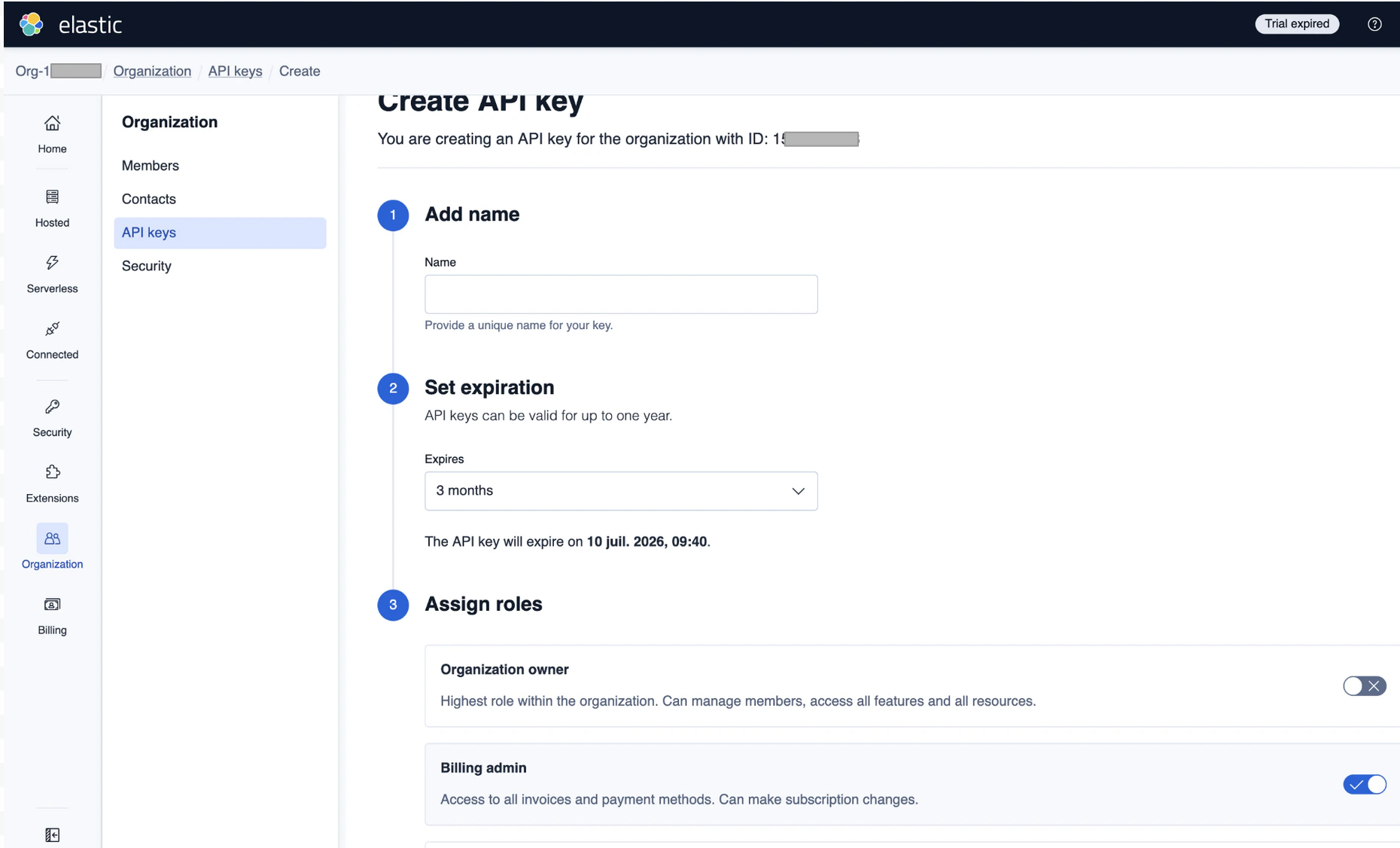 2. Create an **Elastic Cloud Organization API key** with access to billing scope. Only organization owners can create these keys. See [Elastic Cloud API keys](https://www.elastic.co/docs/deploy-manage/api-keys/elastic-cloud-api-keys).
3. In Costory, enter a datasource name, paste the **API key** and **Organization ID**, then submit. Validation calls the Billing API to confirm access.
4. **Start Date** is optional. Use it to narrow the first sync window or cap the range Costory ingests. If you leave them empty, Costory uses its default initial backfill (see [Historical data](#historical-data)).
On first sync, Costory backfills approximately **6 months** of historical billing data (one day at a time). Incremental syncs then keep data current.
1. In the [Elastic Cloud Console](https://cloud.elastic.co/), copy your **Organization ID** and ensure you have an **Elastic Cloud Organization API key** with billing scope. Elastic does not provide Terraform resources for these credentials; create them in the console or via Elastic's APIs. See [Elastic Cloud API keys](https://www.elastic.co/docs/deploy-manage/api-keys/elastic-cloud-api-keys).
2. Add the datasource to Costory with the [Costory Terraform provider](https://registry.terraform.io/providers/costory-io/costory/latest/docs):
```hcl theme={null}
terraform {
required_providers {
costory = {
source = "costory-io/costory"
version = ">= 0.1.0"
}
}
}
variable "costory_api_token" {
type = string
description = "Costory API token."
sensitive = true
}
variable "elastic_cloud_api_key" {
type = string
description = "Elastic Cloud API key used to fetch billing data."
sensitive = true
}
variable "elastic_cloud_organization_id" {
type = string
description = "Elastic Cloud organization ID."
}
provider "costory" {
token = var.costory_api_token
}
resource "costory_billing_datasource_elastic_cloud" "main" {
name = "Elastic Cloud Billing"
api_key = var.elastic_cloud_api_key
organization_id = var.elastic_cloud_organization_id
}
```
## Data in Costory
Elastic sends one daily snapshot per **Elastic Cloud project**; Costory **expands** each project's `product_line_items` so that **one billing row is one product line** for that project and **usage day** (not a single rolled-up row per project per day).
**Dimensions and usage fields**
Each row below is a [Standard Column](/docs/standard-columns) in **Explorer** and breakdowns. Exports and advanced queries use the same names with a `cos_` prefix, for example **`cos_service_name`** for **Service name** and **`cos_consumed_quantity`** for **Consumed quantity**.
| Standard Column | Filled from Elastic | Example |
| -------------------------- | -------------------------------------------------------------------------- | -------------------------------------------------------------------------------------------------- |
| **Provider** | Fixed for this datasource. | `Elastic Cloud` |
| **Billing account id** | Elastic **project id**. | `e9cc2fb04b35414690b77a3b2c593602` |
| **Sub account id** | Elastic **project name**. | `My Elasticsearch project` |
| **Resource id** | Same as **Billing account id** (project id). | `e9cc2fb04b35414690b77a3b2c593602` |
| **Resource name** | Same as **Sub account id** (project name). | `My Elasticsearch project` |
| **Service name** | Full Elastic **product line label** for that billing line. | `Elasticsearch - General Purpose - Search VCU (GCP us-central1)` |
| **SKU ID** | Elastic product line **sku** code. | `elasticsearch.general-purpose-search-vcu_gcp-us-central1` |
| **SKU Description** | Same long label as **Service name** on that line. | `Elasticsearch - General Purpose - Search VCU (GCP us-central1)` |
| **Region** / **Region id** | Parsed from the SKU when Elastic adds a cloud/region suffix. | `gcp-us-central1` when the SKU ends with `_gcp-us-central1`; support lines may leave region empty. |
| **Category** | Elastic line **`type`** (usage vs support, workload shape). | `VCU`, `Search AI Lake`, or `support` |
| **Consumed quantity** | **`quantity.value`** on the product line. | `0.0016008` |
| **Consumed unit** | **`unit`** on the product line (often matches **Category** for VCU lines). | `VCU` |
| **Pricing quantity** | Same value as **Consumed quantity** for this datasource. | `0.0016008` |
| **Pricing unit** | Same value as **Consumed unit** for this datasource. | `VCU` |
**Examples: Service name, SKU ID, and Category on the same billing line**
These are illustrative values Elastic may return; your org’s strings can differ.
* **Search VCU (regional usage)**
* **Service name** / **SKU Description:** `Elasticsearch - General Purpose - Search VCU (GCP us-central1)`
* **SKU ID:** `elasticsearch.general-purpose-search-vcu_gcp-us-central1`
* **Category:** `VCU`
* **Consumed quantity** / **Pricing quantity:** `0.0016008`
* **Consumed unit** / **Pricing unit:** `VCU`
* **Retained storage**
* **Service name** / **SKU Description:** Elastic’s full label for that storage line (same style as other product lines).
* **SKU ID:** `elasticsearch.retained_gcp-us-central1`
* **Category:** Depends on Elastic’s `type` for that line (for example storage-related).
* **Support (often zero rate)**
* **Service name** / **SKU Description:** Elastic’s label for the support tier.
* **SKU ID:** `serverless.support-tier1`
* **Category:** `support`
## API reference
Costory calls Elastic's instance costs endpoint (see [Get costs for instances](https://www.elastic.co/docs/api/doc/cloud-billing/operation/operation-getcostsbyinstancesv2)):
`GET https://cloud.elastic.co/api/v2/billing/organizations/{organization_id}/costs/instances`
Authentication uses an API key in the `Authorization` header. See [Elastic Cloud API keys](https://www.elastic.co/docs/deploy-manage/api-keys/elastic-cloud-api-keys) and the [Elastic Cloud Billing API](https://www.elastic.co/docs/api/doc/cloud-billing/) for details.
## Field reference
| Field | Required | Description |
| ------------------- | -------- | --------------------------------------------------------------------------------------- |
| **API key** | Yes | Elastic Cloud Organization API key with Billing API access. Stored securely by Costory. |
| **Organization ID** | Yes | Identifier of your Elastic Cloud organization. |
| **Start Date** | No | Optional start of the range for the initial sync (ISO 8601). |
| **End Date** | No | Optional end of the sync range (ISO 8601). |
## Historical data
**What Costory includes**
* **Product-line-level costs** for Elastic Cloud **projects** in your organization: each row is a **project** × **usage day** × **product line** (see [Data in Costory](#data-in-costory)).
* **Deployments** Elastic bills through the org (for example Elasticsearch and other Elastic Cloud project types returned by the API).
* **SKUs and service names** from Elastic's billing lines, plus **region** when Elastic encodes it on the SKU.
* **ECU context** as **labels** on each line, and **USD** amounts aligned with Elastic line quantity × rate.
## Related
All supported billing providers and shared setup concepts.
Explore Elastic Cloud costs with the rest of your stack.
Per-column Elastic mapping (open the **Elastic Cloud** tab in each section).
Map Elastic lines and labels to teams or products.
2. Create an **Elastic Cloud Organization API key** with access to billing scope. Only organization owners can create these keys. See [Elastic Cloud API keys](https://www.elastic.co/docs/deploy-manage/api-keys/elastic-cloud-api-keys).
3. In Costory, enter a datasource name, paste the **API key** and **Organization ID**, then submit. Validation calls the Billing API to confirm access.
4. **Start Date** is optional. Use it to narrow the first sync window or cap the range Costory ingests. If you leave them empty, Costory uses its default initial backfill (see [Historical data](#historical-data)).
On first sync, Costory backfills approximately **6 months** of historical billing data (one day at a time). Incremental syncs then keep data current.
1. In the [Elastic Cloud Console](https://cloud.elastic.co/), copy your **Organization ID** and ensure you have an **Elastic Cloud Organization API key** with billing scope. Elastic does not provide Terraform resources for these credentials; create them in the console or via Elastic's APIs. See [Elastic Cloud API keys](https://www.elastic.co/docs/deploy-manage/api-keys/elastic-cloud-api-keys).
2. Add the datasource to Costory with the [Costory Terraform provider](https://registry.terraform.io/providers/costory-io/costory/latest/docs):
```hcl theme={null}
terraform {
required_providers {
costory = {
source = "costory-io/costory"
version = ">= 0.1.0"
}
}
}
variable "costory_api_token" {
type = string
description = "Costory API token."
sensitive = true
}
variable "elastic_cloud_api_key" {
type = string
description = "Elastic Cloud API key used to fetch billing data."
sensitive = true
}
variable "elastic_cloud_organization_id" {
type = string
description = "Elastic Cloud organization ID."
}
provider "costory" {
token = var.costory_api_token
}
resource "costory_billing_datasource_elastic_cloud" "main" {
name = "Elastic Cloud Billing"
api_key = var.elastic_cloud_api_key
organization_id = var.elastic_cloud_organization_id
}
```
## Data in Costory
Elastic sends one daily snapshot per **Elastic Cloud project**; Costory **expands** each project's `product_line_items` so that **one billing row is one product line** for that project and **usage day** (not a single rolled-up row per project per day).
**Dimensions and usage fields**
Each row below is a [Standard Column](/docs/standard-columns) in **Explorer** and breakdowns. Exports and advanced queries use the same names with a `cos_` prefix, for example **`cos_service_name`** for **Service name** and **`cos_consumed_quantity`** for **Consumed quantity**.
| Standard Column | Filled from Elastic | Example |
| -------------------------- | -------------------------------------------------------------------------- | -------------------------------------------------------------------------------------------------- |
| **Provider** | Fixed for this datasource. | `Elastic Cloud` |
| **Billing account id** | Elastic **project id**. | `e9cc2fb04b35414690b77a3b2c593602` |
| **Sub account id** | Elastic **project name**. | `My Elasticsearch project` |
| **Resource id** | Same as **Billing account id** (project id). | `e9cc2fb04b35414690b77a3b2c593602` |
| **Resource name** | Same as **Sub account id** (project name). | `My Elasticsearch project` |
| **Service name** | Full Elastic **product line label** for that billing line. | `Elasticsearch - General Purpose - Search VCU (GCP us-central1)` |
| **SKU ID** | Elastic product line **sku** code. | `elasticsearch.general-purpose-search-vcu_gcp-us-central1` |
| **SKU Description** | Same long label as **Service name** on that line. | `Elasticsearch - General Purpose - Search VCU (GCP us-central1)` |
| **Region** / **Region id** | Parsed from the SKU when Elastic adds a cloud/region suffix. | `gcp-us-central1` when the SKU ends with `_gcp-us-central1`; support lines may leave region empty. |
| **Category** | Elastic line **`type`** (usage vs support, workload shape). | `VCU`, `Search AI Lake`, or `support` |
| **Consumed quantity** | **`quantity.value`** on the product line. | `0.0016008` |
| **Consumed unit** | **`unit`** on the product line (often matches **Category** for VCU lines). | `VCU` |
| **Pricing quantity** | Same value as **Consumed quantity** for this datasource. | `0.0016008` |
| **Pricing unit** | Same value as **Consumed unit** for this datasource. | `VCU` |
**Examples: Service name, SKU ID, and Category on the same billing line**
These are illustrative values Elastic may return; your org’s strings can differ.
* **Search VCU (regional usage)**
* **Service name** / **SKU Description:** `Elasticsearch - General Purpose - Search VCU (GCP us-central1)`
* **SKU ID:** `elasticsearch.general-purpose-search-vcu_gcp-us-central1`
* **Category:** `VCU`
* **Consumed quantity** / **Pricing quantity:** `0.0016008`
* **Consumed unit** / **Pricing unit:** `VCU`
* **Retained storage**
* **Service name** / **SKU Description:** Elastic’s full label for that storage line (same style as other product lines).
* **SKU ID:** `elasticsearch.retained_gcp-us-central1`
* **Category:** Depends on Elastic’s `type` for that line (for example storage-related).
* **Support (often zero rate)**
* **Service name** / **SKU Description:** Elastic’s label for the support tier.
* **SKU ID:** `serverless.support-tier1`
* **Category:** `support`
## API reference
Costory calls Elastic's instance costs endpoint (see [Get costs for instances](https://www.elastic.co/docs/api/doc/cloud-billing/operation/operation-getcostsbyinstancesv2)):
`GET https://cloud.elastic.co/api/v2/billing/organizations/{organization_id}/costs/instances`
Authentication uses an API key in the `Authorization` header. See [Elastic Cloud API keys](https://www.elastic.co/docs/deploy-manage/api-keys/elastic-cloud-api-keys) and the [Elastic Cloud Billing API](https://www.elastic.co/docs/api/doc/cloud-billing/) for details.
## Field reference
| Field | Required | Description |
| ------------------- | -------- | --------------------------------------------------------------------------------------- |
| **API key** | Yes | Elastic Cloud Organization API key with Billing API access. Stored securely by Costory. |
| **Organization ID** | Yes | Identifier of your Elastic Cloud organization. |
| **Start Date** | No | Optional start of the range for the initial sync (ISO 8601). |
| **End Date** | No | Optional end of the sync range (ISO 8601). |
## Historical data
**What Costory includes**
* **Product-line-level costs** for Elastic Cloud **projects** in your organization: each row is a **project** × **usage day** × **product line** (see [Data in Costory](#data-in-costory)).
* **Deployments** Elastic bills through the org (for example Elasticsearch and other Elastic Cloud project types returned by the API).
* **SKUs and service names** from Elastic's billing lines, plus **region** when Elastic encodes it on the SKU.
* **ECU context** as **labels** on each line, and **USD** amounts aligned with Elastic line quantity × rate.
## Related
All supported billing providers and shared setup concepts.
Explore Elastic Cloud costs with the rest of your stack.
Per-column Elastic mapping (open the **Elastic Cloud** tab in each section).
Map Elastic lines and labels to teams or products.