> ## Documentation Index
> Fetch the complete documentation index at: https://docs.costory.io/llms.txt
> Use this file to discover all available pages before exploring further.
# Connect Engineering Events to Costory (GitHub, CI/CD, Custom API)
> Correlate cloud cost changes with GitHub deploys, CI/CD events, Savings Plan purchases, and custom events via API. Save event context and overlay events on cost charts.
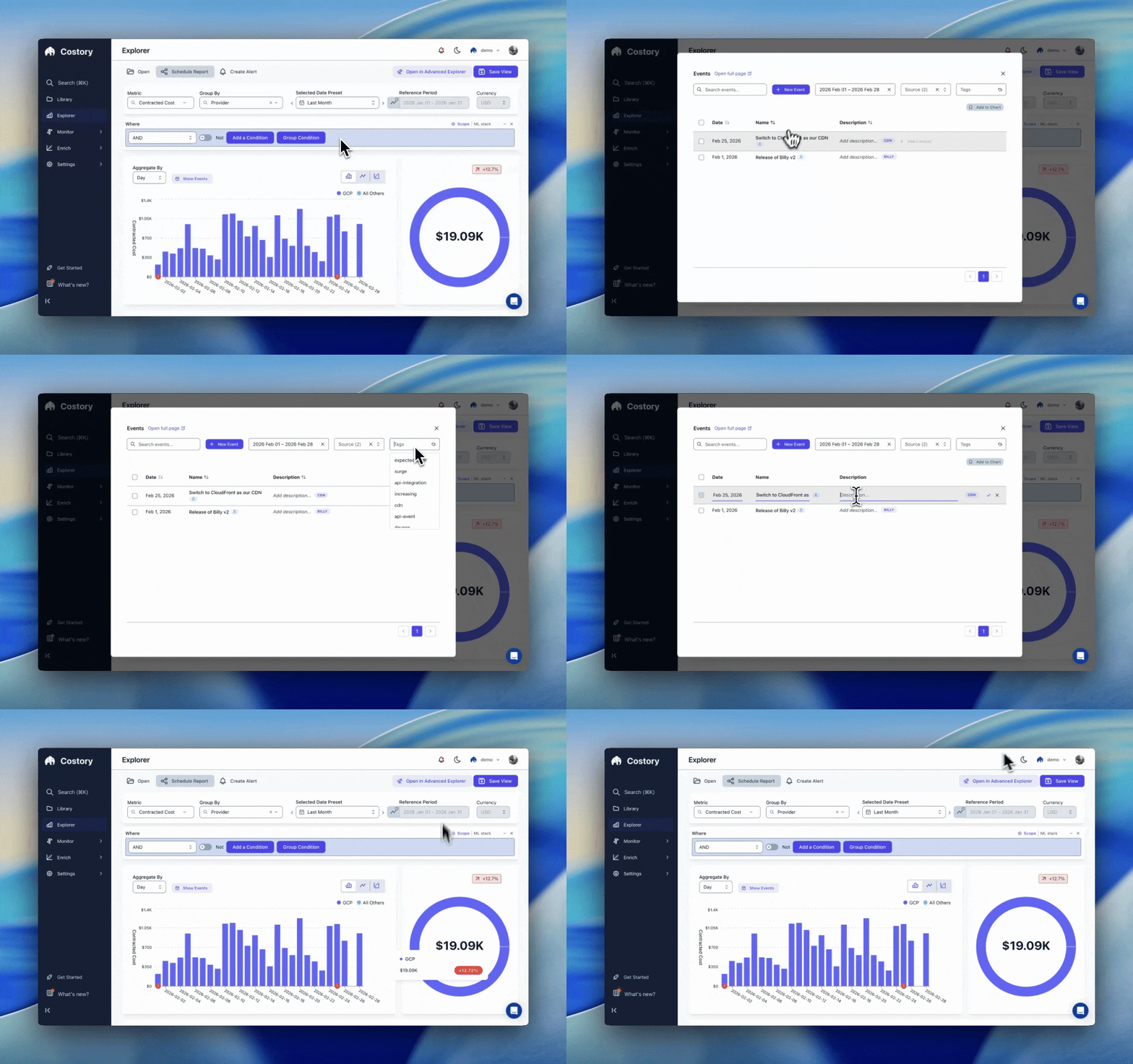
Connect engineering events to Costory so you can correlate cost changes with GitHub deploys, CI/CD runs, provider commitments, and custom API events. This makes root cause analysis faster and gives your team shared context in Explorer and the [Events page](/features/events).
Events show up as timeline markers in Costory. You can filter by source, category, and labels to explain cost changes in seconds.
 ## Supported event sources
Pull request merges, releases, and deployment metadata.
Post build and deploy events directly from your pipelines.
Send any event that explains spend via the Events API.
AWS live; Azure and GCP on the roadmap.
## How events work in Costory
1. **Connect a source** (GitHub, CI/CD, or API).
2. **Categorize events** as BUSINESS, TECHNICAL, or PROVIDER.
3. **Save events with context** so the date, source, labels, and description are available from the [Events page](/features/events).
4. **Overlay events on cost charts** for fast event correlation in [Explorer](/features/cost-explorer).
5. **Share context** in saved views, dashboards, and [Cost Reports](/features/slack-reports).
## Event categories
Costory groups events into three categories so you can filter consistently across teams:
| Category | What it represents | Examples |
| ------------- | -------------------------------------- | --------------------------------------------------------------------------------------------------------------------------------------------------------------------------------------------------------------------------------------------------------------------------------------------------------------------------------------------------------- |
| **BUSINESS** | Go-to-market or product events | Launches, pricing changes, marketing campaigns |
| **TECHNICAL** | Engineering and infrastructure changes | Deploys, incidents, migrations, CI/CD runs |
| **PROVIDER** | Cloud provider and billing changes | Savings Plans purchases, Reserved Instances (RIs) activations, price changes |
## Frequently asked questions
GitHub and provider events typically appear within minutes. API events appear as soon as they are accepted by the Events API.
Yes. Post events with historical timestamps and Costory will place them on the correct date in your cost timeline.
No. Events are metadata overlays only. They help explain costs but do not modify billing data.
Yes. Use category, label, source, and environment filters in the Events page and in Explorer views.
## Next steps
Combine events with KPIs for full context.
Save, filter, and manage event context.
See how events drive cost changes in your dashboards.
## Supported event sources
Pull request merges, releases, and deployment metadata.
Post build and deploy events directly from your pipelines.
Send any event that explains spend via the Events API.
AWS live; Azure and GCP on the roadmap.
## How events work in Costory
1. **Connect a source** (GitHub, CI/CD, or API).
2. **Categorize events** as BUSINESS, TECHNICAL, or PROVIDER.
3. **Save events with context** so the date, source, labels, and description are available from the [Events page](/features/events).
4. **Overlay events on cost charts** for fast event correlation in [Explorer](/features/cost-explorer).
5. **Share context** in saved views, dashboards, and [Cost Reports](/features/slack-reports).
## Event categories
Costory groups events into three categories so you can filter consistently across teams:
| Category | What it represents | Examples |
| ------------- | -------------------------------------- | --------------------------------------------------------------------------------------------------------------------------------------------------------------------------------------------------------------------------------------------------------------------------------------------------------------------------------------------------------- |
| **BUSINESS** | Go-to-market or product events | Launches, pricing changes, marketing campaigns |
| **TECHNICAL** | Engineering and infrastructure changes | Deploys, incidents, migrations, CI/CD runs |
| **PROVIDER** | Cloud provider and billing changes | Savings Plans purchases, Reserved Instances (RIs) activations, price changes |
## Frequently asked questions
GitHub and provider events typically appear within minutes. API events appear as soon as they are accepted by the Events API.
Yes. Post events with historical timestamps and Costory will place them on the correct date in your cost timeline.
No. Events are metadata overlays only. They help explain costs but do not modify billing data.
Yes. Use category, label, source, and environment filters in the Events page and in Explorer views.
## Next steps
Combine events with KPIs for full context.
Save, filter, and manage event context.
See how events drive cost changes in your dashboards.