> ## Documentation Index
> Fetch the complete documentation index at: https://docs.costory.io/llms.txt
> Use this file to discover all available pages before exploring further.
# Increase visibility on your BigQuery costs with dbt
> Track and allocate BigQuery processing and storage costs at the dbt model level using labels, then visualize them in Costory.
When running dbt on BigQuery, it's difficult to know which models drive the most cost. By default, BigQuery billing exports show project-level and dataset-level spend, but offer no model-level granularity. This guide shows you how to use BigQuery labels and dbt macros to break down processing and storage costs by model, team, package, or any custom dimension.
## Prerequisites
* You are using **[dbt](https://www.getdbt.com/)** to orchestrate your BigQuery workloads.
* Your GCP billing export is [connected to Costory](/setup/billing#gcp).
## Output
* Cost visibility broken down by dbt model, team, package, or any custom label.
* Ability to identify which models drive auto-scaling or high processing costs.
* Foundation for cost allocation and optimization.
## Steps
Configure automated labels in your `dbt_project.yml` so every query is tagged with dbt native metadata:
```yaml theme={null}
query-comment:
comment: "{{ bq_labels(node, var) }}"
job-label: True
```
Then create a macro `bq_labels` to populate the labels automatically. Here is all the information you can use:
| Object | Property | Description |
| -------------- | ------------------------------------------- | ------------------------------------------------------------------------------------------------------------ |
| Node | node.original\_file\_path | The original file path of the node |
| Node | node.name | The name of the node |
| Node | node.resource\_type | The resource type of the node (`model`, `test`, `seed`, `snapshot`, `table`) |
| Node | node.package\_name | The dbt package name |
| Node | node.database | For BigQuery, this is the project name of the project on which you write |
| Node | node.schema | The dbt schema of the node |
| env\_var macro | ex: env\_var('username','cloud\_run\_task') | Any env var available at runtime |
| var macro | ex: var('customer', 'test') | Any dbt variable available at runtime |
| target | target.get('profile\_name') | The profile name of the target (useful if you split per target your ingested / full refresh / backfill jobs) |
| target | target.get('target\_name') | The target name of the target |
```sql theme={null}
{% macro bq_labels(node, var) %}
{%- set comment_dict = {} -%}
{%- do comment_dict.update(
app='background_tasks',
customer=var('customer', 'test'),
repository="analytics",
processed_by=env_var('username','cloud_run_task'),
profile_name=target.get('profile_name'),
target_name=target.get('target_name')
) -%}
{%- if node is not none -%}
{%- do comment_dict.update(
file=node.original_file_path,
node_id=node.unique_id,
node_name=node.name,
resource_type=node.resource_type,
package_name=node.package_name,
database=node.database,
schema=node.schema
) -%}
{%- endif -%}
{% do return(tojson(comment_dict)) %}
{% endmacro %}
```
This macro will label every query run during the dbt run.
In BigQuery, storage costs are visible at the dataset level using `resource_id` / `resource_name`, but they are not visible at the billing level per table. To add labels at the table level, apply them in your dbt model config:
```sql theme={null}
{{
config(
tags=["ingestion"],
materialized='table',
labels={'maintained_by': 'team_A'}
)
}}
```
You can also set labels at the `dbt_project.yml` level. Note that project-level labels will override model-level labels if both are set.
Use BigQuery's `INFORMATION_SCHEMA` to analyze costs by label:
```sql theme={null}
SELECT
ARRAY((SELECT value FROM UNNEST(labels) WHERE key = "label_name"))[SAFE_OFFSET(0)] AS label,
SUM(total_slot_ms) AS total_slot_ms,
SUM(total_bytes_billed) AS total_bytes_billed
FROM ``.`region-eu`.INFORMATION_SCHEMA.JOBS_BY_PROJECT
WHERE EXTRACT(DATE FROM creation_time) = CURRENT_DATE()
AND ARRAY((SELECT value FROM UNNEST(labels) WHERE key = "label_name"))[SAFE_OFFSET(0)] IS NOT NULL
GROUP BY 1
```
To query storage-level labels on tables:
```sql theme={null}
SELECT
*,
ARRAY((SELECT AS STRUCT json[0] AS key, json[1] AS value
FROM UNNEST(ARRAY(
(SELECT AS STRUCT JSON_VALUE_ARRAY(CONCAT('[', elements, ']')) AS json
FROM UNNEST(regexp_extract_all(option_value, r'STRUCT\("[^"]+", "[^"]+"\)')) elements)
)))) AS labels
FROM
.INFORMATION_SCHEMA.TABLE_OPTIONS
WHERE option_name = 'labels'
```
1. Ingest the labels into Costory using the feature engineering UI:
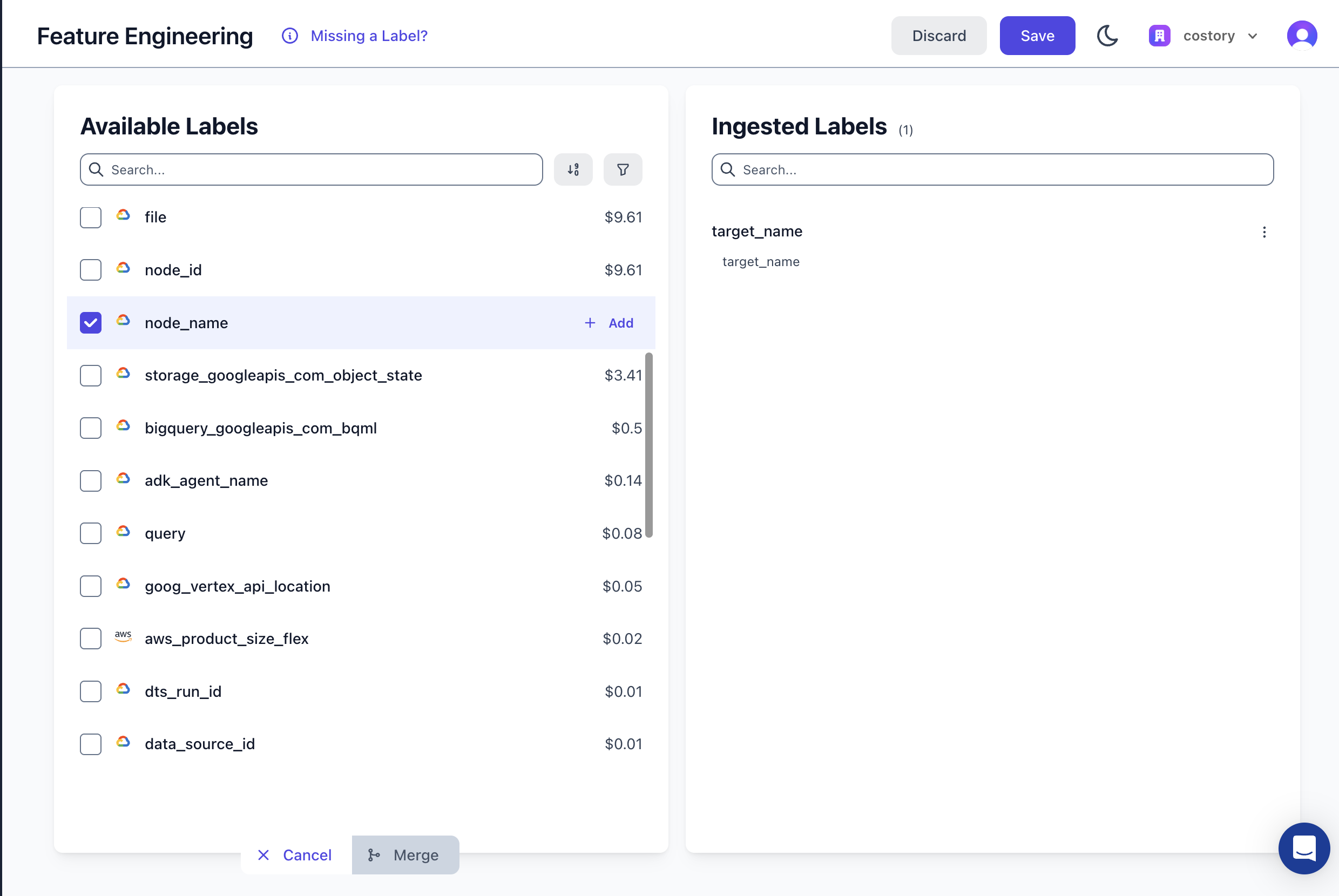 2. If part of your BigQuery labels should be merged within an existing label, use the merge feature to combine two labels into one (e.g., `k8s_label_app` and `app`).
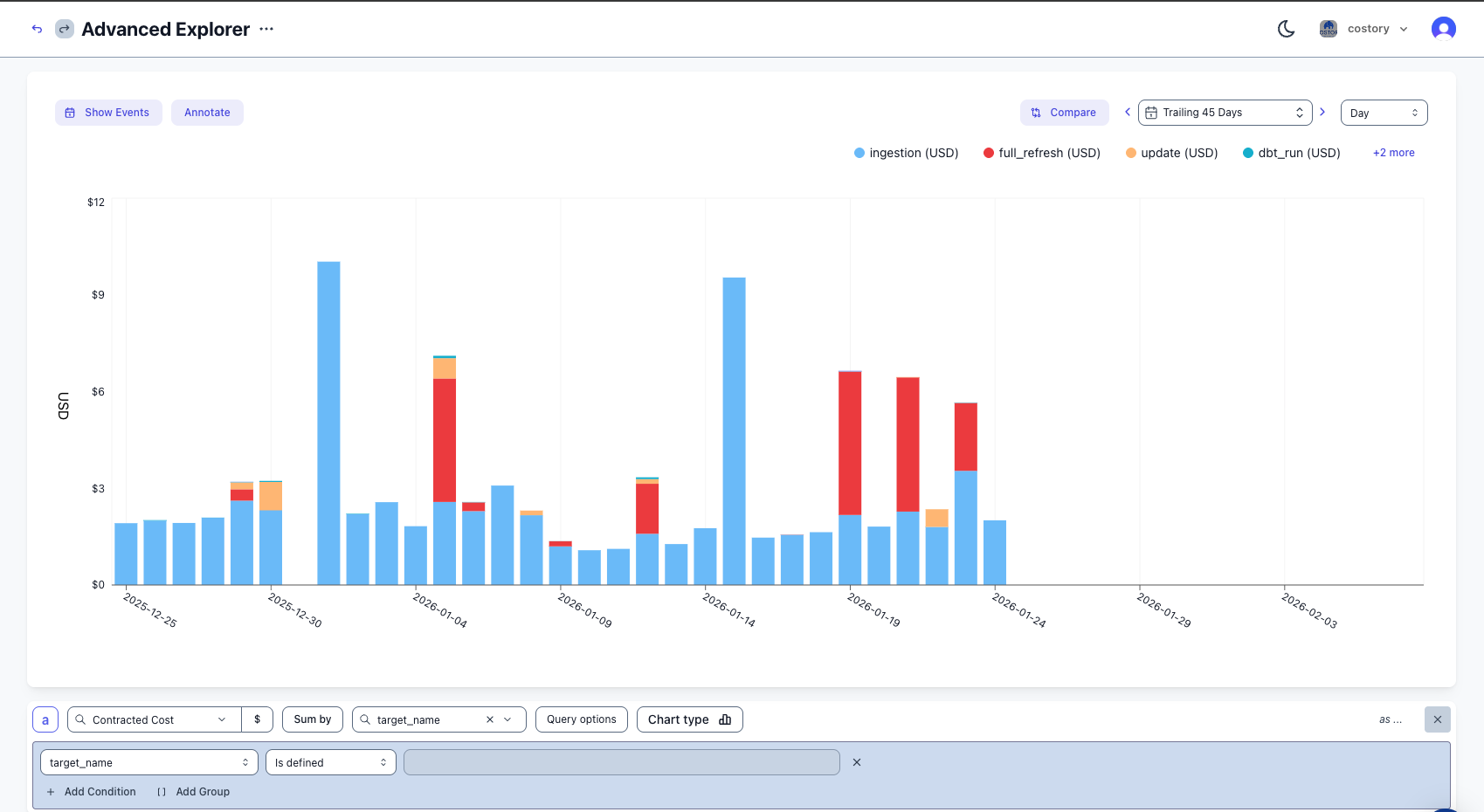
3. [Create a virtual dimension](/features/tagging/dimensions#virtual-dimensions) to allocate the cost, or explore costs directly in [Explorer](/features/cost-explorer):
2. If part of your BigQuery labels should be merged within an existing label, use the merge feature to combine two labels into one (e.g., `k8s_label_app` and `app`).
3. [Create a virtual dimension](/features/tagging/dimensions#virtual-dimensions) to allocate the cost, or explore costs directly in [Explorer](/features/cost-explorer):
 ## Best practices
### Labels
* Ingest `node_name` for fine-grained cost investigation to understand which exact model is driving cost.
* Use `package_name` or `schema` to map each schema to the correct team or owner. You can formalize this mapping with [virtual dimensions](/features/tagging/dimensions#virtual-dimensions).
* Use `target_name` to split daily jobs, full refreshes, and backfills.
### Quotas
* Set a quota on GCP for query bytes billed per service account or per user using [`QueryUsagePerUserPerDay`](https://docs.cloud.google.com/bigquery/docs/custom-quotas).
### Alerts
* Set an alert close to the daily average on ingestion costs. Daily ingestion jobs should be very stable.
* For full refresh jobs, evaluate alerts over a larger period to avoid false positives from spikes.
### Storage costs
* Evaluate storage costs frequently. After 90 days the storage price decreases, but if you never read the data you should rely on an expiration policy instead.
* Since 2023, you can choose per dataset the [storage billing model](https://docs.cloud.google.com/bigquery/docs/updating-datasets#update_storage_billing_models):
* **Logical storage**: you pay based on the logical size (before compression).
* **Physical storage**: you pay based on the physical size (after compression).
You can compare both costs using the following SQL query. Run it per region and change the `region-us` suffix:
```sql theme={null}
DECLARE active_logical_gib_price FLOAT64 DEFAULT 0.02;
DECLARE long_term_logical_gib_price FLOAT64 DEFAULT 0.01;
DECLARE active_physical_gib_price FLOAT64 DEFAULT 0.04;
DECLARE long_term_physical_gib_price FLOAT64 DEFAULT 0.02;
WITH storage_sizes AS (
SELECT
table_schema AS dataset_name,
SUM(active_logical_bytes) / POWER(1024, 3) AS active_logical_gib,
SUM(long_term_logical_bytes) / POWER(1024, 3) AS long_term_logical_gib,
SUM(active_physical_bytes) / POWER(1024, 3) AS active_physical_gib,
SUM(long_term_physical_bytes) / POWER(1024, 3) AS long_term_physical_gib,
SUM(time_travel_physical_bytes) / POWER(1024, 3) AS time_travel_physical_gib,
SUM(fail_safe_physical_bytes) / POWER(1024, 3) AS fail_safe_physical_gib
FROM
`region-us`.INFORMATION_SCHEMA.TABLE_STORAGE_BY_PROJECT
WHERE table_type = 'BASE TABLE'
GROUP BY 1
)
SELECT
dataset_name,
ROUND((active_logical_gib * active_logical_gib_price) + (long_term_logical_gib * long_term_logical_gib_price), 2) AS monthly_cost_logical,
ROUND(
(active_physical_gib * active_physical_gib_price) +
(long_term_physical_gib * long_term_physical_gib_price) +
((time_travel_physical_gib + fail_safe_physical_gib) * active_physical_gib_price), 2
) AS monthly_cost_physical,
ROUND(SAFE_DIVIDE(active_logical_gib + long_term_logical_gib, active_physical_gib + long_term_physical_gib), 2) AS compression_ratio
FROM
storage_sizes
ORDER BY
monthly_cost_logical DESC;
```
Tabular data with frequent values usually compresses well, so the physical cost is typically lower than the logical cost.
If you find a dataset that would be significantly cheaper under the physical model:
```sql theme={null}
ALTER SCHEMA my_dataset SET OPTIONS(storage_billing_model = 'physical');
```
Changes take about 24 hours to affect billing. Once you switch, you must wait
14 days before you can switch back.
## Next steps
* [Explore your costs in Explorer](/features/cost-explorer): slice and dice your BigQuery spend with full context.
* [Tag & allocate costs with dimensions](/features/tagging/dimensions): map labels to teams and build cost allocation rules.
* [Allocate shared Cloud SQL costs across teams](/use-cases/allocate_shared_cloud_sql_database/allocate): apply similar labeling strategies to Cloud SQL.
* [Get Kubernetes cost visibility with EKS](/use-cases/eks-cost-allocation): extend cost tracking to your container workloads.
## FAQ
dbt supports **job-level labels** via `query-comment` in `dbt_project.yml` and **table-level labels** via the `labels` property in model `config()`. Job labels appear in `INFORMATION_SCHEMA.JOBS_BY_PROJECT`, while table labels appear in `INFORMATION_SCHEMA.TABLE_OPTIONS`.
Physical storage costs are the costs of the data stored in BigQuery. Logical storage costs are the costs of the data stored in BigQuery after compression. You can compare both costs using the SQL query above.
Usually tabular data with frequent values compresses well, so the physical cost is typically lower than the logical cost.
Use GCP's custom quotas feature with [`QueryUsagePerUserPerDay`](https://docs.cloud.google.com/bigquery/docs/custom-quotas) to limit bytes billed per user or service account per day.
Yes. Labels set in `dbt_project.yml` at the project level will override labels set in individual model `config()` blocks if both define the same key.
When using slots, you will need to reattribute the slots costs to each query. You can do this using [virtual dimensions](/features/tagging/dimensions#virtual-dimensions). A native connector is under development to do it natively.
## Best practices
### Labels
* Ingest `node_name` for fine-grained cost investigation to understand which exact model is driving cost.
* Use `package_name` or `schema` to map each schema to the correct team or owner. You can formalize this mapping with [virtual dimensions](/features/tagging/dimensions#virtual-dimensions).
* Use `target_name` to split daily jobs, full refreshes, and backfills.
### Quotas
* Set a quota on GCP for query bytes billed per service account or per user using [`QueryUsagePerUserPerDay`](https://docs.cloud.google.com/bigquery/docs/custom-quotas).
### Alerts
* Set an alert close to the daily average on ingestion costs. Daily ingestion jobs should be very stable.
* For full refresh jobs, evaluate alerts over a larger period to avoid false positives from spikes.
### Storage costs
* Evaluate storage costs frequently. After 90 days the storage price decreases, but if you never read the data you should rely on an expiration policy instead.
* Since 2023, you can choose per dataset the [storage billing model](https://docs.cloud.google.com/bigquery/docs/updating-datasets#update_storage_billing_models):
* **Logical storage**: you pay based on the logical size (before compression).
* **Physical storage**: you pay based on the physical size (after compression).
You can compare both costs using the following SQL query. Run it per region and change the `region-us` suffix:
```sql theme={null}
DECLARE active_logical_gib_price FLOAT64 DEFAULT 0.02;
DECLARE long_term_logical_gib_price FLOAT64 DEFAULT 0.01;
DECLARE active_physical_gib_price FLOAT64 DEFAULT 0.04;
DECLARE long_term_physical_gib_price FLOAT64 DEFAULT 0.02;
WITH storage_sizes AS (
SELECT
table_schema AS dataset_name,
SUM(active_logical_bytes) / POWER(1024, 3) AS active_logical_gib,
SUM(long_term_logical_bytes) / POWER(1024, 3) AS long_term_logical_gib,
SUM(active_physical_bytes) / POWER(1024, 3) AS active_physical_gib,
SUM(long_term_physical_bytes) / POWER(1024, 3) AS long_term_physical_gib,
SUM(time_travel_physical_bytes) / POWER(1024, 3) AS time_travel_physical_gib,
SUM(fail_safe_physical_bytes) / POWER(1024, 3) AS fail_safe_physical_gib
FROM
`region-us`.INFORMATION_SCHEMA.TABLE_STORAGE_BY_PROJECT
WHERE table_type = 'BASE TABLE'
GROUP BY 1
)
SELECT
dataset_name,
ROUND((active_logical_gib * active_logical_gib_price) + (long_term_logical_gib * long_term_logical_gib_price), 2) AS monthly_cost_logical,
ROUND(
(active_physical_gib * active_physical_gib_price) +
(long_term_physical_gib * long_term_physical_gib_price) +
((time_travel_physical_gib + fail_safe_physical_gib) * active_physical_gib_price), 2
) AS monthly_cost_physical,
ROUND(SAFE_DIVIDE(active_logical_gib + long_term_logical_gib, active_physical_gib + long_term_physical_gib), 2) AS compression_ratio
FROM
storage_sizes
ORDER BY
monthly_cost_logical DESC;
```
Tabular data with frequent values usually compresses well, so the physical cost is typically lower than the logical cost.
If you find a dataset that would be significantly cheaper under the physical model:
```sql theme={null}
ALTER SCHEMA my_dataset SET OPTIONS(storage_billing_model = 'physical');
```
Changes take about 24 hours to affect billing. Once you switch, you must wait
14 days before you can switch back.
## Next steps
* [Explore your costs in Explorer](/features/cost-explorer): slice and dice your BigQuery spend with full context.
* [Tag & allocate costs with dimensions](/features/tagging/dimensions): map labels to teams and build cost allocation rules.
* [Allocate shared Cloud SQL costs across teams](/use-cases/allocate_shared_cloud_sql_database/allocate): apply similar labeling strategies to Cloud SQL.
* [Get Kubernetes cost visibility with EKS](/use-cases/eks-cost-allocation): extend cost tracking to your container workloads.
## FAQ
dbt supports **job-level labels** via `query-comment` in `dbt_project.yml` and **table-level labels** via the `labels` property in model `config()`. Job labels appear in `INFORMATION_SCHEMA.JOBS_BY_PROJECT`, while table labels appear in `INFORMATION_SCHEMA.TABLE_OPTIONS`.
Physical storage costs are the costs of the data stored in BigQuery. Logical storage costs are the costs of the data stored in BigQuery after compression. You can compare both costs using the SQL query above.
Usually tabular data with frequent values compresses well, so the physical cost is typically lower than the logical cost.
Use GCP's custom quotas feature with [`QueryUsagePerUserPerDay`](https://docs.cloud.google.com/bigquery/docs/custom-quotas) to limit bytes billed per user or service account per day.
Yes. Labels set in `dbt_project.yml` at the project level will override labels set in individual model `config()` blocks if both define the same key.
When using slots, you will need to reattribute the slots costs to each query. You can do this using [virtual dimensions](/features/tagging/dimensions#virtual-dimensions). A native connector is under development to do it natively.