> ## Documentation Index
> Fetch the complete documentation index at: https://docs.costory.io/llms.txt
> Use this file to discover all available pages before exploring further.
# Kubernetes Cost Visibility: Measure Waste, Allocate Costs, Reduce Over-Provisioning
> Kubernetes cost visibility for granular insight into waste, over-provisioned resources, and cost reallocation across teams
## Prerequisites
* You have a Kubernetes cluster running (AWS EKS or GCP GKE).
* You have a provider connected to Costory with your billing data ingested.
* You have labels / tags applied (or plan to apply them) to your pod deployments.
Azure AKS support is coming soon.
## Output
* Granular cost visibility at the Kubernetes label level (team, app, environment, etc.) without any third-party agent.
* Ability to track waste ratio per node pool and identify over-provisioned clusters.
* Foundation for cost allocation and chargeback across teams.
## How waste is defined in Kubernetes
In Kubernetes, your pods request a certain amount of CPU, memory, and GPU. The scheduler then decides on which node(s) to run your pods. Two concepts matter here:
* **Requests**: the amount of resources reserved by the pod. The scheduler uses this to pick the right node(s).
* **Limits**: the maximum resources a pod can consume before getting killed by the kernel (OOM killer).
Waste is the gap between available capacity and what pods have claimed:
```
waste = available_resources − requests
```
Waste does not take into account the limits of the pods. It's only based on the requests, since requests are used to schedule nodes, not limits.
### Example
Consider a cluster with two nodes and three pods:
| | CPU | Memory |
| ------------------- | --------- | -------- |
| Node 1 (available) | 2 CPU | 4 GB |
| Node 2 (available) | 4 CPU | 4 GB |
| **Total available** | **6 CPU** | **8 GB** |
| | CPU request | Memory request |
| ------------------- | ----------- | -------------- |
| Pod 1 | 1 CPU | 2 GB |
| Pod 2 | 1 CPU | 2 GB |
| Pod 3 | 1 CPU | 1 GB |
| **Total requested** | **3 CPU** | **5 GB** |
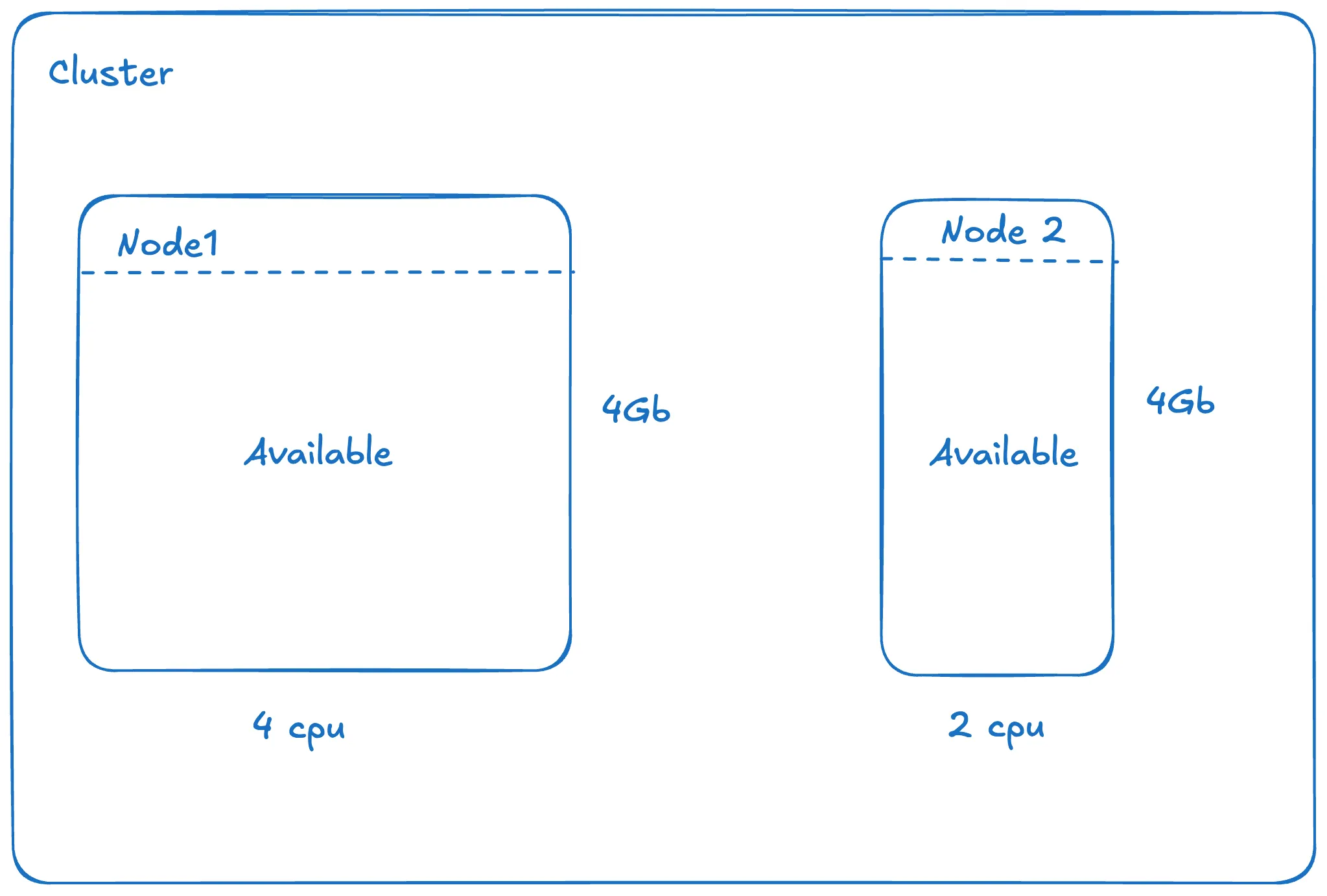 This gives us: **waste CPU = 6 − 3 = 3 CPU** and **waste memory = 8 − 5 = 3 GB**.
### Converting waste to cost
Since you pay per machine (not per core or per GB), we need a ratio to split the cost between CPU and memory. We use a **9:1 ratio** in favor of CPU. This reflects that, on most AWS and GCP instance families, CPU is roughly 9x more expensive per unit than memory. You can verify this by comparing on-demand pricing for common instance types.
From there, it's useful to compute waste at two levels:
* **Cluster level**: get an overall view of waste.
* **Node pool level**: if you rely on affinity rules, this helps identify which node pools are underutilized.
Some providers compute waste from actual usage (possible in Costory via AWS
Managed Prometheus). The downside is that per-namespace costs become unstable
and harder to compare over time, since you pay for the nodes you schedule,
not for what pods actually consume.
## Steps
Follow the [EKS cost allocation](/use-cases/eks-cost-allocation) guide to enable split cost allocation and add labels to your pod deployments.
On GKE, Google exposes cost allocation data with labels prefixed by `k8s_label_` (see [GKE cost allocations](https://cloud.google.com/kubernetes-engine/docs/how-to/cost-allocations)). Your labels should be directly visible in Costory Dimensions, no extra setup needed.
Once your pods have labels, such as team, app, and environment, use Costory **Dimensions** to merge these labels with your billing data. This lets you split cluster costs per label for cost allocation and chargeback.
This allows you to fix the automatic renaming performed by GCP (`k8s_label_`).
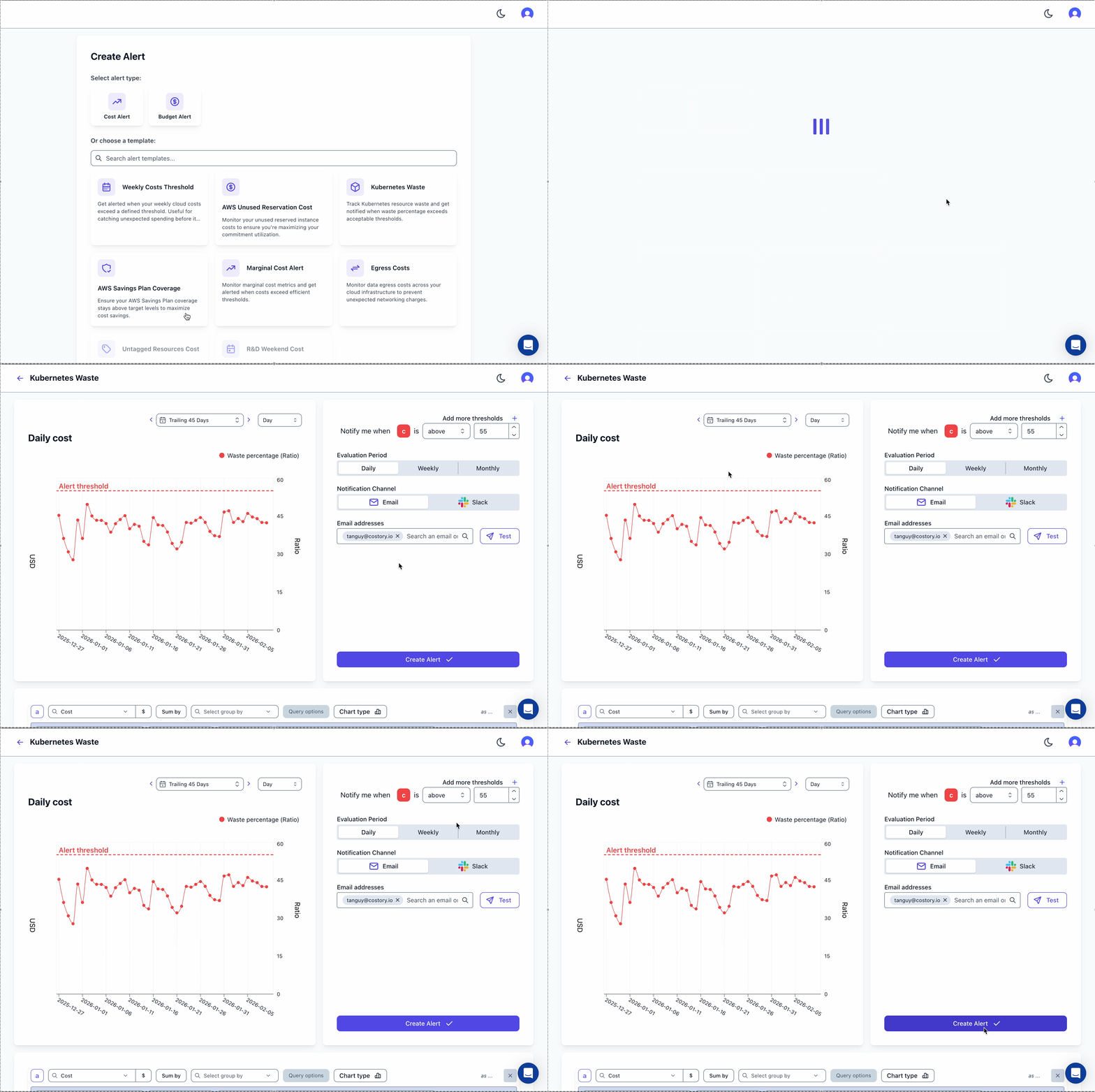
Track your waste ratio over time and get notified when it exceeds acceptable thresholds. In Costory, create an alert using the **Kubernetes Waste** template:
This gives us: **waste CPU = 6 − 3 = 3 CPU** and **waste memory = 8 − 5 = 3 GB**.
### Converting waste to cost
Since you pay per machine (not per core or per GB), we need a ratio to split the cost between CPU and memory. We use a **9:1 ratio** in favor of CPU. This reflects that, on most AWS and GCP instance families, CPU is roughly 9x more expensive per unit than memory. You can verify this by comparing on-demand pricing for common instance types.
From there, it's useful to compute waste at two levels:
* **Cluster level**: get an overall view of waste.
* **Node pool level**: if you rely on affinity rules, this helps identify which node pools are underutilized.
Some providers compute waste from actual usage (possible in Costory via AWS
Managed Prometheus). The downside is that per-namespace costs become unstable
and harder to compare over time, since you pay for the nodes you schedule,
not for what pods actually consume.
## Steps
Follow the [EKS cost allocation](/use-cases/eks-cost-allocation) guide to enable split cost allocation and add labels to your pod deployments.
On GKE, Google exposes cost allocation data with labels prefixed by `k8s_label_` (see [GKE cost allocations](https://cloud.google.com/kubernetes-engine/docs/how-to/cost-allocations)). Your labels should be directly visible in Costory Dimensions, no extra setup needed.
Once your pods have labels, such as team, app, and environment, use Costory **Dimensions** to merge these labels with your billing data. This lets you split cluster costs per label for cost allocation and chargeback.
This allows you to fix the automatic renaming performed by GCP (`k8s_label_`).
Track your waste ratio over time and get notified when it exceeds acceptable thresholds. In Costory, create an alert using the **Kubernetes Waste** template:
 Waste reallocation is currently available for **EKS only**.
Costory supports two reallocation strategies:
| Strategy | How it works | Best for |
| ------------------------------------ | --------------------------------------------------------------------------------------------------------------------------------------------------------------------------------------------- | ------------------------------------------------------------------------------------------------------------------------------------------------------------ |
| **Namespace reallocation** (default) | Calculates per-hour usage requested by each namespace and reallocates waste proportionally. | Most clusters with standard scheduling. |
| **Node-based reallocation** | Calculates per-hour resource requests per pod on each individual node and reallocates waste accordingly. A pod alone on a node will bear its full cost for the period it's the sole occupant. | Clusters relying heavily on affinity rules (node pools, zones, etc.) where a single pod may trigger a new node. Trade-off: more variance in waste over time. |
By default, namespace reallocation is enabled. Reach out to us to enable node-based reallocation.
## What's next?
Need a quick read on waste? Ask the [Costory MCP](/features/mcp) to "show the waste ratio per node pool this month and the namespaces driving the most over-provisioning" and get the answer in chat.
* Set up a [weekly Slack report](/features/slack-reports) to share waste metrics with your team.
* Add your Kubernetes labels to the [digest tree](/features/digest) for automated cost-change notifications.
* Explore your data in [Explorer](/features/cost-explorer) to identify faulty deployments over-requesting resources.
Waste reallocation is currently available for **EKS only**.
Costory supports two reallocation strategies:
| Strategy | How it works | Best for |
| ------------------------------------ | --------------------------------------------------------------------------------------------------------------------------------------------------------------------------------------------- | ------------------------------------------------------------------------------------------------------------------------------------------------------------ |
| **Namespace reallocation** (default) | Calculates per-hour usage requested by each namespace and reallocates waste proportionally. | Most clusters with standard scheduling. |
| **Node-based reallocation** | Calculates per-hour resource requests per pod on each individual node and reallocates waste accordingly. A pod alone on a node will bear its full cost for the period it's the sole occupant. | Clusters relying heavily on affinity rules (node pools, zones, etc.) where a single pod may trigger a new node. Trade-off: more variance in waste over time. |
By default, namespace reallocation is enabled. Reach out to us to enable node-based reallocation.
## What's next?
Need a quick read on waste? Ask the [Costory MCP](/features/mcp) to "show the waste ratio per node pool this month and the namespaces driving the most over-provisioning" and get the answer in chat.
* Set up a [weekly Slack report](/features/slack-reports) to share waste metrics with your team.
* Add your Kubernetes labels to the [digest tree](/features/digest) for automated cost-change notifications.
* Explore your data in [Explorer](/features/cost-explorer) to identify faulty deployments over-requesting resources.