Split Shared API Costs Across Teams Using Usage Metrics
Allocate untagged or shared API costs to the right teams based on actual usage data. This guide walks you through usage-based shared cost allocation with Costory, from connecting an external metric to building a reusable chargeback model.
When part of your cloud bill is untagged, for example a shared API gateway used by several teams, tags alone can’t attribute it. Without , those costs land in an “other” bucket, and chargeback or showback becomes impossible.This guide splits shared API costs proportionally. You connect an external usage metric (API call counts per team) in Costory, then build a reusable that attributes the right share of cost to each team going forward.
You have identified the total cost of this API in your billing data.
You have a usage metric from your internal monitoring tool (e.g., API call counts per team) that can serve as an allocation key to split costs across callers.
In this example, you will use an AWS S3 Parquet file that looks like:
date
team
region
api_call_count
2025-12-01 00:00:00
Team_A
North
1081
2025-12-01 00:00:00
Team_A
South
1330
2025-12-01 00:00:00
Team_A
East
1201
2025-12-01 00:00:00
Team_A
West
505
2025-12-01 00:00:00
Team_B
North
983
For each team and region, you know how many API calls were made.
This use case uses an AWS S3 Parquet file, but you can use any source on the External metric grid: Datadog, Datadog CI Visibility, Amplitude, BigQuery, Google Sheets, Tsuga, CloudWatch, or S3.
The overall flow is: export a usage metric from your monitoring system, import it into Costory, preview the proportional split, then lock it in with a Virtual Dimension.
Create an IAM role with READ and LIST permissions on this bucket
Add a federated trust policy so the Costory service account can assume the role
Attach the read policy to the role
2
Schedule the metric export
Create a scheduled job (cron, Airflow, GitHub Actions, or any orchestrator) that writes the metric file to the bucket every day. The job should:
Output format: A Parquet file with one row per combination of dimensions per day. At minimum, include a date column, one or more dimension columns (e.g., team, region), and a numeric value column (e.g., api_call_count).
S3 prefix: Write files under a consistent prefix, for example s3://<bucket>/api_cost_allocations/. Costory scans this prefix for new files.
Overwrite strategy: You can safely write a new file each day. Costory applies an incremental overwrite strategy: for a given day, the last data received wins, and existing data for other days is preserved.
You can force a re-import on demand from the Metrics DataSource page. Otherwise, files are imported automatically every day at 06:00 UTC.
3
Create the metric in Costory
Terraform
Manual
# Add this to the same Terraform configuration as the previous step.resource "costory_metrics_datasource_s3_parquet" "single_dims" { name = "API Usage" bucket_name = local.bucket_name prefix = "api_cost_allocations" role_arn = aws_iam_role.federated.arn metrics_definition = [ { metric_name = "API Usage" gap_filling = "ZERO" // How to handle missing values for a day aggregation = "SUM" // How to aggregate the metric across multiple days value_column = "api_call_count" date_column = "date" dimensions = ["region", "team"] unit = "calls" } ]}
Go to the Metrics DataSource Page and create a new metric.
Select the S3 bucket and the file name.
Select the column that contains the date.
Select the column that contains the team.
Select the column that contains the region.
Select the column that contains the API call count.
Save the metric.
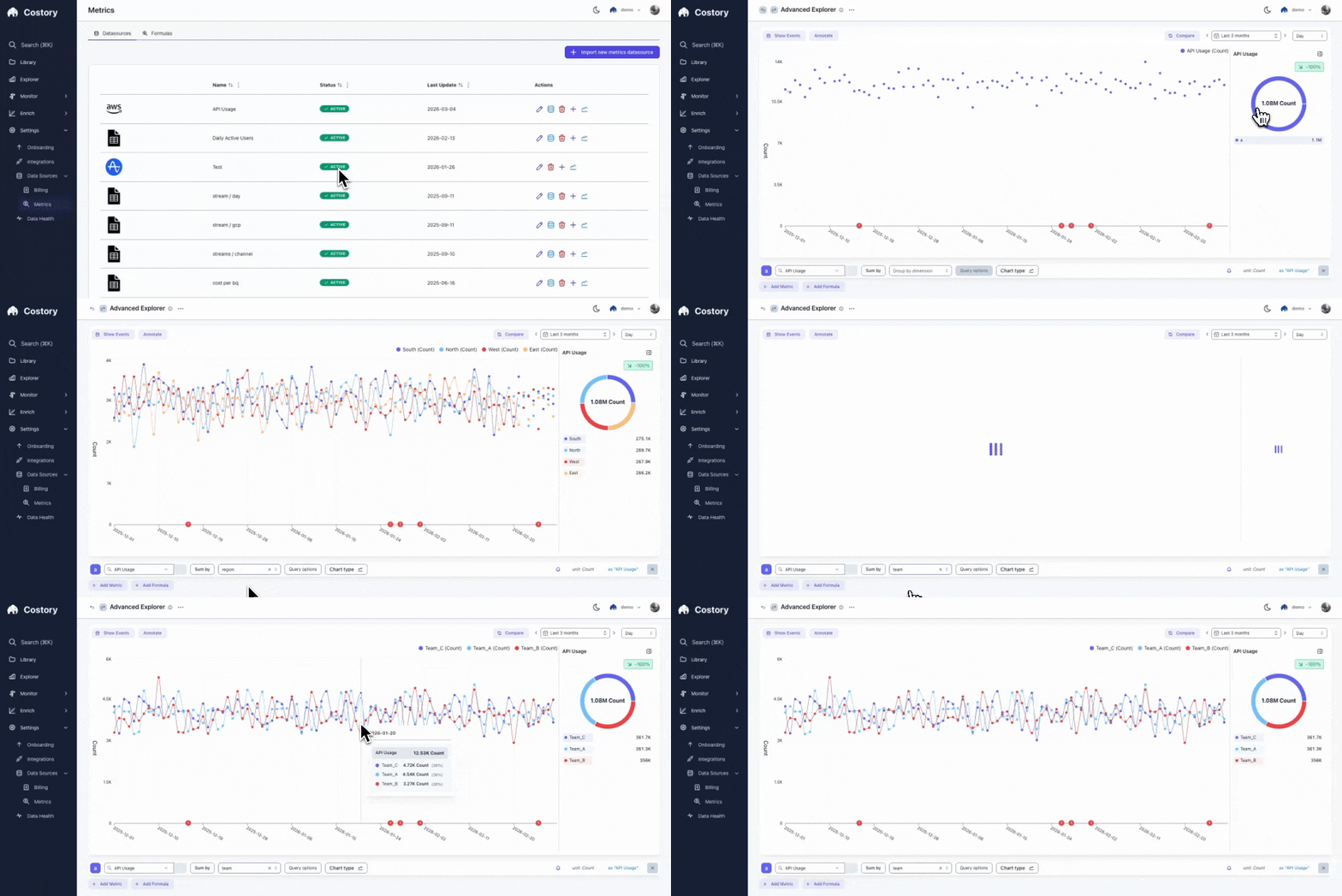
The metric will take a few minutes to be ingested. Once ready, you can see it and its values in Costory.
The Metrics Datasources page showing the imported API Usage metric as Active
4
Preview the reallocation
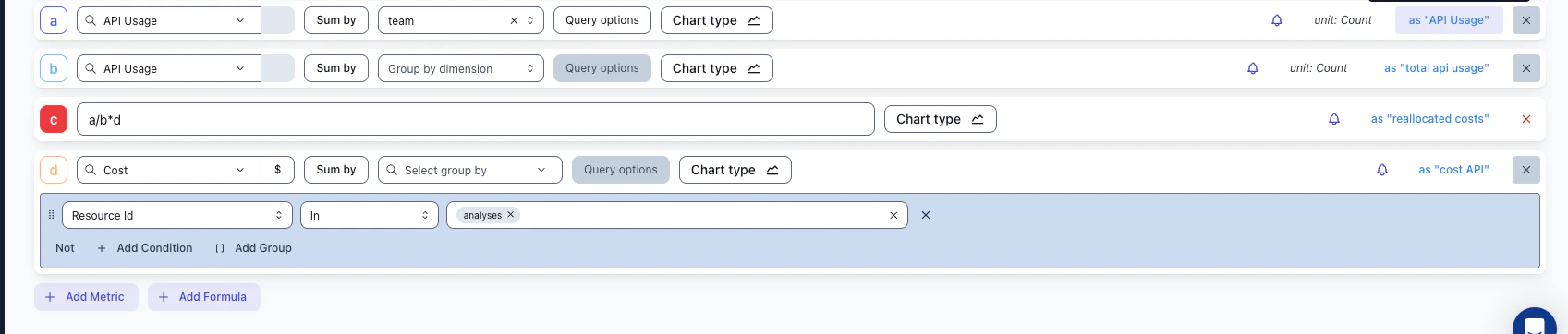
Use Explorer to preview how the reallocated costs would look before committing to a virtual dimension.The idea is to build a formula that computes each team’s proportional share of the total API cost:
Row
What it represents
Example
a
API Usage metric, grouped by team
Team A: 4 117 calls, Team B: 983 calls
b
Total API usage across all teams
5 100 calls
c
The reallocation formula: a / b * d
Team A gets 80.7% of the cost
d
Total cost of the shared API resource
$1 000
The formula a / b * d gives you: (team’s calls / total calls) * total cost = team’s share.
Explorer showing the reallocation formula: team usage (a) / total usage (b) * total cost (d)
5
Create the Virtual Dimension
Create a virtual dimension that automatically allocates the shared cost going forward.
Add a new rule for those API costs:
Rely on reallocation based on usage metrics
Use the metric you just imported
Choose an allocation strategy:
Identity mapping: The new label value is the team name
Regex mapping: The API name contains the team name (extract it with a regex)
Manual mapping: The API name has no relation to the team name; map each name manually
Save the virtual dimension
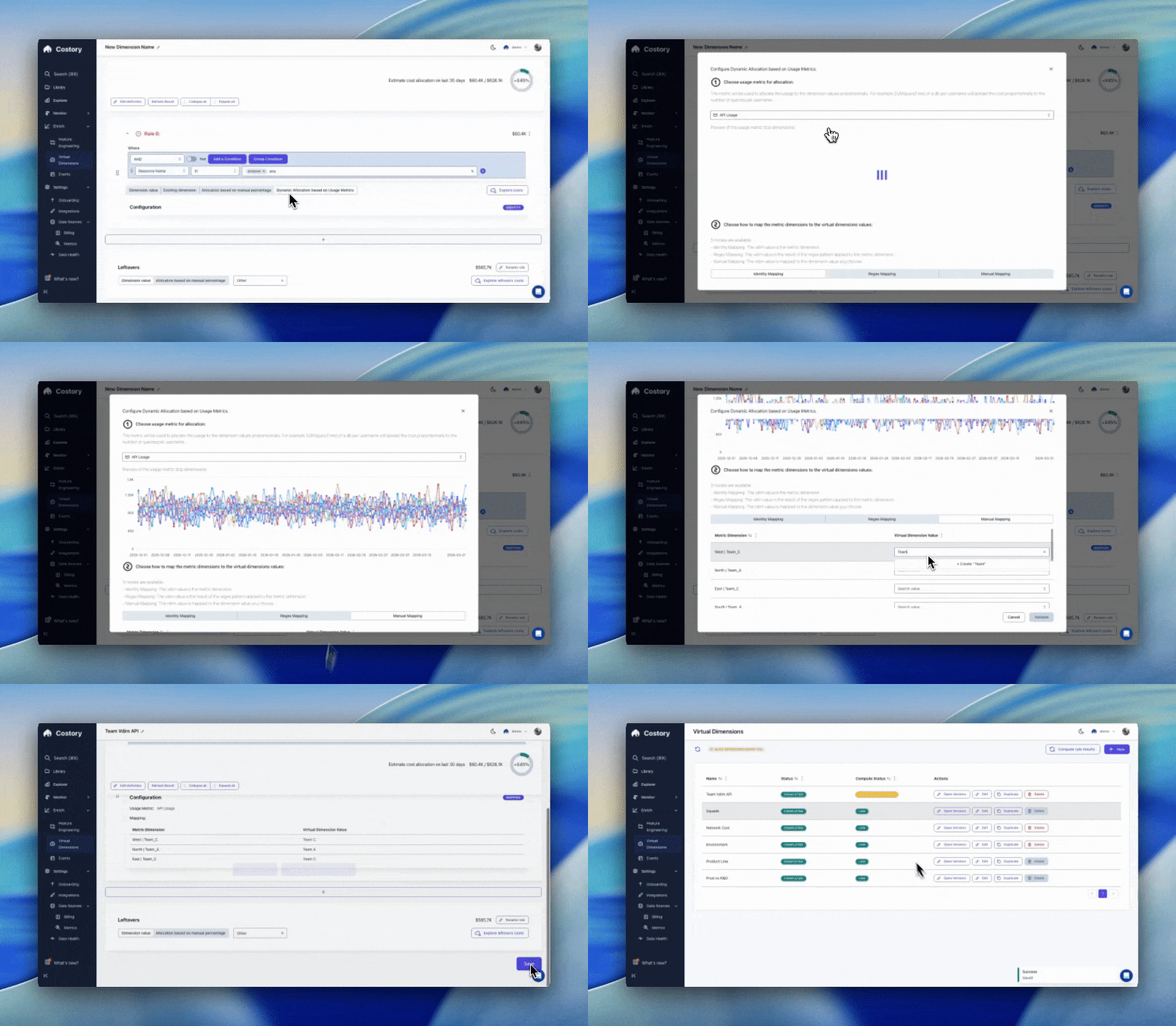
Watch how a Virtual Dimension rule is configured with dynamic allocation based on the imported usage metric:
Creating a Virtual Dimension rule that dynamically allocates API costs based on the imported usage metric
Prefer to skip the UI? The Costory MCP can draft, preview, and publish this reallocation virtual dimension from chat. Try “draft a virtual dimension that splits my API gateway cost across teams using the API Usage metric, then show me the preview.”
Set up a weekly Slack report to share the reallocated costs with each team automatically.
Explore the results in Explorer to validate cost attribution per team.
Build on this allocation to create a budget tracking workflow per team.