Track Unit Economics to Justify Cloud Cost Increases
Link cloud cost increases to business growth by connecting external metrics in Costory and building unit economics formulas. Defend scaling decisions with data.
Not every cost increase is a problem. More customers, higher traffic, and new workloads all raise cloud spend. That nuance is usually lost when finance reviews the bill.Engineering needs to show that costs grew because the business grew, not because something broke.Connect a usage source from Integrations > + Add integration > External metric, then define formulas in Explorer to track over time.
Your cloud billing data is connected to Costory (see Quickstart).
You have access to a business or usage metric (for example active users, API calls, or transactions) from a source on the External metric grid: Datadog, Datadog CI Visibility, Amplitude, BigQuery, Google Sheets, Tsuga, CloudWatch, or S3.
Connect the usage data that matters to your business from any source on the External metric grid: Datadog, Datadog CI Visibility, Amplitude, BigQuery, Google Sheets, Tsuga, CloudWatch, or S3.See Metrics Correlation for connection details.
Usage metrics queried next to cloud cost data
2
Define a unit economics formula
Once you can query the metric in Advanced Explorer, define a formula in Explorer to track the KPIs that matter:
Cost per active customer, to track infrastructure efficiency per user
Storage cost per document, to monitor storage efficiency at the resource level
Lambda cost per OCR job, to measure serverless cost per operation
A custom KPI that matches how your business measures output
These metrics can be visualized over time and scoped by team, product, or region.
The Costory MCP can assemble the view for you: “build a cost-per-active-customer chart over the last 6 months and save it to a dashboard.”
3
Share unit economics with stakeholders
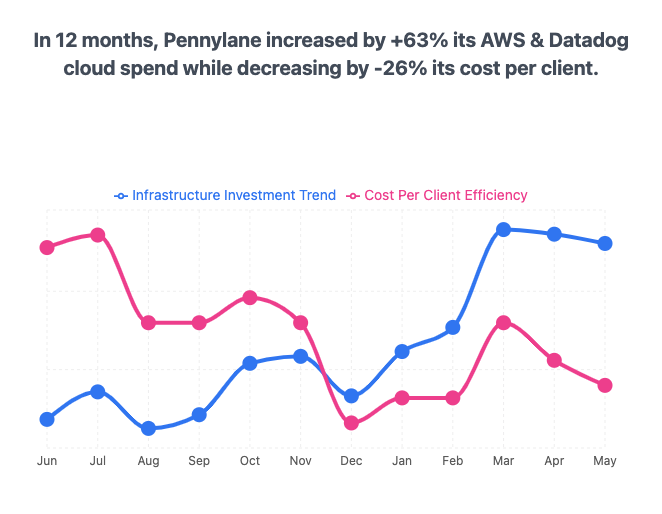
Use the resulting charts to show finance that your cost per user is going down even as total spend goes up.
Include unit economics in your monthly cost report. The Digest can reference usage metrics in its AI-generated explanations.