
What is a FinOps MCP?
A FinOps MCP is a Model Context Protocol server that exposes cloud billing, allocation, and automation tools to AI assistants. Instead of pasting CUR exports into chat, the assistant calls tools likequery, create_alert, and create_report against live data.
Costory FinOps MCP adds workspace context on top of raw provider billing: , , dashboards, alerts, and saved views.
Add Costory MCP to your Cursor / Claude / Dust
- Claude Desktop
- Claude Code
- VS Code (Copilot)
- Cursor
- Dust
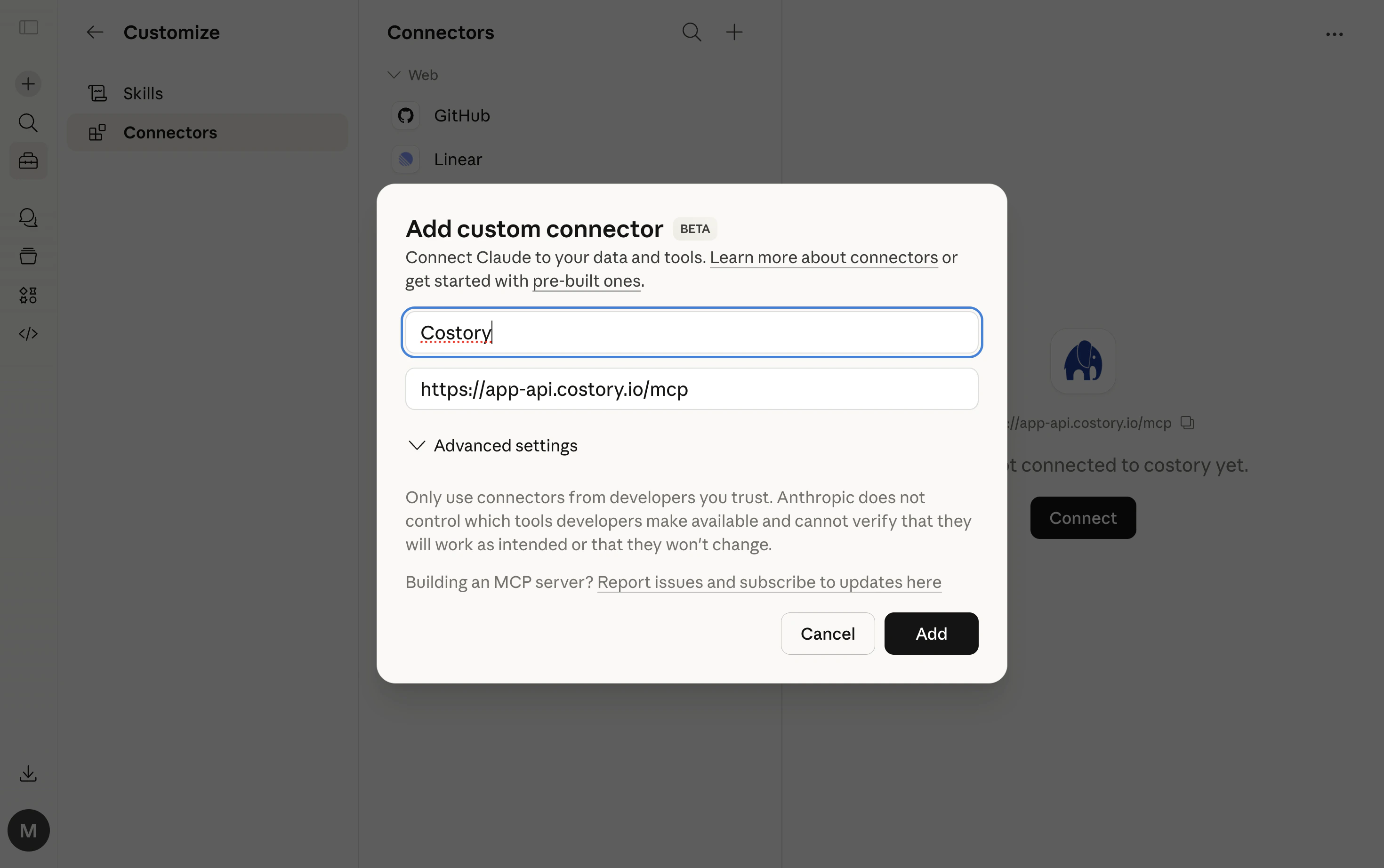
- Open Claude Desktop settings
- Go to Connectors
- Click Add custom connector
- Enter Costory as the name and
https://app-api.costory.io/mcpas the URL - Click Add, then Connect
- A browser window will open. Log in with your Costory account
- Start asking about your costs
Alternative: JSON config
Alternative: JSON config
mcp-remote fallback requires Node.js to be installed.Example FinOps prompts
Explore costs
Ask questions in natural language and the assistant will query your cost data:- “How much is the platform team spending on compute this month?”
- “Show me infrastructure costs for the recommendations API, broken down by service”
- “What’s our total AI spend across Anthropic, OpenAI, and Bedrock?”
- “How much are we spending on storage?”
Compare periods
Understand how costs have changed over time:- “What’s driving the cost increase on our data pipeline this week? Any related deploys or traffic changes?”
- “Did the March 15th release affect our search service costs?”
- “Compare this week’s spend to last week for the data squad”
- “How have our compute costs changed compared to last month?”
Find information
Search across your entire Costory workspace:- “Find the saved view for the data team’s Kubernetes costs”
- “What dashboards do we have for AI spend across providers?”
- “Show me alert history related to BigQuery pipelines”
Get recommendations
The assistant can suggest what to look at:- “What dimension should I group by to explain the billing-api cost spike?”
- “Based on deploy and metric history, what should I investigate next on the data pipeline increase?”
Take action
Go beyond analysis. Create views, alerts, events, and share reports:- “Save this query as a view called ‘Recommendations API Infra Cost’”
- “Set up an alert if platform team compute costs go above $10,000 this month”
- “Log an event: deployed billing-api v2 on March 15th”
- “Send this cross-provider AI cost report to the #finops Slack channel”
FinOps MCP workflows
Each workflow below shows a natural-language prompt, the MCP tools the assistant calls, and the JSON payload shape. These examples are specific to Costory workspace context. For plugin install and additional reference examples, see the costory-plugin repository.Correlate a deploy with a cost change
Correlate a deploy with a cost change
query with period comparison, then list_events to pull deploy markers in the same window.Result: A side-by-side cost breakdown by service plus a timeline of deploys that overlapped the spike.Underlying MCP calls (JSON)
Underlying MCP calls (JSON)
querylist_eventsQuery allocated spend by team and environment
Query allocated spend by team and environment
query with a filterCel scope built from your dimensions.Result: Monthly compute spend for the platform team in production, grouped by cloud service.Underlying MCP calls (JSON)
Underlying MCP calls (JSON)
queryTrack cost per business metric
Track cost per business metric
list_metrics to resolve the metric ID, then query with a formula.Result: Unit cost trend with period-over-period comparison. See Unit Economics for the same analysis in Explorer.Underlying MCP calls (JSON)
Underlying MCP calls (JSON)
queryFind the right dimension for a spike
Find the right dimension for a spike
suggest_groupby, then query using the recommended dimension.Result: The assistant picks the most explanatory split (for example cos_k8s_namespace or cos_service_name) and drills down automatically.Underlying MCP calls (JSON)
Underlying MCP calls (JSON)
suggest_groupbyquery (using the suggested dimension)Backtest an alert before creating it
Backtest an alert before creating it
preview_alert to backtest, then create_alert with the same condition. Resolve the Slack channel via list_available_destinations.Result: A validated alert with historical firing days and a link to edit it in Costory. Requires Slack integration.Underlying MCP calls (JSON)
Underlying MCP calls (JSON)
preview_alertcreate_alert (after preview passes)Build a post-incident cost dashboard
Build a post-incident cost dashboard
create_dashboard with a scoped context and one or more widgets.Result: A shareable dashboard URL your team can reuse after incidents or cost reviews.Underlying MCP calls (JSON)
Underlying MCP calls (JSON)
create_dashboardExplore how to split costs, then publish a virtual dimension
Explore how to split costs, then publish a virtual dimension
suggest_groupby and query (which field best separates the cost) and search type dimensions (the real values behind each concept). Then commit: create_virtual_dimension_draft, preview_virtual_dimension_draft to check per-rule costs and leftover %, virtual_dimension_overlap_matrix to catch shadowing, and publish_virtual_dimension.Result: A published Team dimension across Explorer, dashboards, alerts, and reports after the refresh. The exploration loop is the point; drafting and publishing are the easy last steps. See Dimensions.Underlying MCP calls (JSON)
Underlying MCP calls (JSON)
suggest_groupby (which field best explains the spend?)create_virtual_dimension_draft (after the split is validated)preview_virtual_dimension_draftpublish_virtual_dimension (after preview and overlap check pass)Example conversations
Investigating a cost spike
Investigating a cost spike
- Call
get_contextto load dimensions and recent dashboards - Run
querywith a week-over-week comparison - Call
list_eventsfor deploys and provider events in the same period - Highlight likely causes with a timeline of what changed first
- Call
suggest_actionsfor follow-ups (drill deeper, set up an alert, share to Slack)
Underlying MCP calls (JSON)
Underlying MCP calls (JSON)
querylist_eventsCross-provider AI cost review
Cross-provider AI cost review
- Query AI-related spend across Anthropic, OpenAI, and AWS Bedrock
- Combine results into one total with a provider-level breakdown
- Break down the same spend by team and model
- Offer to save the view or send the report to Slack
Underlying MCP calls (JSON)
Underlying MCP calls (JSON)
queryBuilding a cost report
Building a cost report
- Query costs grouped by service for the current month
- Schedule a report via
create_report - Deliver a formatted chart to the Slack channel
Underlying MCP calls (JSON)
Underlying MCP calls (JSON)
create_reportSetting up monitoring
Setting up monitoring
- Run
preview_alertto confirm the threshold would have fired recently - Create a cost alert with
create_alert - Return a link to review and edit the alert in Costory
Underlying MCP calls (JSON)
Underlying MCP calls (JSON)
create_alertWhy Costory MCP?
Direct access to AWS CUR or a GCP MCP server gives you provider-native line items and dimensions. Costory MCP adds your Costory workspace context so you can ask higher-level cost questions and take action in the same flow.- Query spend by team, product, or feature because and are already modeled.
- Ask one question across AWS, GCP, Azure, Datadog, Anthropic, OpenAI, and Cursor instead of wiring and maintaining separate MCP servers per provider.
- Explain why costs moved by using with deploys, Datadog metrics, and provider events in the same investigation.
- Continue from saved views, dashboards, team structures, alert history, and prior investigations so your assistant has persistent workspace context.
- Connect with one URL and OAuth (no IAM credentials, Docker, or local server setup), and use it in Claude, Cursor, VS Code, or Claude Code.
- Take action directly from chat by creating alerts, saving views, logging events, and sending Cost Reports.
- Use pre-computed allocation rules and shared costs so each query starts from resolved context instead of rebuilding logic from raw CUR data.
MCP tools reference
Discovery and context
Query and data
query query types
Dashboards
update_dashboard operations
Alerts
Virtual dimensions
Manage virtual dimensions end-to-end. Edits happen on a draft; publishing is explicit and triggers a BigQuery refresh. Rules are always read and written as CEL (first match wins), with an automatic catch-all leftover bucket.Events
Reports and notifications
create_report widget types
Organization metadata
Documentation
Agent helpers
Tips
Be specific about time
Use your own names
Ask follow-ups
Multi-org support
FAQ
What is a FinOps MCP?
What is a FinOps MCP?
How is Costory FinOps MCP different from an AWS billing MCP?
How is Costory FinOps MCP different from an AWS billing MCP?
Which AI clients support FinOps MCP?
Which AI clients support FinOps MCP?
https://app-api.costory.io/mcp and authenticate via OAuth.Do I need to run a local MCP server?
Do I need to run a local MCP server?
mcp-remote bridge is available as a fallback if your client does not support HTTP transport natively.Can FinOps MCP create alerts and Cost Reports?
Can FinOps MCP create alerts and Cost Reports?
create_alert, create_report, and list_available_destinations to set up cloud cost alerts and Cost Reports directly from chat.Troubleshooting
Browser doesn't open for login
Browser doesn't open for login
mcp-remote fallback, make sure npx is available in your PATH.Claude Code: 'does not support dynamic client registration'
Claude Code: 'does not support dynamic client registration'
type: "http") rather than mcp-remote. Run /mcp in Claude Code, then select Authenticate to trigger the OAuth flow.'Not authenticated' errors
'Not authenticated' errors
/mcp and select Authenticate.'Multiple organizations' error
'Multiple organizations' error
No results from search
No results from search