
What is a cloud cost digest
A cloud cost digest is an automated FinOps report that compares one billing period to another, ranks the largest cost movers by dollar impact, and drafts a plain-language explanation of why spend changed. Platform engineers use it to replace the monthly write-up they would otherwise assemble from billing consoles, GitHub PRs, and incident history. Finance and engineering stakeholders get a shareable Summary they can read without a dashboard walkthrough. A static chart or a table of numbers only shows that spend moved. Digest adds the ranked drivers and optional AI root-cause analysis, then delivers the narrative to Slack or email on a schedule. Digests cover AWS, GCP, Azure, and AI spend in the same tree.Automate FinOps reporting with Digest
Digest is an element inside a Cost Report, not a standalone export. You set the report scope once (metric, group-by, filters, currency), add a Cost digest, and stack other elements around it to match how you already report: a Graph for the trend, Text for markdown context, Top / Flop for a short ranking, or a Dashboard PDF when stakeholders still want the full board. Inside Costory you can reopen each run as Summary, Tree, or Table. Where FinOps reporting usually breaks down without a digest:- Pasting screenshots into Notion or Slack and answering “what happened?” in thread. See the monthly reporting guide.
- Shipping charts without an explanation, so finance still needs a live walkthrough
- Leaving each engineering squad without a scoped view of their own movers. Use dimensions to filter digests per team
- Rebuilding a spreadsheet when an alert fires or a CFO asks why the bill jumped
Key terms used in this article
- Cost digest: A report element that turns period-over-period cost changes into a ranked tree and optional AI narrative for FinOps reporting.
- Report parameters: The shared scope for every element in the report: Metric, Group By, Where, and Currency.
- Additional group by: Extra dimensions stacked under the report Group By, in order. Each one adds a deeper level to the tree.
- AI investigation: An async analysis that runs after scheduled or manual delivery. Deepest leaf nodes get root-cause text. It does not appear in the builder preview.
- Costory AI: Costory’s AI FinOps assistant. It drafts the digest narrative and per-node explanations.
Prerequisites
- Cloud billing data connected for AWS, GCP, Azure, or your other sources. Start with the Quickstart.
- For Slack or email delivery, finish Slack or Email setup.
- Optional: connect events so AI explanations can reference deploys, incidents, or pricing changes.
Get started
Create or open a Cost Report
Add and configure a Cost digest element
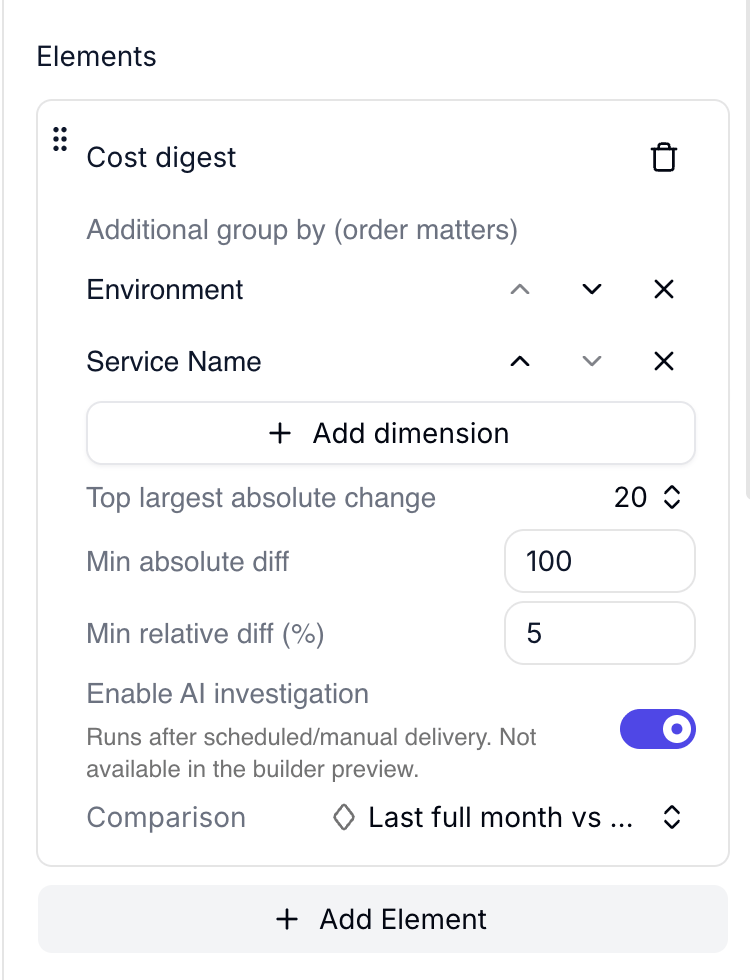
Cost digest element with Environment and Service Name dimensions, thresholds, and Enable AI investigation on
10.100.5.Preview as Tree or Table
Schedule delivery to Slack or email
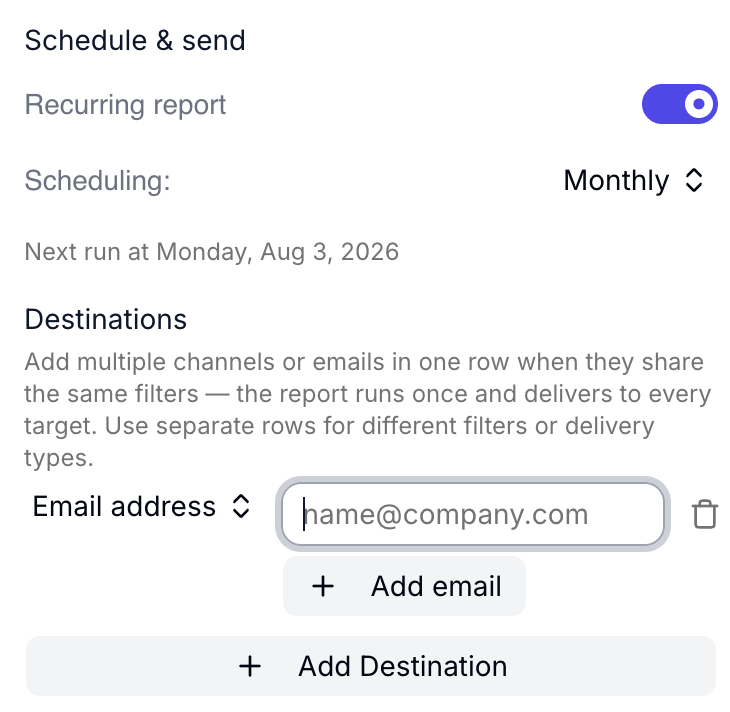
Schedule and send with monthly cadence and email destinations
How to read a Cost digest
Tree
Tree is the hierarchical breakdown: provider, then your additional dimensions, with absolute change, percentage change, and previous-to-current amounts. Increases show in red, decreases in green.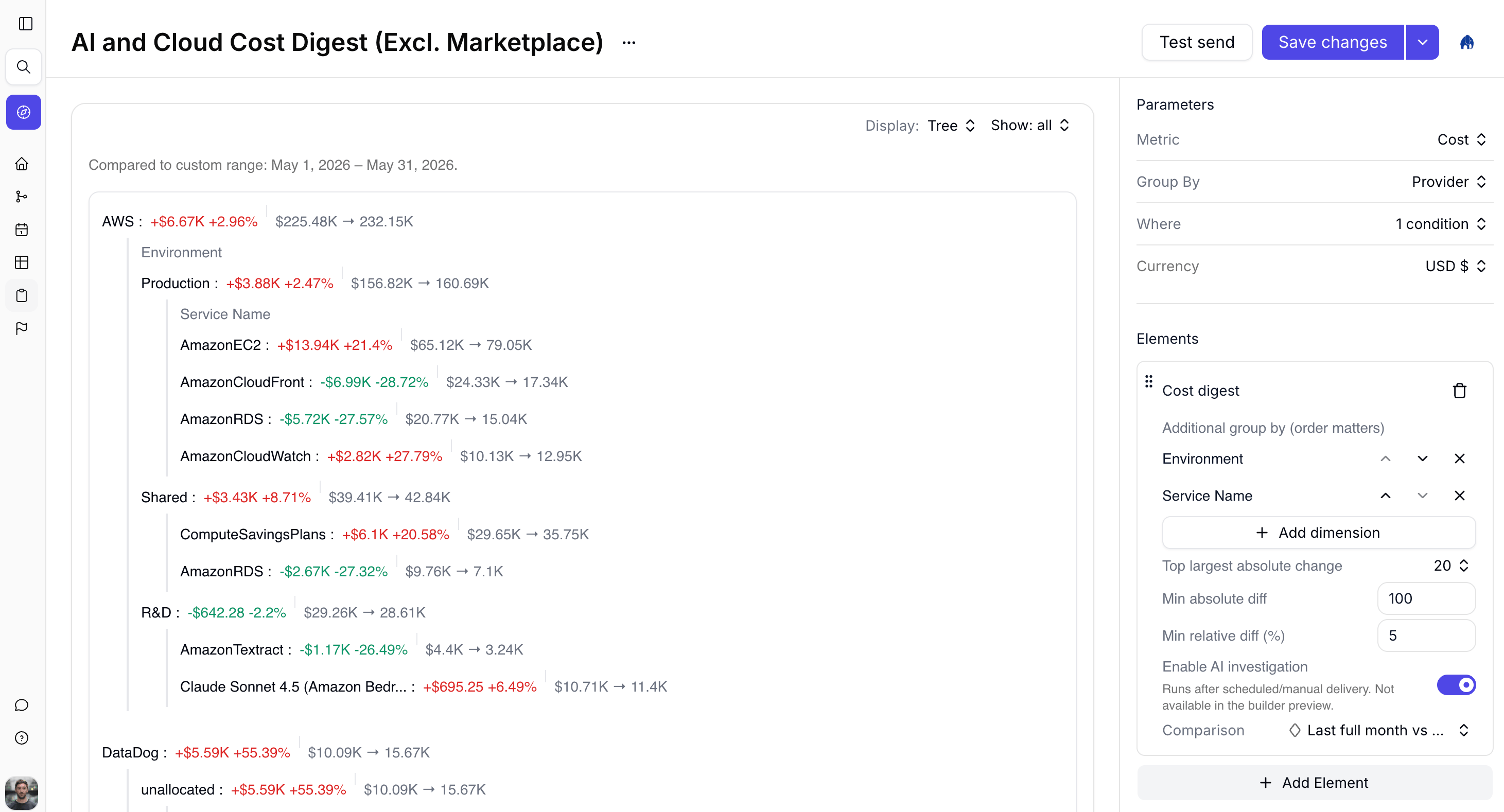
Tree display for Provider then Environment then Service Name
Table
Table flattens the same nodes into columns such as Provider, Environment, Service Name, Absolute diff, and Relative diff. Useful when you want to scan or export movers without expanding the tree.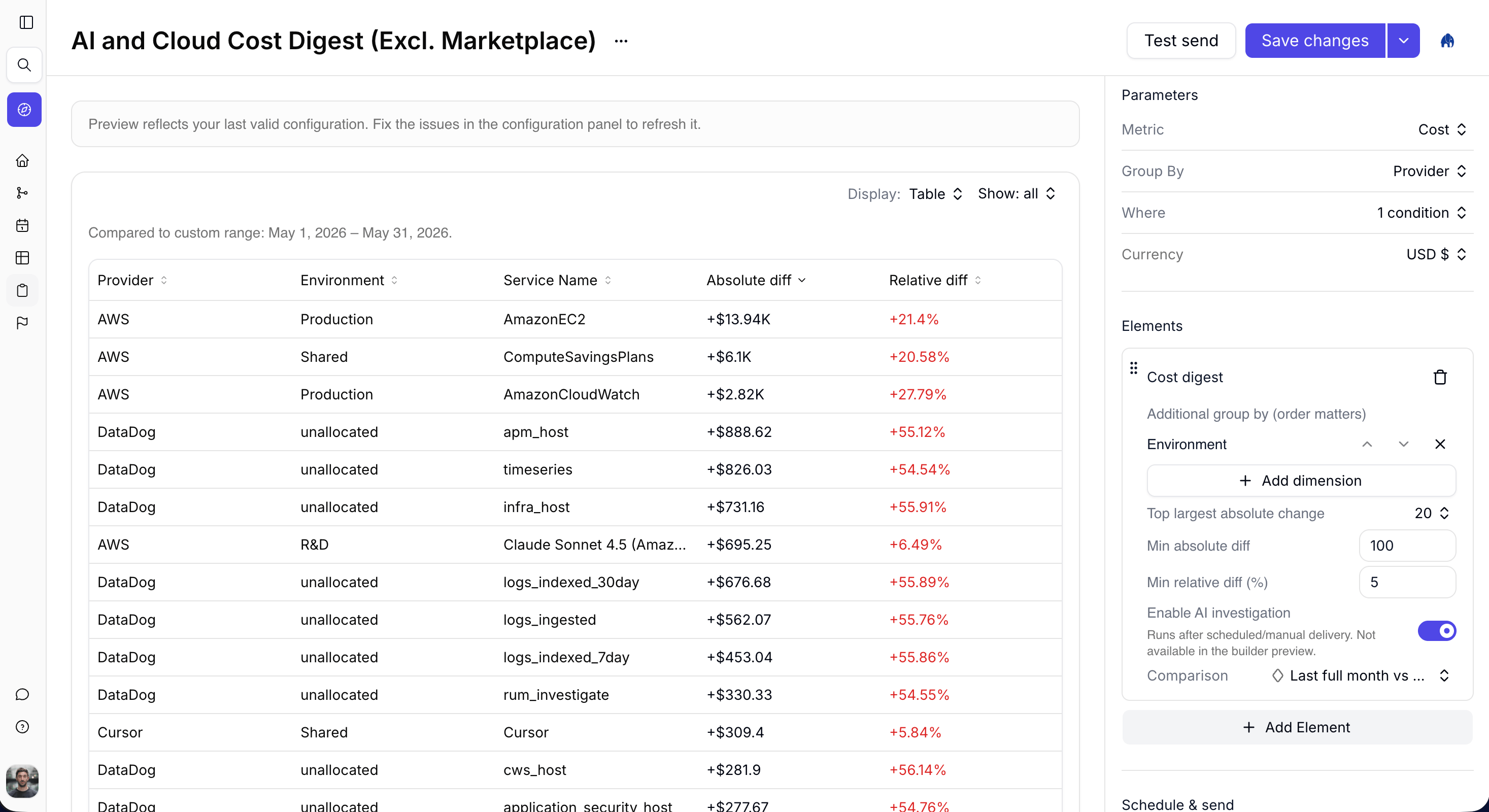
Table display of digest rows with absolute and relative diffs
Summary
After a run with Enable AI investigation on, open the sent digest and switch Display to Summary for the AI narrative. That narrative is what Slack and email recipients typically receive.Build digests with the API or MCP
The UI, Costory MCP, and Reports API create the sameDIGEST widget. Example: weekly engineering pulse grouped by environment, then service, with AI investigation on.
table DIGEST supports at most two group-by dimensions (report context.groupBy plus additionalGroupBy).
FinOps use cases
Automate monthly FinOps reporting
Set Group By to Provider, add Environment then Service Name as additional dimensions, enable AI investigation, and schedule monthly email to finance. You stop assembling the monthly write-up by hand. Finance gets the Summary narrative; you keep the Tree when someone asks for detail. Walkthrough: Automate Monthly Cloud Cost Reporting.Squad cost ownership
Filter Where to one team dimension, group by service, and send weekly Slack digests to each squad channel. Engineers see their own movers first, so fewer “is this ours?” pings land on the platform team. See Decentralize FinOps.Cloud cost root cause on demand
Leave scheduling off, add a Cost digest with AI investigation, and run the report now when an alert fires or a CFO asks why the bill jumped. The digest ranks which services or projects drove the change and drafts the explanation in the same shape you would write yourself.Frequently Asked Questions
What is Costory Digest?
What is Costory Digest?
How is a Cost digest different from a static cost chart?
How is a Cost digest different from a static cost chart?
Is Digest still a separate product area?
Is Digest still a separate product area?
Why is the AI text missing in the builder preview?
Why is the AI text missing in the builder preview?
How do I choose digest dimensions?
How do I choose digest dimensions?
Does Cost digest work across AWS, GCP, and Azure?
Does Cost digest work across AWS, GCP, and Azure?
What is the difference between Cost digest and Top / Flop?
What is the difference between Cost digest and Top / Flop?
Can I mix a digest with other report elements?
Can I mix a digest with other report elements?