Connect Elastic Cloud organization billing to Costory with an Organization API key. Covers setup, historical sync, and what cost grain and dimensions you get in Explorer.
Costory pulls costs from the Elastic Cloud Billing API using your Organization ID and an Elastic Cloud Organization API key. Data is normalized into so you can explore Elastic spend next to AWS, GCP, Azure, and other billing datasources.After setup, Elastic Cloud costs behave like other billing data in Explorer: same filters, breakdowns, and saved views. The sections below cover what one row represents and which dimensions you can rely on.
Manual setup
Terraform / API
Open Costory and go to Billing > Import new billing datasource > Elastic Cloud. The stepper guides you through each field.
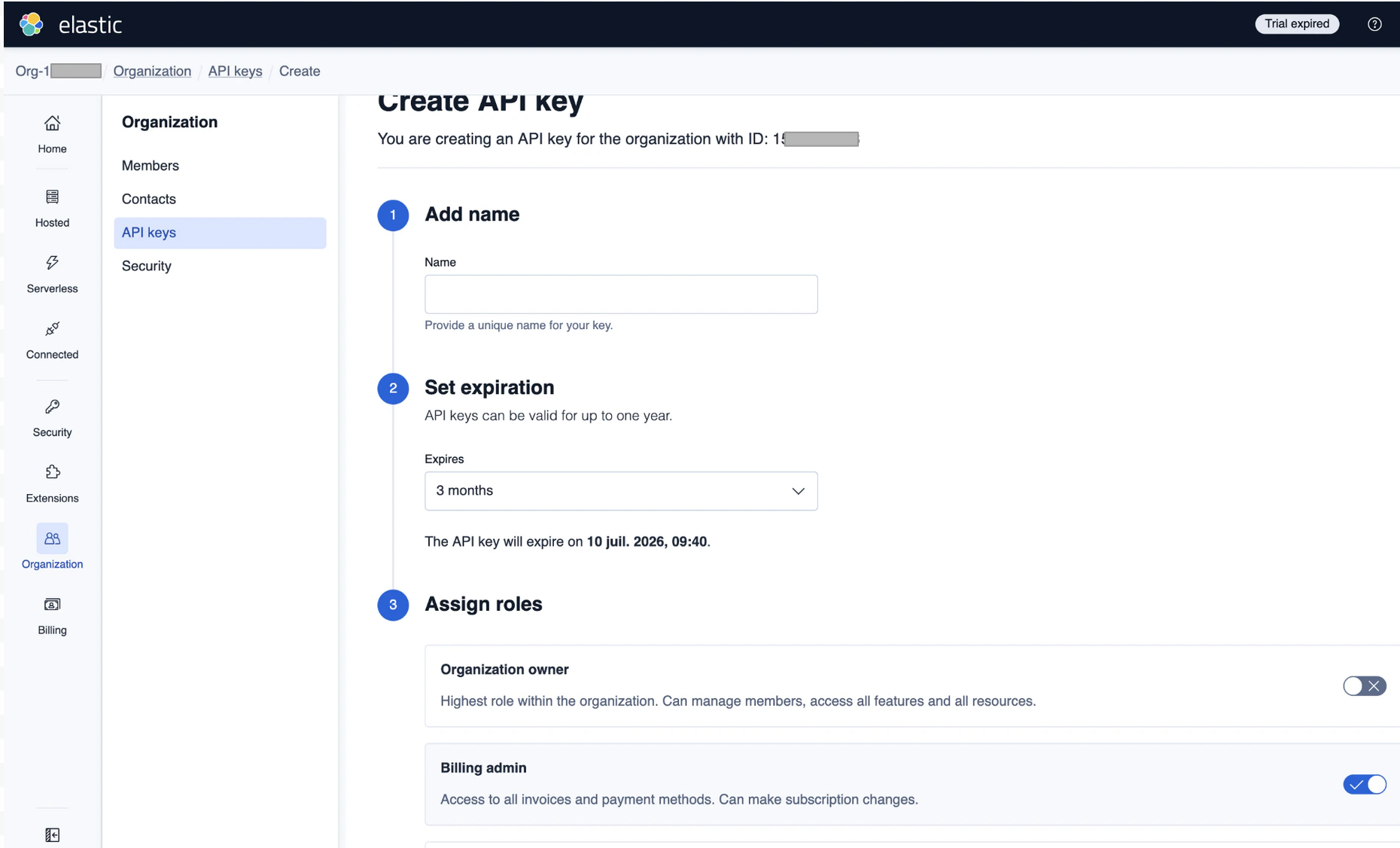
In the Elastic Cloud Console, open your organization and copy the Organization ID (you need it for the Costory form).
Elastic Cloud console: organization settings with Organization ID and API key management.
Create an Elastic Cloud Organization API key with access to billing scope. Only organization owners can create these keys. See Elastic Cloud API keys.
In Costory, enter a datasource name, paste the API key and Organization ID, then submit. Validation calls the Billing API to confirm access.
Start Date is optional. Use it to narrow the first sync window or cap the range Costory ingests. If you leave them empty, Costory uses its default initial backfill (see Historical data).
On first sync, Costory backfills approximately 6 months of historical billing data (one day at a time). Incremental syncs then keep data current.
In the Elastic Cloud Console, copy your Organization ID and ensure you have an Elastic Cloud Organization API key with billing scope. Elastic does not provide Terraform resources for these credentials; create them in the console or via Elastic’s APIs. See Elastic Cloud API keys.
Elastic Cloud console: organization settings with Organization ID and API key management.
Elastic sends one daily snapshot per Elastic Cloud project; Costory expands each project’s product_line_items so that one billing row is one product line for that project and usage day (not a single rolled-up row per project per day).Dimensions and usage fieldsEach row below is a Standard Column in Explorer and breakdowns. Exports and advanced queries use the same names with a cos_ prefix, for example cos_service_name for Service name and cos_consumed_quantity for Consumed quantity.
Standard Column
Filled from Elastic
Example
Provider
Fixed for this datasource.
Elastic Cloud
Billing account id
Elastic project id.
e9cc2fb04b35414690b77a3b2c593602
Sub account id
Elastic project name.
My Elasticsearch project
Resource id
Same as Billing account id (project id).
e9cc2fb04b35414690b77a3b2c593602
Resource name
Same as Sub account id (project name).
My Elasticsearch project
Service name
Full Elastic product line label for that billing line.
Elasticsearch - General Purpose - Search VCU (GCP us-central1)
Costory calls Elastic’s instance costs endpoint (see Get costs for instances):GET https://cloud.elastic.co/api/v2/billing/organizations/{organization_id}/costs/instancesAuthentication uses an API key in the Authorization header. See Elastic Cloud API keys and the Elastic Cloud Billing API for details.
All supported billing providers and shared setup concepts.
Explorer
Explore Elastic Cloud costs with the rest of your stack.
Standard Columns
Per-column Elastic mapping (open the Elastic Cloud tab in each section).
Dimensions
Map Elastic lines and labels to teams or products.
Last modified on October 12, 2026
Was this page helpful?
{"docsConfig":{"theme":"mint","$schema":"https://mintlify.com/docs.json","name":"Costory Documentation","colors":{"primary":"#1D3C93","light":"#305DD9","dark":"#1D3C93"},"logo":{"light":"https://mintcdn.com/costory/jdghijjvsrOsYiTC/logo/light.png?fit=max\u0026auto=format\u0026n=jdghijjvsrOsYiTC\u0026q=85\u0026s=dee63acdba91bf952855557cc5c5ec16","dark":"https://mintcdn.com/costory/jdghijjvsrOsYiTC/logo/light.png?fit=max\u0026auto=format\u0026n=jdghijjvsrOsYiTC\u0026q=85\u0026s=dee63acdba91bf952855557cc5c5ec16","href":"https://costory.io"},"favicon":"https://mintcdn.com/costory/stODLWETeKeyz7ed/favicon-new.svg?fit=max\u0026auto=format\u0026n=stODLWETeKeyz7ed\u0026q=85\u0026s=334ff5307103e4ffc0473bb6e1b9b56c","appearance":{"default":"light","strict":true},"navbar":{"links":[{"href":"https://costory.io","label":"Website"}],"primary":{"type":"button","label":"Start a free trial","href":"https://app.costory.io/welcome-demo?utm_source=get-started"}},"integrations":{"posthog":{"apiKey":"phc_jgU0iQbU4Arfu5ouKpn9YhzkTWv3P5VfW2n7sJsKR0P","apiHost":"https://user.costory.io","sessionRecording":true}},"contextual":{"options":["copy","view","chatgpt","claude","aistudio"],"display":"header"},"metadata":{"timestamp":true},"styling":{"latex":true},"navigation":{"pages":[]}},"deployment":{"deploymentMetadataValue":{"subdomain":"costory","hasAudioNarration":false,"actualSubdomain":"costory","customDomains":["docs.costory.io"],"gitSource":{"type":"github","owner":"costory-io","repo":"mintlify-docs","deployBranch":"main","contentDirectory":"","isPrivate":true,"mountPath":"","label":""},"chroma":{"liveDeploymentHistoryId":"6ad8a863df39c05fa0b74b9d","collectionId":"805c32b4-8819-4f85-ab41-abf4cad9d5d6","schemaVersion":"v3","latestBuiltDeploymentHistoryId":"6ad8a863df39c05fa0b74b9d"},"feedback":{"thumbs":true},"entitlements":{},"buildId":"6ad8a863df39c05fa0b74b9d","clientVersion":"0.0.3964","searchFilterCounts":[{"language":"default","tag":"API Reference","count":124},{"language":"default","tag":"Documentation","count":69},{"language":"default","tag":"Setup","count":43},{"language":"default","tag":"Alerts V2","count":26},{"language":"default","tag":"Dashboards","count":23},{"language":"default","tag":"Billing Data","count":21},{"language":"default","tag":"Use Cases","count":17},{"language":"default","tag":"Reports","count":16},{"language":"default","tag":"Metrics Correlation","count":13},{"language":"default","tag":"Events","count":11}]},"assistantConfig":{"enableAskAiButton":false,"enableStarterQuestions":false,"enableAskAiSearchBar":true},"hasChatPermissions":false,"hasWebMcpPermissions":false,"toggles":[{"name":"kill-isr","enabled":true,"variant":{"name":"disabled","enabled":false,"feature_enabled":true},"impressionData":false},{"name":"agent-mintlify-slack","enabled":true,"variant":{"name":"disabled","enabled":false,"feature_enabled":true},"impressionData":false},{"name":"editor-v7-file-tree","enabled":true,"variant":{"name":"disabled","enabled":false,"feature_enabled":true},"impressionData":false},{"name":"agent-integrations-settings","enabled":true,"variant":{"name":"disabled","enabled":false,"feature_enabled":true},"impressionData":false},{"name":"automations-pr-grouping","enabled":true,"variant":{"name":"disabled","enabled":false,"feature_enabled":true},"impressionData":false},{"name":"custom-prefix","enabled":true,"variant":{"name":"disabled","enabled":false,"feature_enabled":true},"impressionData":false},{"name":"analytics-v7","enabled":true,"variant":{"name":"disabled","enabled":false,"feature_enabled":true},"impressionData":false},{"name":"user-flows-analytics","enabled":true,"variant":{"name":"disabled","enabled":false,"feature_enabled":true},"impressionData":false},{"name":"no-publish-flow","enabled":true,"variant":{"name":"disabled","enabled":false,"feature_enabled":true},"impressionData":false},{"name":"workos-onboarding","enabled":true,"variant":{"name":"disabled","enabled":false,"feature_enabled":true},"impressionData":false},{"name":"llms-txt-v2","enabled":true,"variant":{"name":"disabled","enabled":false,"feature_enabled":true},"impressionData":false},{"name":"pause-universal-search-reconcile","enabled":true,"variant":{"name":"disabled","enabled":false,"feature_enabled":true},"impressionData":false},{"name":"snapshot-serving-live","enabled":true,"variant":{"name":"disabled","enabled":false,"feature_enabled":true},"impressionData":false},{"name":"stripTemperatureMiddleware","enabled":true,"variant":{"name":"disabled","enabled":false,"feature_enabled":true},"impressionData":false},{"name":"per-site-search-delta","enabled":true,"variant":{"name":"disabled","enabled":false,"feature_enabled":true},"impressionData":false},{"name":"support-platform-pylon-zendesk","enabled":true,"variant":{"name":"disabled","enabled":false,"feature_enabled":true},"impressionData":false},{"name":"snapshot-serving","enabled":true,"variant":{"name":"disabled","enabled":false,"feature_enabled":true},"impressionData":false},{"name":"instant-rollback","enabled":true,"variant":{"name":"disabled","enabled":false,"feature_enabled":true},"impressionData":false},{"name":"granular-notifications-server","enabled":true,"variant":{"name":"disabled","enabled":false,"feature_enabled":true},"impressionData":false},{"name":"granular-notifications","enabled":true,"variant":{"name":"disabled","enabled":false,"feature_enabled":true},"impressionData":false},{"name":"editor-private-page-search","enabled":true,"variant":{"name":"disabled","enabled":false,"feature_enabled":true},"impressionData":false},{"name":"automations-fable","enabled":true,"variant":{"name":"disabled","enabled":false,"feature_enabled":true},"impressionData":false},{"name":"fixed-ai-action-pricing","enabled":true,"variant":{"name":"disabled","enabled":false,"feature_enabled":true},"impressionData":false},{"name":"automation-resolve-merge-conflict","enabled":true,"variant":{"name":"disabled","enabled":false,"feature_enabled":true},"impressionData":false},{"name":"scoped-publishing","enabled":true,"variant":{"name":"disabled","enabled":false,"feature_enabled":true},"impressionData":false},{"name":"mintql","enabled":true,"variant":{"name":"disabled","enabled":false,"feature_enabled":true},"impressionData":false},{"name":"page-level-analytics","enabled":true,"variant":{"name":"disabled","enabled":false,"feature_enabled":true},"impressionData":false},{"name":"editor-version-history-v2","enabled":true,"variant":{"name":"disabled","enabled":false,"feature_enabled":true},"impressionData":false},{"name":"editor-nav-generations","enabled":true,"variant":{"name":"disabled","enabled":false,"feature_enabled":true},"impressionData":false},{"name":"billing-page-v2","enabled":true,"variant":{"name":"disabled","enabled":false,"feature_enabled":true},"impressionData":false},{"name":"workspace-projects","enabled":true,"variant":{"name":"disabled","enabled":false,"feature_enabled":true},"impressionData":false},{"name":"assistant-v5","enabled":true,"variant":{"name":"disabled","enabled":false,"feature_enabled":true},"impressionData":false},{"name":"byok-sep-25","enabled":true,"variant":{"name":"disabled","enabled":false,"feature_enabled":true},"impressionData":false},{"name":"fork-pr-previews","enabled":true,"variant":{"name":"disabled","enabled":false,"feature_enabled":true},"impressionData":false},{"name":"revalidation-jwt","enabled":true,"variant":{"name":"disabled","enabled":false,"feature_enabled":true},"impressionData":false},{"name":"vite-origin","enabled":true,"variant":{"name":"disabled","enabled":false,"feature_enabled":true},"impressionData":false},{"name":"editor-agent-model-picker","enabled":true,"variant":{"name":"disabled","enabled":false,"feature_enabled":true},"impressionData":false},{"name":"billing-updated-9-15","enabled":true,"variant":{"name":"disabled","enabled":false,"feature_enabled":true},"impressionData":false},{"name":"hobby-abuse-scan","enabled":true,"variant":{"name":"disabled","enabled":false,"feature_enabled":true},"impressionData":false},{"name":"dashboard-inbox","enabled":true,"variant":{"name":"disabled","enabled":false,"feature_enabled":true},"impressionData":false}],"isAtlas":false,"googleFontsInlined":false},"customCss":[],"page":{"pagePath":"setup/billing/elastic-cloud","slug":"/setup/billing/elastic-cloud","pageMetadata":{"title":"Elastic Cloud Billing Setup","description":"Connect Elastic Cloud organization billing to Costory with an Organization API key. Covers setup, historical sync, and what cost grain and dimensions you get in Explorer.","href":"/setup/billing/elastic-cloud"},"description":{"compiledSource":"\"use strict\";\nconst {jsx: _jsx} = arguments[0];\nconst {useMDXComponents: _provideComponents} = arguments[0];\nfunction _createMdxContent(props) {\n const _components = {\n p: \"p\",\n ..._provideComponents(),\n ...props.components\n };\n return _jsx(_components.p, {\n children: \"Connect Elastic Cloud organization billing to Costory with an Organization API key. Covers setup, historical sync, and what cost grain and dimensions you get in Explorer.\"\n });\n}\nfunction MDXContent(props = {}) {\n const {wrapper: MDXLayout} = {\n ..._provideComponents(),\n ...props.components\n };\n return MDXLayout ? _jsx(MDXLayout, {\n ...props,\n children: _jsx(_createMdxContent, {\n ...props\n })\n }) : _createMdxContent(props);\n}\nreturn {\n default: MDXContent\n};\n","frontmatter":{},"scope":{}},"pageType":"default","mdx":{"mdxSource":{"compiledSource":"\"use strict\";const{Fragment:_Fragment,jsx:_jsx,jsxs:_jsxs}=arguments[0];const{useMDXComponents:_provideComponents}=arguments[0];function _createMdxContent(props){const _components={a:`a`,code:`code`,li:`li`,ol:`ol`,p:`p`,pre:`pre`,span:`span`,strong:`strong`,tbody:`tbody`,td:`td`,th:`th`,thead:`thead`,tr:`tr`,ul:`ul`,..._provideComponents(),...props.components},{Card,CardGroup,CodeBlock,Frame,Heading,OptimizedImage,Tab,Table,Tabs,Tooltip}=_components;if(!Card)_missingMdxReference(`Card`,true);if(!CardGroup)_missingMdxReference(`CardGroup`,true);if(!CodeBlock)_missingMdxReference(`CodeBlock`,true);if(!Frame)_missingMdxReference(`Frame`,true);if(!Heading)_missingMdxReference(`Heading`,true);if(!OptimizedImage)_missingMdxReference(`OptimizedImage`,true);if(!Tab)_missingMdxReference(`Tab`,true);if(!Table)_missingMdxReference(`Table`,true);if(!Tabs)_missingMdxReference(`Tabs`,true);if(!Tooltip)_missingMdxReference(`Tooltip`,true);return _jsxs(_Fragment,{children:[_jsxs(_components.p,{children:[`Costory pulls costs from the `,_jsx(_components.a,{href:`https://www.elastic.co/docs/api/doc/cloud-billing/`,children:`Elastic Cloud Billing API`}),` using your `,_jsx(_components.strong,{children:`Organization ID`}),` and an `,_jsx(_components.strong,{children:`Elastic Cloud Organization API key`}),`. Data is normalized into `,_jsx(Tooltip,{tip:`Costory's unified billing schema: the same dimensions everywhere (Provider, Billing account id, Service name, SKU ID, Region, Category, and more). In SQL and exports, column names use a cos_ prefix (for example cos_service_name).`,cta:`See Glossary`,href:`/docs/glossary#standard-columns`,children:`Standard Columns`}),` so you can explore Elastic spend next to AWS, GCP, Azure, and other `,_jsx(_components.a,{href:`/setup/billing`,children:`billing datasources`}),`.`]}),`\n`,_jsxs(_components.p,{children:[`After setup, Elastic Cloud costs behave like other billing data in `,_jsx(_components.strong,{children:`Explorer`}),`: same filters, breakdowns, and saved views. The sections below cover what one row represents and which dimensions you can rely on.`]}),`\n`,_jsxs(Tabs,{children:[_jsxs(Tab,{title:`Manual setup`,id:`manual-setup`,children:[_jsxs(_components.p,{children:[`Open Costory and go to `,_jsx(_components.strong,{children:`Billing > Import new billing datasource > Elastic Cloud`}),`. The stepper guides you through each field.`]}),_jsxs(_components.ol,{children:[`\n`,_jsxs(_components.li,{children:[`In the `,_jsx(_components.a,{href:`https://cloud.elastic.co/`,children:`Elastic Cloud Console`}),`, open your organization and copy the `,_jsx(_components.strong,{children:`Organization ID`}),` (you need it for the Costory form).`]}),`\n`]}),_jsx(Frame,{caption:`Elastic Cloud console: organization settings with Organization ID and API key management.`,children:_jsx(OptimizedImage,{src:`https://mintcdn.com/costory/rLxSU1gpc8jKXT5r/images/billing/elastic-cloud-org-api-key.png?fit=max\u0026auto=format\u0026n=rLxSU1gpc8jKXT5r\u0026q=85\u0026s=c0c16f0823fdc933028e3ebc6c4ca4c2`,alt:`Elastic Cloud console showing organization ID and API key management`,\"data-og-width\":`1860`,width:`1860`,\"data-og-height\":`1126`,height:`1126`,\"data-path\":`images/billing/elastic-cloud-org-api-key.png`,\"data-optimize\":`true`,\"data-opv\":`3`,srcset:`https://mintcdn.com/costory/rLxSU1gpc8jKXT5r/images/billing/elastic-cloud-org-api-key.png?w=280\u0026fit=max\u0026auto=format\u0026n=rLxSU1gpc8jKXT5r\u0026q=85\u0026s=5ffc83dba4fa8bd087abc275a0ef8d9c 280w, https://mintcdn.com/costory/rLxSU1gpc8jKXT5r/images/billing/elastic-cloud-org-api-key.png?w=560\u0026fit=max\u0026auto=format\u0026n=rLxSU1gpc8jKXT5r\u0026q=85\u0026s=b643fba06d35b64a876683ce0f5b0e7d 560w, https://mintcdn.com/costory/rLxSU1gpc8jKXT5r/images/billing/elastic-cloud-org-api-key.png?w=840\u0026fit=max\u0026auto=format\u0026n=rLxSU1gpc8jKXT5r\u0026q=85\u0026s=b8ef199df15b8c5668f1ff851f54aba4 840w, https://mintcdn.com/costory/rLxSU1gpc8jKXT5r/images/billing/elastic-cloud-org-api-key.png?w=1100\u0026fit=max\u0026auto=format\u0026n=rLxSU1gpc8jKXT5r\u0026q=85\u0026s=cb82970664c1f6f71c0b44f24b2f9473 1100w, https://mintcdn.com/costory/rLxSU1gpc8jKXT5r/images/billing/elastic-cloud-org-api-key.png?w=1650\u0026fit=max\u0026auto=format\u0026n=rLxSU1gpc8jKXT5r\u0026q=85\u0026s=93528622fa1b62248c56ab5eccd7eb6c 1650w, https://mintcdn.com/costory/rLxSU1gpc8jKXT5r/images/billing/elastic-cloud-org-api-key.png?w=2500\u0026fit=max\u0026auto=format\u0026n=rLxSU1gpc8jKXT5r\u0026q=85\u0026s=cf0ad26c6792609c2ec03bcc007e0e00 2500w`})}),_jsxs(_components.ol,{start:`2`,children:[`\n`,_jsxs(_components.li,{children:[`Create an `,_jsx(_components.strong,{children:`Elastic Cloud Organization API key`}),` with access to billing scope. Only organization owners can create these keys. See `,_jsx(_components.a,{href:`https://www.elastic.co/docs/deploy-manage/api-keys/elastic-cloud-api-keys`,children:`Elastic Cloud API keys`}),`.`]}),`\n`,_jsxs(_components.li,{children:[`In Costory, enter a datasource name, paste the `,_jsx(_components.strong,{children:`API key`}),` and `,_jsx(_components.strong,{children:`Organization ID`}),`, then submit. Validation calls the Billing API to confirm access.`]}),`\n`,_jsxs(_components.li,{children:[_jsx(_components.strong,{children:`Start Date`}),` is optional. Use it to narrow the first sync window or cap the range Costory ingests. If you leave them empty, Costory uses its default initial backfill (see `,_jsx(_components.a,{href:`#historical-data`,children:`Historical data`}),`).`]}),`\n`]}),_jsxs(_components.p,{children:[`On first sync, Costory backfills approximately `,_jsx(_components.strong,{children:`6 months`}),` of historical billing data (one day at a time). Incremental syncs then keep data current.`]})]}),_jsxs(Tab,{title:`Terraform / API`,id:`terraform-%2F-api`,children:[_jsxs(_components.ol,{children:[`\n`,_jsxs(_components.li,{children:[`In the `,_jsx(_components.a,{href:`https://cloud.elastic.co/`,children:`Elastic Cloud Console`}),`, copy your `,_jsx(_components.strong,{children:`Organization ID`}),` and ensure you have an `,_jsx(_components.strong,{children:`Elastic Cloud Organization API key`}),` with billing scope. Elastic does not provide Terraform resources for these credentials; create them in the console or via Elastic’s APIs. See `,_jsx(_components.a,{href:`https://www.elastic.co/docs/deploy-manage/api-keys/elastic-cloud-api-keys`,children:`Elastic Cloud API keys`}),`.`]}),`\n`]}),_jsx(Frame,{caption:`Elastic Cloud console: organization settings with Organization ID and API key management.`,children:_jsx(OptimizedImage,{src:`https://mintcdn.com/costory/rLxSU1gpc8jKXT5r/images/billing/elastic-cloud-org-api-key.png?fit=max\u0026auto=format\u0026n=rLxSU1gpc8jKXT5r\u0026q=85\u0026s=c0c16f0823fdc933028e3ebc6c4ca4c2`,alt:`Elastic Cloud console showing organization ID and API key management`,\"data-og-width\":`1860`,width:`1860`,\"data-og-height\":`1126`,height:`1126`,\"data-path\":`images/billing/elastic-cloud-org-api-key.png`,\"data-optimize\":`true`,\"data-opv\":`3`,srcset:`https://mintcdn.com/costory/rLxSU1gpc8jKXT5r/images/billing/elastic-cloud-org-api-key.png?w=280\u0026fit=max\u0026auto=format\u0026n=rLxSU1gpc8jKXT5r\u0026q=85\u0026s=5ffc83dba4fa8bd087abc275a0ef8d9c 280w, https://mintcdn.com/costory/rLxSU1gpc8jKXT5r/images/billing/elastic-cloud-org-api-key.png?w=560\u0026fit=max\u0026auto=format\u0026n=rLxSU1gpc8jKXT5r\u0026q=85\u0026s=b643fba06d35b64a876683ce0f5b0e7d 560w, https://mintcdn.com/costory/rLxSU1gpc8jKXT5r/images/billing/elastic-cloud-org-api-key.png?w=840\u0026fit=max\u0026auto=format\u0026n=rLxSU1gpc8jKXT5r\u0026q=85\u0026s=b8ef199df15b8c5668f1ff851f54aba4 840w, https://mintcdn.com/costory/rLxSU1gpc8jKXT5r/images/billing/elastic-cloud-org-api-key.png?w=1100\u0026fit=max\u0026auto=format\u0026n=rLxSU1gpc8jKXT5r\u0026q=85\u0026s=cb82970664c1f6f71c0b44f24b2f9473 1100w, https://mintcdn.com/costory/rLxSU1gpc8jKXT5r/images/billing/elastic-cloud-org-api-key.png?w=1650\u0026fit=max\u0026auto=format\u0026n=rLxSU1gpc8jKXT5r\u0026q=85\u0026s=93528622fa1b62248c56ab5eccd7eb6c 1650w, https://mintcdn.com/costory/rLxSU1gpc8jKXT5r/images/billing/elastic-cloud-org-api-key.png?w=2500\u0026fit=max\u0026auto=format\u0026n=rLxSU1gpc8jKXT5r\u0026q=85\u0026s=cf0ad26c6792609c2ec03bcc007e0e00 2500w`})}),_jsxs(_components.ol,{start:`2`,children:[`\n`,_jsxs(_components.li,{children:[`Add the datasource to Costory with the `,_jsx(_components.a,{href:`https://registry.terraform.io/providers/costory-io/costory/latest/docs`,children:`Costory Terraform provider`}),`:`]}),`\n`]}),_jsx(CodeBlock,{filename:``,numberOfLines:`35`,language:`hcl`,children:_jsx(_components.pre,{className:`shiki shiki-themes github-light-default dark-plus`,style:{backgroundColor:`#ffffff`,\"--shiki-dark-bg\":`#0B0C0E`,color:`#1f2328`,\"--shiki-dark\":`#D4D4D4`},language:`hcl`,children:_jsxs(_components.code,{language:`hcl`,numberOfLines:`35`,children:[_jsxs(_components.span,{className:`line`,children:[_jsx(_components.span,{style:{color:`#953800`,\"--shiki-dark\":`#4EC9B0`},children:`terraform`}),_jsx(_components.span,{style:{color:`#1F2328`,\"--shiki-dark\":`#D4D4D4`},children:` {`})]}),`\n`,_jsxs(_components.span,{className:`line`,children:[_jsx(_components.span,{style:{color:`#953800`,\"--shiki-dark\":`#4EC9B0`},children:` required_providers`}),_jsx(_components.span,{style:{color:`#1F2328`,\"--shiki-dark\":`#D4D4D4`},children:` {`})]}),`\n`,_jsxs(_components.span,{className:`line`,children:[_jsx(_components.span,{style:{color:`#1F2328`,\"--shiki-dark\":`#9CDCFE`},children:` costory`}),_jsx(_components.span,{style:{color:`#CF222E`,\"--shiki-dark\":`#D4D4D4`},children:` =`}),_jsx(_components.span,{style:{color:`#1F2328`,\"--shiki-dark\":`#D4D4D4`},children:` {`})]}),`\n`,_jsxs(_components.span,{className:`line`,children:[_jsx(_components.span,{style:{color:`#1F2328`,\"--shiki-dark\":`#9CDCFE`},children:` source`}),_jsx(_components.span,{style:{color:`#CF222E`,\"--shiki-dark\":`#D4D4D4`},children:` =`}),_jsx(_components.span,{style:{color:`#0A3069`,\"--shiki-dark\":`#CE9178`},children:` \"costory-io/costory\"`})]}),`\n`,_jsxs(_components.span,{className:`line`,children:[_jsx(_components.span,{style:{color:`#1F2328`,\"--shiki-dark\":`#9CDCFE`},children:` version`}),_jsx(_components.span,{style:{color:`#CF222E`,\"--shiki-dark\":`#D4D4D4`},children:` =`}),_jsx(_components.span,{style:{color:`#0A3069`,\"--shiki-dark\":`#CE9178`},children:` \">= 0.1.0\"`})]}),`\n`,_jsx(_components.span,{className:`line`,children:_jsx(_components.span,{style:{color:`#1F2328`,\"--shiki-dark\":`#D4D4D4`},children:` }`})}),`\n`,_jsx(_components.span,{className:`line`,children:_jsx(_components.span,{style:{color:`#1F2328`,\"--shiki-dark\":`#D4D4D4`},children:` }`})}),`\n`,_jsx(_components.span,{className:`line`,children:_jsx(_components.span,{style:{color:`#1F2328`,\"--shiki-dark\":`#D4D4D4`},children:`}`})}),`\n`,_jsx(_components.span,{className:`line`}),`\n`,_jsxs(_components.span,{className:`line`,children:[_jsx(_components.span,{style:{color:`#953800`,\"--shiki-dark\":`#4EC9B0`},children:`variable`}),_jsx(_components.span,{style:{color:`#0550AE`,\"--shiki-dark\":`#4FC1FF`},children:` \"costory_api_token\"`}),_jsx(_components.span,{style:{color:`#1F2328`,\"--shiki-dark\":`#D4D4D4`},children:` {`})]}),`\n`,_jsxs(_components.span,{className:`line`,children:[_jsx(_components.span,{style:{color:`#1F2328`,\"--shiki-dark\":`#9CDCFE`},children:` type`}),_jsx(_components.span,{style:{color:`#CF222E`,\"--shiki-dark\":`#D4D4D4`},children:` =`}),_jsx(_components.span,{style:{color:`#CF222E`,\"--shiki-dark\":`#569CD6`},children:` string`})]}),`\n`,_jsxs(_components.span,{className:`line`,children:[_jsx(_components.span,{style:{color:`#1F2328`,\"--shiki-dark\":`#9CDCFE`},children:` description`}),_jsx(_components.span,{style:{color:`#CF222E`,\"--shiki-dark\":`#D4D4D4`},children:` =`}),_jsx(_components.span,{style:{color:`#0A3069`,\"--shiki-dark\":`#CE9178`},children:` \"Costory API token.\"`})]}),`\n`,_jsxs(_components.span,{className:`line`,children:[_jsx(_components.span,{style:{color:`#1F2328`,\"--shiki-dark\":`#9CDCFE`},children:` sensitive`}),_jsx(_components.span,{style:{color:`#CF222E`,\"--shiki-dark\":`#D4D4D4`},children:` =`}),_jsx(_components.span,{style:{color:`#0550AE`,\"--shiki-dark\":`#569CD6`},children:` true`})]}),`\n`,_jsx(_components.span,{className:`line`,children:_jsx(_components.span,{style:{color:`#1F2328`,\"--shiki-dark\":`#D4D4D4`},children:`}`})}),`\n`,_jsx(_components.span,{className:`line`}),`\n`,_jsxs(_components.span,{className:`line`,children:[_jsx(_components.span,{style:{color:`#953800`,\"--shiki-dark\":`#4EC9B0`},children:`variable`}),_jsx(_components.span,{style:{color:`#0550AE`,\"--shiki-dark\":`#4FC1FF`},children:` \"elastic_cloud_api_key\"`}),_jsx(_components.span,{style:{color:`#1F2328`,\"--shiki-dark\":`#D4D4D4`},children:` {`})]}),`\n`,_jsxs(_components.span,{className:`line`,children:[_jsx(_components.span,{style:{color:`#1F2328`,\"--shiki-dark\":`#9CDCFE`},children:` type`}),_jsx(_components.span,{style:{color:`#CF222E`,\"--shiki-dark\":`#D4D4D4`},children:` =`}),_jsx(_components.span,{style:{color:`#CF222E`,\"--shiki-dark\":`#569CD6`},children:` string`})]}),`\n`,_jsxs(_components.span,{className:`line`,children:[_jsx(_components.span,{style:{color:`#1F2328`,\"--shiki-dark\":`#9CDCFE`},children:` description`}),_jsx(_components.span,{style:{color:`#CF222E`,\"--shiki-dark\":`#D4D4D4`},children:` =`}),_jsx(_components.span,{style:{color:`#0A3069`,\"--shiki-dark\":`#CE9178`},children:` \"Elastic Cloud API key used to fetch billing data.\"`})]}),`\n`,_jsxs(_components.span,{className:`line`,children:[_jsx(_components.span,{style:{color:`#1F2328`,\"--shiki-dark\":`#9CDCFE`},children:` sensitive`}),_jsx(_components.span,{style:{color:`#CF222E`,\"--shiki-dark\":`#D4D4D4`},children:` =`}),_jsx(_components.span,{style:{color:`#0550AE`,\"--shiki-dark\":`#569CD6`},children:` true`})]}),`\n`,_jsx(_components.span,{className:`line`,children:_jsx(_components.span,{style:{color:`#1F2328`,\"--shiki-dark\":`#D4D4D4`},children:`}`})}),`\n`,_jsx(_components.span,{className:`line`}),`\n`,_jsxs(_components.span,{className:`line`,children:[_jsx(_components.span,{style:{color:`#953800`,\"--shiki-dark\":`#4EC9B0`},children:`variable`}),_jsx(_components.span,{style:{color:`#0550AE`,\"--shiki-dark\":`#4FC1FF`},children:` \"elastic_cloud_organization_id\"`}),_jsx(_components.span,{style:{color:`#1F2328`,\"--shiki-dark\":`#D4D4D4`},children:` {`})]}),`\n`,_jsxs(_components.span,{className:`line`,children:[_jsx(_components.span,{style:{color:`#1F2328`,\"--shiki-dark\":`#9CDCFE`},children:` type`}),_jsx(_components.span,{style:{color:`#CF222E`,\"--shiki-dark\":`#D4D4D4`},children:` =`}),_jsx(_components.span,{style:{color:`#CF222E`,\"--shiki-dark\":`#569CD6`},children:` string`})]}),`\n`,_jsxs(_components.span,{className:`line`,children:[_jsx(_components.span,{style:{color:`#1F2328`,\"--shiki-dark\":`#9CDCFE`},children:` description`}),_jsx(_components.span,{style:{color:`#CF222E`,\"--shiki-dark\":`#D4D4D4`},children:` =`}),_jsx(_components.span,{style:{color:`#0A3069`,\"--shiki-dark\":`#CE9178`},children:` \"Elastic Cloud organization ID.\"`})]}),`\n`,_jsx(_components.span,{className:`line`,children:_jsx(_components.span,{style:{color:`#1F2328`,\"--shiki-dark\":`#D4D4D4`},children:`}`})}),`\n`,_jsx(_components.span,{className:`line`}),`\n`,_jsxs(_components.span,{className:`line`,children:[_jsx(_components.span,{style:{color:`#953800`,\"--shiki-dark\":`#4EC9B0`},children:`provider`}),_jsx(_components.span,{style:{color:`#0550AE`,\"--shiki-dark\":`#4FC1FF`},children:` \"costory\"`}),_jsx(_components.span,{style:{color:`#1F2328`,\"--shiki-dark\":`#D4D4D4`},children:` {`})]}),`\n`,_jsxs(_components.span,{className:`line`,children:[_jsx(_components.span,{style:{color:`#1F2328`,\"--shiki-dark\":`#9CDCFE`},children:` token`}),_jsx(_components.span,{style:{color:`#CF222E`,\"--shiki-dark\":`#D4D4D4`},children:` =`}),_jsx(_components.span,{style:{color:`#1F2328`,\"--shiki-dark\":`#D4D4D4`},children:` var`}),_jsx(_components.span,{style:{color:`#CF222E`,\"--shiki-dark\":`#D4D4D4`},children:`.`}),_jsx(_components.span,{style:{color:`#1F2328`,\"--shiki-dark\":`#9CDCFE`},children:`costory_api_token`})]}),`\n`,_jsx(_components.span,{className:`line`,children:_jsx(_components.span,{style:{color:`#1F2328`,\"--shiki-dark\":`#D4D4D4`},children:`}`})}),`\n`,_jsx(_components.span,{className:`line`}),`\n`,_jsxs(_components.span,{className:`line`,children:[_jsx(_components.span,{style:{color:`#953800`,\"--shiki-dark\":`#4EC9B0`},children:`resource`}),_jsx(_components.span,{style:{color:`#0550AE`,\"--shiki-dark\":`#4FC1FF`},children:` \"costory_billing_datasource_elastic_cloud\"`}),_jsx(_components.span,{style:{color:`#0550AE`,\"--shiki-dark\":`#4FC1FF`},children:` \"main\"`}),_jsx(_components.span,{style:{color:`#1F2328`,\"--shiki-dark\":`#D4D4D4`},children:` {`})]}),`\n`,_jsxs(_components.span,{className:`line`,children:[_jsx(_components.span,{style:{color:`#1F2328`,\"--shiki-dark\":`#9CDCFE`},children:` name`}),_jsx(_components.span,{style:{color:`#CF222E`,\"--shiki-dark\":`#D4D4D4`},children:` =`}),_jsx(_components.span,{style:{color:`#0A3069`,\"--shiki-dark\":`#CE9178`},children:` \"Elastic Cloud Billing\"`})]}),`\n`,_jsxs(_components.span,{className:`line`,children:[_jsx(_components.span,{style:{color:`#1F2328`,\"--shiki-dark\":`#9CDCFE`},children:` api_key`}),_jsx(_components.span,{style:{color:`#CF222E`,\"--shiki-dark\":`#D4D4D4`},children:` =`}),_jsx(_components.span,{style:{color:`#1F2328`,\"--shiki-dark\":`#D4D4D4`},children:` var`}),_jsx(_components.span,{style:{color:`#CF222E`,\"--shiki-dark\":`#D4D4D4`},children:`.`}),_jsx(_components.span,{style:{color:`#1F2328`,\"--shiki-dark\":`#9CDCFE`},children:`elastic_cloud_api_key`})]}),`\n`,_jsxs(_components.span,{className:`line`,children:[_jsx(_components.span,{style:{color:`#1F2328`,\"--shiki-dark\":`#9CDCFE`},children:` organization_id`}),_jsx(_components.span,{style:{color:`#CF222E`,\"--shiki-dark\":`#D4D4D4`},children:` =`}),_jsx(_components.span,{style:{color:`#1F2328`,\"--shiki-dark\":`#D4D4D4`},children:` var`}),_jsx(_components.span,{style:{color:`#CF222E`,\"--shiki-dark\":`#D4D4D4`},children:`.`}),_jsx(_components.span,{style:{color:`#1F2328`,\"--shiki-dark\":`#9CDCFE`},children:`elastic_cloud_organization_id`})]}),`\n`,_jsx(_components.span,{className:`line`,children:_jsx(_components.span,{style:{color:`#1F2328`,\"--shiki-dark\":`#D4D4D4`},children:`}`})}),`\n`]})})})]})]}),`\n`,_jsx(Heading,{level:`2`,id:`data-in-costory`,children:`Data in Costory`}),`\n`,_jsxs(_components.p,{children:[`Elastic sends one daily snapshot per `,_jsx(_components.strong,{children:`Elastic Cloud project`}),`; Costory `,_jsx(_components.strong,{children:`expands`}),` each project’s `,_jsx(_components.code,{children:`product_line_items`}),` so that `,_jsx(_components.strong,{children:`one billing row is one product line`}),` for that project and `,_jsx(_components.strong,{children:`usage day`}),` (not a single rolled-up row per project per day).`]}),`\n`,_jsx(_components.p,{children:_jsx(_components.strong,{children:`Dimensions and usage fields`})}),`\n`,_jsxs(_components.p,{children:[`Each row below is a `,_jsx(_components.a,{href:`/docs/standard-columns`,children:`Standard Column`}),` in `,_jsx(_components.strong,{children:`Explorer`}),` and breakdowns. Exports and advanced queries use the same names with a `,_jsx(_components.code,{children:`cos_`}),` prefix, for example `,_jsx(_components.strong,{children:_jsx(_components.code,{children:`cos_service_name`})}),` for `,_jsx(_components.strong,{children:`Service name`}),` and `,_jsx(_components.strong,{children:_jsx(_components.code,{children:`cos_consumed_quantity`})}),` for `,_jsx(_components.strong,{children:`Consumed quantity`}),`.`]}),`\n`,_jsxs(Table,{children:[_jsx(_components.thead,{children:_jsxs(_components.tr,{children:[_jsx(_components.th,{children:`Standard Column`}),_jsx(_components.th,{children:`Filled from Elastic`}),_jsx(_components.th,{children:`Example`})]})}),_jsxs(_components.tbody,{children:[_jsxs(_components.tr,{children:[_jsx(_components.td,{children:_jsx(_components.strong,{children:`Provider`})}),_jsx(_components.td,{children:`Fixed for this datasource.`}),_jsx(_components.td,{children:_jsx(_components.code,{children:`Elastic Cloud`})})]}),_jsxs(_components.tr,{children:[_jsx(_components.td,{children:_jsx(_components.strong,{children:`Billing account id`})}),_jsxs(_components.td,{children:[`Elastic `,_jsx(_components.strong,{children:`project id`}),`.`]}),_jsx(_components.td,{children:_jsx(_components.code,{children:`e9cc2fb04b35414690b77a3b2c593602`})})]}),_jsxs(_components.tr,{children:[_jsx(_components.td,{children:_jsx(_components.strong,{children:`Sub account id`})}),_jsxs(_components.td,{children:[`Elastic `,_jsx(_components.strong,{children:`project name`}),`.`]}),_jsx(_components.td,{children:_jsx(_components.code,{children:`My Elasticsearch project`})})]}),_jsxs(_components.tr,{children:[_jsx(_components.td,{children:_jsx(_components.strong,{children:`Resource id`})}),_jsxs(_components.td,{children:[`Same as `,_jsx(_components.strong,{children:`Billing account id`}),` (project id).`]}),_jsx(_components.td,{children:_jsx(_components.code,{children:`e9cc2fb04b35414690b77a3b2c593602`})})]}),_jsxs(_components.tr,{children:[_jsx(_components.td,{children:_jsx(_components.strong,{children:`Resource name`})}),_jsxs(_components.td,{children:[`Same as `,_jsx(_components.strong,{children:`Sub account id`}),` (project name).`]}),_jsx(_components.td,{children:_jsx(_components.code,{children:`My Elasticsearch project`})})]}),_jsxs(_components.tr,{children:[_jsx(_components.td,{children:_jsx(_components.strong,{children:`Service name`})}),_jsxs(_components.td,{children:[`Full Elastic `,_jsx(_components.strong,{children:`product line label`}),` for that billing line.`]}),_jsx(_components.td,{children:_jsx(_components.code,{children:`Elasticsearch - General Purpose - Search VCU (GCP us-central1)`})})]}),_jsxs(_components.tr,{children:[_jsx(_components.td,{children:_jsx(_components.strong,{children:`SKU ID`})}),_jsxs(_components.td,{children:[`Elastic product line `,_jsx(_components.strong,{children:`sku`}),` code.`]}),_jsx(_components.td,{children:_jsx(_components.code,{children:`elasticsearch.general-purpose-search-vcu_gcp-us-central1`})})]}),_jsxs(_components.tr,{children:[_jsx(_components.td,{children:_jsx(_components.strong,{children:`SKU Description`})}),_jsxs(_components.td,{children:[`Same long label as `,_jsx(_components.strong,{children:`Service name`}),` on that line.`]}),_jsx(_components.td,{children:_jsx(_components.code,{children:`Elasticsearch - General Purpose - Search VCU (GCP us-central1)`})})]}),_jsxs(_components.tr,{children:[_jsxs(_components.td,{children:[_jsx(_components.strong,{children:`Region`}),` / `,_jsx(_components.strong,{children:`Region id`})]}),_jsx(_components.td,{children:`Parsed from the SKU when Elastic adds a cloud/region suffix.`}),_jsxs(_components.td,{children:[_jsx(_components.code,{children:`gcp-us-central1`}),` when the SKU ends with `,_jsx(_components.code,{children:`_gcp-us-central1`}),`; support lines may leave region empty.`]})]}),_jsxs(_components.tr,{children:[_jsx(_components.td,{children:_jsx(_components.strong,{children:`Category`})}),_jsxs(_components.td,{children:[`Elastic line `,_jsx(_components.strong,{children:_jsx(_components.code,{children:`type`})}),` (usage vs support, workload shape).`]}),_jsxs(_components.td,{children:[_jsx(_components.code,{children:`VCU`}),`, `,_jsx(_components.code,{children:`Search AI Lake`}),`, or `,_jsx(_components.code,{children:`support`})]})]}),_jsxs(_components.tr,{children:[_jsx(_components.td,{children:_jsx(_components.strong,{children:`Consumed quantity`})}),_jsxs(_components.td,{children:[_jsx(_components.strong,{children:_jsx(_components.code,{children:`quantity.value`})}),` on the product line.`]}),_jsx(_components.td,{\"data-numeric\":`true`,children:_jsx(_components.code,{children:`0.0016008`})})]}),_jsxs(_components.tr,{children:[_jsx(_components.td,{children:_jsx(_components.strong,{children:`Consumed unit`})}),_jsxs(_components.td,{children:[_jsx(_components.strong,{children:_jsx(_components.code,{children:`unit`})}),` on the product line (often matches `,_jsx(_components.strong,{children:`Category`}),` for VCU lines).`]}),_jsx(_components.td,{children:_jsx(_components.code,{children:`VCU`})})]}),_jsxs(_components.tr,{children:[_jsx(_components.td,{children:_jsx(_components.strong,{children:`Pricing quantity`})}),_jsxs(_components.td,{children:[`Same value as `,_jsx(_components.strong,{children:`Consumed quantity`}),` for this datasource.`]}),_jsx(_components.td,{\"data-numeric\":`true`,children:_jsx(_components.code,{children:`0.0016008`})})]}),_jsxs(_components.tr,{children:[_jsx(_components.td,{children:_jsx(_components.strong,{children:`Pricing unit`})}),_jsxs(_components.td,{children:[`Same value as `,_jsx(_components.strong,{children:`Consumed unit`}),` for this datasource.`]}),_jsx(_components.td,{children:_jsx(_components.code,{children:`VCU`})})]})]})]}),`\n`,_jsx(_components.p,{children:_jsx(_components.strong,{children:`Examples: Service name, SKU ID, and Category on the same billing line`})}),`\n`,_jsx(_components.p,{children:`These are illustrative values Elastic may return; your org’s strings can differ.`}),`\n`,_jsxs(_components.ul,{children:[`\n`,_jsxs(_components.li,{children:[`\n`,_jsx(_components.p,{children:_jsx(_components.strong,{children:`Search VCU (regional usage)`})}),`\n`,_jsxs(_components.ul,{children:[`\n`,_jsxs(_components.li,{children:[_jsx(_components.strong,{children:`Service name`}),` / `,_jsx(_components.strong,{children:`SKU Description:`}),` `,_jsx(_components.code,{children:`Elasticsearch - General Purpose - Search VCU (GCP us-central1)`})]}),`\n`,_jsxs(_components.li,{children:[_jsx(_components.strong,{children:`SKU ID:`}),` `,_jsx(_components.code,{children:`elasticsearch.general-purpose-search-vcu_gcp-us-central1`})]}),`\n`,_jsxs(_components.li,{children:[_jsx(_components.strong,{children:`Category:`}),` `,_jsx(_components.code,{children:`VCU`})]}),`\n`,_jsxs(_components.li,{children:[_jsx(_components.strong,{children:`Consumed quantity`}),` / `,_jsx(_components.strong,{children:`Pricing quantity:`}),` `,_jsx(_components.code,{children:`0.0016008`})]}),`\n`,_jsxs(_components.li,{children:[_jsx(_components.strong,{children:`Consumed unit`}),` / `,_jsx(_components.strong,{children:`Pricing unit:`}),` `,_jsx(_components.code,{children:`VCU`})]}),`\n`]}),`\n`]}),`\n`,_jsxs(_components.li,{children:[`\n`,_jsx(_components.p,{children:_jsx(_components.strong,{children:`Retained storage`})}),`\n`,_jsxs(_components.ul,{children:[`\n`,_jsxs(_components.li,{children:[_jsx(_components.strong,{children:`Service name`}),` / `,_jsx(_components.strong,{children:`SKU Description:`}),` Elastic’s full label for that storage line (same style as other product lines).`]}),`\n`,_jsxs(_components.li,{children:[_jsx(_components.strong,{children:`SKU ID:`}),` `,_jsx(_components.code,{children:`elasticsearch.retained_gcp-us-central1`})]}),`\n`,_jsxs(_components.li,{children:[_jsx(_components.strong,{children:`Category:`}),` Depends on Elastic’s `,_jsx(_components.code,{children:`type`}),` for that line (for example storage-related).`]}),`\n`]}),`\n`]}),`\n`,_jsxs(_components.li,{children:[`\n`,_jsx(_components.p,{children:_jsx(_components.strong,{children:`Support (often zero rate)`})}),`\n`,_jsxs(_components.ul,{children:[`\n`,_jsxs(_components.li,{children:[_jsx(_components.strong,{children:`Service name`}),` / `,_jsx(_components.strong,{children:`SKU Description:`}),` Elastic’s label for the support tier.`]}),`\n`,_jsxs(_components.li,{children:[_jsx(_components.strong,{children:`SKU ID:`}),` `,_jsx(_components.code,{children:`serverless.support-tier1`})]}),`\n`,_jsxs(_components.li,{children:[_jsx(_components.strong,{children:`Category:`}),` `,_jsx(_components.code,{children:`support`})]}),`\n`]}),`\n`]}),`\n`]}),`\n`,_jsx(Heading,{level:`2`,id:`api-reference`,children:`API reference`}),`\n`,_jsxs(_components.p,{children:[`Costory calls Elastic’s instance costs endpoint (see `,_jsx(_components.a,{href:`https://www.elastic.co/docs/api/doc/cloud-billing/operation/operation-getcostsbyinstancesv2`,children:`Get costs for instances`}),`):`]}),`\n`,_jsx(_components.p,{children:_jsx(_components.code,{children:`GET https://cloud.elastic.co/api/v2/billing/organizations/{organization_id}/costs/instances`})}),`\n`,_jsxs(_components.p,{children:[`Authentication uses an API key in the `,_jsx(_components.code,{children:`Authorization`}),` header. See `,_jsx(_components.a,{href:`https://www.elastic.co/docs/deploy-manage/api-keys/elastic-cloud-api-keys`,children:`Elastic Cloud API keys`}),` and the `,_jsx(_components.a,{href:`https://www.elastic.co/docs/api/doc/cloud-billing/`,children:`Elastic Cloud Billing API`}),` for details.`]}),`\n`,_jsx(Heading,{level:`2`,id:`field-reference`,children:`Field reference`}),`\n`,_jsxs(Table,{children:[_jsx(_components.thead,{children:_jsxs(_components.tr,{children:[_jsx(_components.th,{children:`Field`}),_jsx(_components.th,{children:`Required`}),_jsx(_components.th,{children:`Description`})]})}),_jsxs(_components.tbody,{children:[_jsxs(_components.tr,{children:[_jsx(_components.td,{children:_jsx(_components.strong,{children:`API key`})}),_jsx(_components.td,{children:`Yes`}),_jsx(_components.td,{children:`Elastic Cloud Organization API key with Billing API access. Stored securely by Costory.`})]}),_jsxs(_components.tr,{children:[_jsx(_components.td,{children:_jsx(_components.strong,{children:`Organization ID`})}),_jsx(_components.td,{children:`Yes`}),_jsx(_components.td,{children:`Identifier of your Elastic Cloud organization.`})]}),_jsxs(_components.tr,{children:[_jsx(_components.td,{children:_jsx(_components.strong,{children:`Start Date`})}),_jsx(_components.td,{children:`No`}),_jsx(_components.td,{children:`Optional start of the range for the initial sync (ISO 8601).`})]}),_jsxs(_components.tr,{children:[_jsx(_components.td,{children:_jsx(_components.strong,{children:`End Date`})}),_jsx(_components.td,{children:`No`}),_jsx(_components.td,{children:`Optional end of the sync range (ISO 8601).`})]})]})]}),`\n`,_jsx(Heading,{level:`2`,id:`historical-data`,children:`Historical data`}),`\n`,_jsx(_components.p,{children:_jsx(_components.strong,{children:`What Costory includes`})}),`\n`,_jsxs(_components.ul,{children:[`\n`,_jsxs(_components.li,{children:[_jsx(_components.strong,{children:`Product-line-level costs`}),` for Elastic Cloud `,_jsx(_components.strong,{children:`projects`}),` in your organization: each row is a `,_jsx(_components.strong,{children:`project`}),` × `,_jsx(_components.strong,{children:`usage day`}),` × `,_jsx(_components.strong,{children:`product line`}),` (see `,_jsx(_components.a,{href:`#data-in-costory`,children:`Data in Costory`}),`).`]}),`\n`,_jsxs(_components.li,{children:[_jsx(_components.strong,{children:`Deployments`}),` Elastic bills through the org (for example Elasticsearch and other Elastic Cloud project types returned by the API).`]}),`\n`,_jsxs(_components.li,{children:[_jsx(_components.strong,{children:`SKUs and service names`}),` from Elastic’s billing lines, plus `,_jsx(_components.strong,{children:`region`}),` when Elastic encodes it on the SKU.`]}),`\n`,_jsxs(_components.li,{children:[_jsx(_components.strong,{children:`ECU context`}),` as `,_jsx(_components.strong,{children:`labels`}),` on each line, and `,_jsx(_components.strong,{children:`USD`}),` amounts aligned with Elastic line quantity × rate.`]}),`\n`]}),`\n`,_jsx(Heading,{level:`2`,id:`related`,children:`Related`}),`\n`,_jsxs(CardGroup,{cols:2,children:[_jsx(Card,{title:`Billing Data overview`,icon:`database`,href:`/setup/billing`,children:_jsx(_components.p,{children:`All supported billing providers and shared setup concepts.`})}),_jsx(Card,{title:`Explorer`,icon:`chart-line`,href:`/features/cost-explorer`,children:_jsx(_components.p,{children:`Explore Elastic Cloud costs with the rest of your stack.`})}),_jsx(Card,{title:`Standard Columns`,icon:`book`,href:`/docs/standard-columns`,children:_jsxs(_components.p,{children:[`Per-column Elastic mapping (open the `,_jsx(_components.strong,{children:`Elastic Cloud`}),` tab in each section).`]})}),_jsx(Card,{title:`Dimensions`,icon:`tags`,href:`/features/tagging/dimensions`,children:_jsx(_components.p,{children:`Map Elastic lines and labels to teams or products.`})})]})]})}function MDXContent(props={}){const{wrapper:MDXLayout}={..._provideComponents(),...props.components};return MDXLayout?_jsx(MDXLayout,{...props,children:_jsx(_createMdxContent,{...props})}):_createMdxContent(props)}return{default:MDXContent};function _missingMdxReference(id,component){throw new Error(`Expected `+(component?`component`:`object`)+\" `\"+id+\"` to be defined: you likely forgot to import, pass, or provide it.\")}","frontmatter":{},"scope":{"config":{},"pageMetadata":{"title":"Elastic Cloud Billing Setup","description":"Connect Elastic Cloud organization billing to Costory with an Organization API key. Covers setup, historical sync, and what cost grain and dimensions you get in Explorer.","href":"/setup/billing/elastic-cloud"}}},"mdxSourceWithNoJs":null},"mdxExtracts":{"tableOfContents":[{"title":"Data in Costory","slug":"data-in-costory","depth":2,"children":[]},{"title":"API reference","slug":"api-reference","depth":2,"children":[]},{"title":"Field reference","slug":"field-reference","depth":2,"children":[]},{"title":"Historical data","slug":"historical-data","depth":2,"children":[]},{"title":"Related","slug":"related","depth":2,"children":[]}],"codeExamples":{}},"jsLinks":[],"subdomain":"costory","siteName":"Costory Documentation","title":"Elastic Cloud Billing Setup - Costory Documentation","navMaps":{"firstHrefInVersion":{},"firstHrefInLanguage":{}},"lastModified":"2026-10-12T07:11:21.497Z","gitLastModified":"2026-10-12T07:10:59.000Z","originalFileLocation":"setup/billing/elastic-cloud.mdx"},"headHtml":"\u003cscript data-mint-head>(function(){var d=document.documentElement,p=\"light\";if(!p){try{p=localStorage.getItem(\"isDarkMode\")}catch(e){}if(p==='true')p='dark';else if(p==='false')p='light';if(p!=='light'\u0026\u0026p!=='dark'\u0026\u0026p!=='system')p=\"light\"}var r=p==='system'?(matchMedia(\"(prefers-color-scheme: dark)\").matches?'dark':'light'):p;d.classList.remove(r==='dark'?'light':'dark');d.classList.add(r);d.setAttribute(\"data-theme-preference\",p)})();\u003c/script>\u003cmeta data-mint-head name=\"description\" content=\"Connect Elastic Cloud organization billing to Costory with an Organization API key. Covers setup, historical sync, and what cost grain and dimensions you get in Explorer.\">\u003cmeta data-mint-head name=\"application-name\" content=\"Costory Documentation\">\u003cmeta data-mint-head name=\"generator\" content=\"Mintlify\">\u003clink data-mint-head rel=\"apple-touch-icon\" type=\"image/svg+xml\" sizes=\"180x180\" href=\"https://mintcdn.com/costory/stODLWETeKeyz7ed/favicon-new.svg?fit=max\u0026amp;auto=format\u0026amp;n=stODLWETeKeyz7ed\u0026amp;q=85\u0026amp;s=334ff5307103e4ffc0473bb6e1b9b56c\">\u003clink data-mint-head rel=\"icon\" type=\"image/svg+xml\" sizes=\"32x32\" href=\"https://mintcdn.com/costory/stODLWETeKeyz7ed/favicon-new.svg?fit=max\u0026amp;auto=format\u0026amp;n=stODLWETeKeyz7ed\u0026amp;q=85\u0026amp;s=334ff5307103e4ffc0473bb6e1b9b56c\">\u003clink data-mint-head rel=\"icon\" type=\"image/svg+xml\" sizes=\"16x16\" href=\"https://mintcdn.com/costory/stODLWETeKeyz7ed/favicon-new.svg?fit=max\u0026amp;auto=format\u0026amp;n=stODLWETeKeyz7ed\u0026amp;q=85\u0026amp;s=334ff5307103e4ffc0473bb6e1b9b56c\">\u003clink data-mint-head rel=\"shortcut icon\" type=\"image/svg+xml\" href=\"https://mintcdn.com/costory/stODLWETeKeyz7ed/favicon-new.svg?fit=max\u0026amp;auto=format\u0026amp;n=stODLWETeKeyz7ed\u0026amp;q=85\u0026amp;s=334ff5307103e4ffc0473bb6e1b9b56c\">\u003cmeta data-mint-head property=\"og:title\" content=\"Elastic Cloud Billing Setup - Costory Documentation\">\u003cmeta data-mint-head property=\"og:description\" content=\"Connect Elastic Cloud organization billing to Costory with an Organization API key. Covers setup, historical sync, and what cost grain and dimensions you get in Explorer.\">\u003cmeta data-mint-head property=\"og:site_name\" content=\"Costory Documentation\">\u003cmeta data-mint-head property=\"og:url\" content=\"https://docs.costory.io/setup/billing/elastic-cloud\">\u003cmeta data-mint-head property=\"og:type\" content=\"website\">\u003cmeta data-mint-head property=\"og:image\" content=\"https://costory.mintlify.app/_mintlify/api/og/v2?division=Billing+Data\u0026amp;title=Elastic+Cloud+Billing+Setup\u0026amp;description=Connect+Elastic+Cloud+organization+billing+to+Costory+with+an+Organization+API+key.+Covers+setup%2C+historical+sync%2C+and+what+cost+grain+and+dimensions+you+get+in\u0026amp;theme=b49e3abe5bc1f04563d7a8cc\u0026amp;signature=d4780a93a7391de755d16a235c9e46ca2e40674ea22e2e94cf845de55a479ed5\">\u003cmeta data-mint-head property=\"og:image:width\" content=\"1200\">\u003cmeta data-mint-head property=\"og:image:height\" content=\"630\">\u003cmeta data-mint-head name=\"twitter:card\" content=\"summary_large_image\">\u003cmeta data-mint-head name=\"twitter:title\" content=\"Elastic Cloud Billing Setup - Costory Documentation\">\u003cmeta data-mint-head name=\"twitter:description\" content=\"Connect Elastic Cloud organization billing to Costory with an Organization API key. Covers setup, historical sync, and what cost grain and dimensions you get in Explorer.\">\u003cmeta data-mint-head name=\"twitter:image\" content=\"https://costory.mintlify.app/_mintlify/api/og/v2?division=Billing+Data\u0026amp;title=Elastic+Cloud+Billing+Setup\u0026amp;description=Connect+Elastic+Cloud+organization+billing+to+Costory+with+an+Organization+API+key.+Covers+setup%2C+historical+sync%2C+and+what+cost+grain+and+dimensions+you+get+in\u0026amp;theme=b49e3abe5bc1f04563d7a8cc\u0026amp;signature=d4780a93a7391de755d16a235c9e46ca2e40674ea22e2e94cf845de55a479ed5\">\u003cmeta data-mint-head name=\"twitter:image:width\" content=\"1200\">\u003cmeta data-mint-head name=\"twitter:image:height\" content=\"630\">\u003cmeta data-mint-head name=\"msapplication-config\" content=\"https://mintlify.s3.us-west-1.amazonaws.com/costory/_generated/favicon/browserconfig.xml?v=3\">\u003cmeta data-mint-head name=\"apple-mobile-web-app-title\" content=\"Costory Documentation\">\u003cmeta data-mint-head name=\"msapplication-TileColor\" content=\"#1D3C93\">\u003clink data-mint-head rel=\"canonical\" href=\"https://docs.costory.io/setup/billing/elastic-cloud\">\u003clink data-mint-head rel=\"alternate\" type=\"application/xml\" href=\"/sitemap.xml\">\u003clink data-mint-head rel=\"alternate\" type=\"text/markdown\" href=\"/setup/billing/elastic-cloud.md\">\u003cscript data-mint-head type=\"application/ld+json\">{\"@context\":\"https://schema.org\",\"@graph\":[{\"@type\":\"Organization\",\"@id\":\"https://docs.costory.io/#organization\",\"name\":\"Costory Documentation\",\"url\":\"https://docs.costory.io\",\"logo\":{\"@type\":\"ImageObject\",\"url\":\"https://mintcdn.com/costory/jdghijjvsrOsYiTC/logo/light.png?fit=max\u0026auto=format\u0026n=jdghijjvsrOsYiTC\u0026q=85\u0026s=dee63acdba91bf952855557cc5c5ec16\"}},{\"@type\":\"WebSite\",\"@id\":\"https://docs.costory.io#website\",\"name\":\"Costory Documentation\",\"url\":\"https://docs.costory.io\",\"publisher\":{\"@id\":\"https://docs.costory.io/#organization\"}},{\"@type\":\"WebPage\",\"@id\":\"https://docs.costory.io/setup/billing/elastic-cloud#webpage\",\"url\":\"https://docs.costory.io/setup/billing/elastic-cloud\",\"name\":\"Elastic Cloud Billing Setup\",\"description\":\"Connect Elastic Cloud organization billing to Costory with an Organization API key. Covers setup, historical sync, and what cost grain and dimensions you get in Explorer.\",\"dateModified\":\"2026-10-12T07:10:59.000Z\",\"isPartOf\":{\"@id\":\"https://docs.costory.io#website\"},\"breadcrumb\":{\"@id\":\"https://docs.costory.io/setup/billing/elastic-cloud#breadcrumb\"}},{\"@type\":\"BreadcrumbList\",\"@id\":\"https://docs.costory.io/setup/billing/elastic-cloud#breadcrumb\",\"itemListElement\":[{\"@type\":\"ListItem\",\"position\":1,\"name\":\"Setup\",\"item\":\"https://docs.costory.io/setup/billing/aiven\"},{\"@type\":\"ListItem\",\"position\":2,\"name\":\"Billing Data\",\"item\":\"https://docs.costory.io/setup/billing\"},{\"@type\":\"ListItem\",\"position\":3,\"name\":\"Elastic Cloud Billing Setup\",\"item\":\"https://docs.costory.io/setup/billing/elastic-cloud\"}]},{\"@type\":[\"Article\",\"TechArticle\"],\"@id\":\"https://docs.costory.io/setup/billing/elastic-cloud#article\",\"headline\":\"Elastic Cloud Billing Setup\",\"name\":\"Elastic Cloud Billing Setup\",\"description\":\"Connect Elastic Cloud organization billing to Costory with an Organization API key. Covers setup, historical sync, and what cost grain and dimensions you get in Explorer.\",\"url\":\"https://docs.costory.io/setup/billing/elastic-cloud\",\"mainEntityOfPage\":{\"@id\":\"https://docs.costory.io/setup/billing/elastic-cloud#webpage\"},\"dateModified\":\"2026-10-12T07:10:59.000Z\",\"publisher\":{\"@id\":\"https://docs.costory.io/#organization\"},\"isPartOf\":{\"@id\":\"https://docs.costory.io#website\"}}]}\u003c/script>\u003cscript data-mint-head type=\"application/ld+json\">{\"@context\":\"https://schema.org\",\"@type\":\"WebSite\",\"name\":\"Costory Documentation\",\"creator\":{\"@type\":\"Organization\",\"name\":\"Mintlify\",\"url\":\"https://mintlify.com\"}}\u003c/script>","siteName":"Costory Documentation","nav":{"global":null,"tabs":[{"tab":"Documentation","icon":"book","groups":[{"group":"Get Started","pages":[{"title":"Welcome to Costory","href":"/get-started/welcome"},{"title":"Quickstart: How to set up automated cloud cost reporting in 30 minutes","sidebarTitle":"Quickstart: Automate your cloud cost reporting","href":"/get-started/quickstart"},{"title":"Plans and fair use","icon":"tags","href":"/get-started/plans"}]},{"group":"Setup","pages":[{"group":"Billing Data","root":{"title":"Billing Data","href":"/setup/billing"},"pages":[{"title":"Aiven Billing Setup","href":"/setup/billing/aiven"},{"title":"Anthropic Billing Setup","href":"/setup/billing/anthropic"},{"title":"AWS Billing Setup","href":"/setup/billing/aws"},{"title":"Azure Billing Setup","href":"/setup/billing/azure"},{"title":"BytePlus Billing Setup","sidebarTitle":"BytePlus","href":"/setup/billing/byteplus"},{"title":"ClickHouse Billing Setup","href":"/setup/billing/clickhouse"},{"title":"Cloudflare Billing Setup","href":"/setup/billing/cloudflare"},{"title":"Confluent Billing Setup","href":"/setup/billing/confluent"},{"title":"Cursor Billing Setup","href":"/setup/billing/cursor"},{"title":"Custom Billing Format (FOCUS) in BigQuery","href":"/setup/billing/focus"},{"title":"Datadog Billing Setup","description":"Connect Datadog usage and billing estimates to Costory.","href":"/setup/billing/datadog"},{"title":"Elastic Cloud Billing Setup","href":"/setup/billing/elastic-cloud"},{"title":"ElevenLabs Billing Setup","description":"Connect ElevenLabs workspace usage to Costory with a workspace API key. Import voice and audio spend into Explorer next to AWS, GCP, and Azure.","sidebarTitle":"ElevenLabs","href":"/setup/billing/elevenlabs"},{"title":"GCP Billing Setup","href":"/setup/billing/gcp"},{"title":"GCP CUD Metadata","href":"/setup/billing/gcp-cud-metadata"},{"title":"Kling AI Billing Setup","sidebarTitle":"Kling AI","href":"/setup/billing/kling-ai"},{"title":"OpenAI Billing Setup","href":"/setup/billing/openai"},{"title":"OpenRouter Billing Setup","sidebarTitle":"OpenRouter","href":"/setup/billing/openrouter"},{"title":"Oracle Cloud Infrastructure Billing Setup","sidebarTitle":"Oracle Cloud","href":"/setup/billing/oci"},{"title":"Scaleway Billing Setup","href":"/setup/billing/scaleway"},{"title":"Snowflake Billing Setup","href":"/setup/billing/snowflake"}]},{"group":"Metrics Correlation","root":{"title":"Correlate your costs with technical or business metrics","sidebarTitle":"Metrics Correlation","href":"/setup/usage-metrics"},"pages":[{"title":"Amplitude","href":"/setup/usage-metrics/amplitude"},{"title":"AWS CloudWatch","href":"/setup/usage-metrics/aws-cloudwatch"},{"title":"BigQuery","href":"/setup/usage-metrics/bigquery"},{"title":"BigQuery jobs","sidebarTitle":"BigQuery jobs (beta)","href":"/setup/usage-metrics/bigquery-jobs"},{"title":"GCP Cloud Monitoring","sidebarTitle":"Cloud Monitoring","href":"/setup/usage-metrics/gcp-cloud-monitoring"},{"title":"Custom Metrics Push","sidebarTitle":"Custom metrics","href":"/setup/usage-metrics/custom-metrics-push"},{"title":"Datadog","href":"/setup/usage-metrics/datadog"},{"title":"Datadog CI Visibility","href":"/setup/usage-metrics/datadog-ci"},{"title":"GCS Inventory (Parquet)","href":"/setup/usage-metrics/gcs-inventory"},{"title":"Google Sheets","href":"/setup/usage-metrics/google-sheet"},{"title":"S3 metrics","href":"/setup/usage-metrics/s3-parquet"},{"title":"Snowflake Metrics","href":"/setup/usage-metrics/snowflake"},{"title":"Tsuga","href":"/setup/usage-metrics/tsuga"}]},{"group":"Data Exports","pages":[{"title":"BigQuery Data Exports","sidebarTitle":"BigQuery exports","href":"/setup/destinations/bigquery"}]},{"group":"Events","root":{"title":"Connect Engineering Events to Costory (GitHub, CI/CD, Custom API)","sidebarTitle":"Events","href":"/setup/events"},"pages":[{"title":"Connect GitHub Events","href":"/setup/events/github"},{"title":"Send Events from CI/CD Pipelines","href":"/setup/events/ci-cd"},{"title":"Send Custom Events via API","href":"/setup/events/custom-api"},{"title":"Provider Events","href":"/setup/events/provider"}]},{"group":"Collaboration","pages":[{"title":"Slack","href":"/setup/collaboration/slack"},{"title":"Microsoft Teams","href":"/setup/collaboration/teams"},{"title":"Email","href":"/setup/collaboration/email"}]},{"title":"FinOps MCP: Cloud Cost Automation for AI Assistants","href":"/features/mcp"}]},{"group":"Understand","pages":[{"title":"Explorer","sidebarTitle":"Explorer","href":"/features/cost-explorer"},{"group":"Dashboards","root":{"title":"Cloud Cost Dashboards","sidebarTitle":"Dashboards","href":"/features/dashboards"},"pages":[{"title":"Create and Organize Dashboards","sidebarTitle":"Create dashboards","href":"/features/dashboards/create-dashboard"},{"title":"Dashboard Templates","sidebarTitle":"Templates","href":"/features/dashboards/templates"},{"title":"Dashboard Widgets and Chart Types","sidebarTitle":"Widgets and charts","href":"/features/dashboards/widgets"}]},{"title":"Events","sidebarTitle":"Events","href":"/features/events"},{"title":"Unit Economics","sidebarTitle":"Unit Economics","href":"/features/unit-economics"}]},{"group":"Tag \u0026 Allocate","expanded":true,"pages":[{"title":"Tag \u0026 Allocate Cloud Costs","sidebarTitle":"Overview","href":"/features/tagging"},{"title":"Dimensions","sidebarTitle":"Dimensions","href":"/features/tagging/dimensions"},{"title":"Split Shared Infrastructure Costs Across Teams","sidebarTitle":"Shared Cost Allocation","href":"/features/tagging/shared-cost-allocation"},{"title":"Enrichments","sidebarTitle":"Enrichments","href":"/features/tagging/enrichments"}]},{"group":"Share","pages":[{"title":"Share cost views","sidebarTitle":"Sharing","href":"/features/sharing"},{"title":"Cost Reports","sidebarTitle":"Cost Reports","href":"/v2/Automate/reports"},{"title":"Cost Digest: automate your FinOps reporting","sidebarTitle":"Digest","href":"/features/digest"},{"title":"Alerts","sidebarTitle":"Alerts","href":"/features/alerts"}]},{"group":"Teams","pages":[{"title":"Teams","sidebarTitle":"Teams","href":"/features/teams"},{"title":"Cloud Cost Budgets and Budget Alerts","sidebarTitle":"Budgets","href":"/features/budgets"}]},{"group":"Technical Documentation","pages":[{"group":"Cost Metrics","root":{"title":"Cost Metrics","href":"/docs/cost-metrics"},"pages":[{"title":"Contracted Cost vs Billed Cost: Savings Plan discount sharing issues","sidebarTitle":"Savings Plan discount sharing issues","href":"/docs/savings-plan-cost-fluctuation"},{"title":"Cloud Cost Currency Conversion","href":"/docs/currency-conversion"}]},{"title":"Standard Columns","href":"/docs/standard-columns"},{"title":"Billing Data Refresh Schedule and Cloud Cost Data Freshness","href":"/docs/data-refresh"},{"title":"Settings","sidebarTitle":"Settings","href":"/get-started/settings"},{"group":"Security","root":{"title":"Security","href":"/docs/security"},"pages":[{"title":"Identity and Access","href":"/docs/sso-access-control"},{"title":"Subprocessors","href":"/docs/subprocessors"}]}]},{"group":"Glossary","pages":[{"title":"Glossary","href":"/docs/glossary"}]}]},{"tab":"Use Cases","icon":"lightbulb","pages":[{"title":"Use Cases","href":"/use-cases/overview"}]},{"tab":"API Reference","icon":"code","pages":[{"title":"API Reference","href":"/api-reference/overview"}]},{"tab":"Changelog","icon":"clock-rotate-left","pages":[{"title":"Changelog","href":"/changelog"}]},{"tab":"FinOps Memes","icon":"face-laugh-squint","pages":[{"title":"FinOps Memes","href":"/docs/finops-memes"}]}]},"title":"Elastic Cloud Billing Setup - Costory Documentation","buildId":"dpl_HcHmUS6i3UwswnTHJUEdcTtwfdTQ","deploymentId":"dpl_HcHmUS6i3UwswnTHJUEdcTtwfdTQ","dynamics":["07c022d89b","a74be98ba7"],"chunks":["Frame-D1UCVuPB.js","DynamicMarkdown-Crwq6WG_.js","zoom-image-lightbox-CFBqa0On.js","lightbox-handle-r17bVUz3.js"]}